Vite 项目环境搭建
创建项目
powershell
pnpm create vite安装 pinia
javascript
pnpm install pinia导入组件
javascript
// 导入组件
import { createPinia } from "pinia"

// 创建根存储库并将其传递给应用程序
app.use(createPinia())
安装 sass
powershell
pnpm install -D sass sass-loader在 vite.config.js 中配置
javascript
import { defineConfig } from 'vite';
import vue from '@vitejs/plugin-vue';
import path from 'path';

// https://vitejs.dev/config/
export default defineConfig({
  plugins: [vue()],
  build: {
    outDir: 'dist', // 设置输出目录
    assetsDir: 'assets', // 设置静态资源目录
    minify: 'terser', // 设置代码压缩方式
  },
  // 配置文件引用别名 alias
  resolve: {
    alias: {
      '@': path.resolve(__dirname, 'src'),
    },
  },
  // 全局配置  样式变量
  css: {
    preprocessorOptions: {
      scss: {
        additionalData: '@import "@/assets/style/main.scss";',
      },
    },
  },
});
安装 eslint
powershell
# 安装 eslint
pnpm create @eslint/config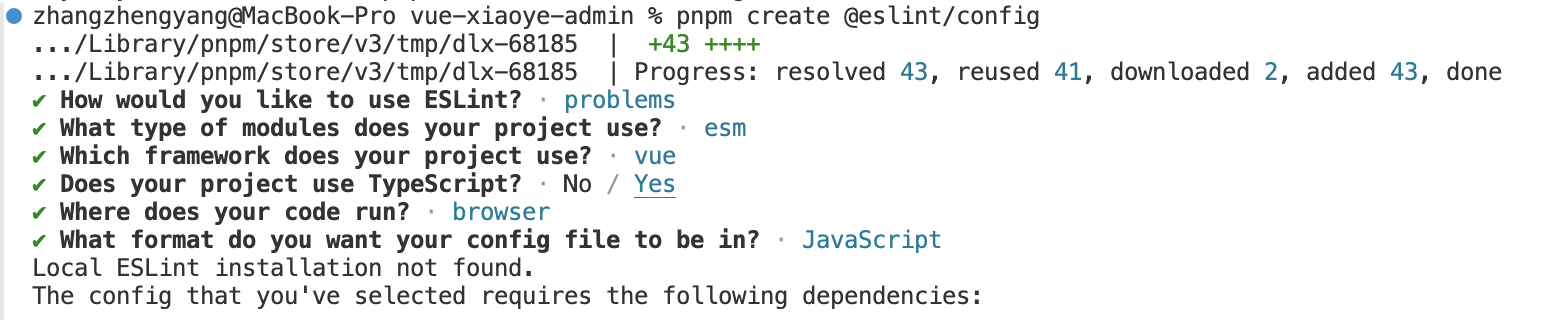
按需选择完配置后,选择立即安装,就可一键安装相关依赖。安装成功后 ESLint 创建了.eslintrc.cjs 配置文件
javascript
module.exports = {
  env: {
    browser: true,
    es2021: true
  },
  extends: ['eslint:recommended', 'plugin:@typescript-eslint/recommended', 'plugin:vue/vue3-essential'],
  overrides: [
    {
      env: {
        node: true
      },
      files: ['.eslintrc.{js,cjs}'],
      parserOptions: {
        sourceType: 'script'
      }
    }
  ],
  parserOptions: {
    ecmaVersion: 'latest',
    parser: '@typescript-eslint/parser',
    sourceType: 'module'
  },
  plugins: ['@typescript-eslint', 'vue'],
  rules: {}
}
配置命令
json
"scripts": {
  "dev": "vite",
  "build": "vue-tsc && vite build",
  "preview": "vite preview",
  "lint": "eslint --ext .ts,.js,.vue src",
  "lint:fix": "eslint --fix --ext .ts,.js,.vue src"
},
安装 Prettier
一般 ESLint 用于检测代码风格代码规范,Prettier 用于对代码进行格式化。
javascript
pnpm i prettier -D然后在根目录创建 .prettierrc.js 配置文件
javascript
// @ts-check

/** @type {import("prettier").Config} */
export default {
  bracketSpacing: true,
  singleQuote: false,
  arrowParens: "avoid",
  trailingComma: "none",
  printWidth: 80,
  tabWidth: 2,
  useTabs: false,
  semi: false
};
在 eslint 校验中加入 Prettier 格式化,安装依赖
javascript
pnpm i eslint-config-prettier eslint-plugin-prettier -D更改 Eslint 的配置文件 .eslintrc.cjs, 在里面加入 Prettier 相关配置,webstorm 修改保存是操作
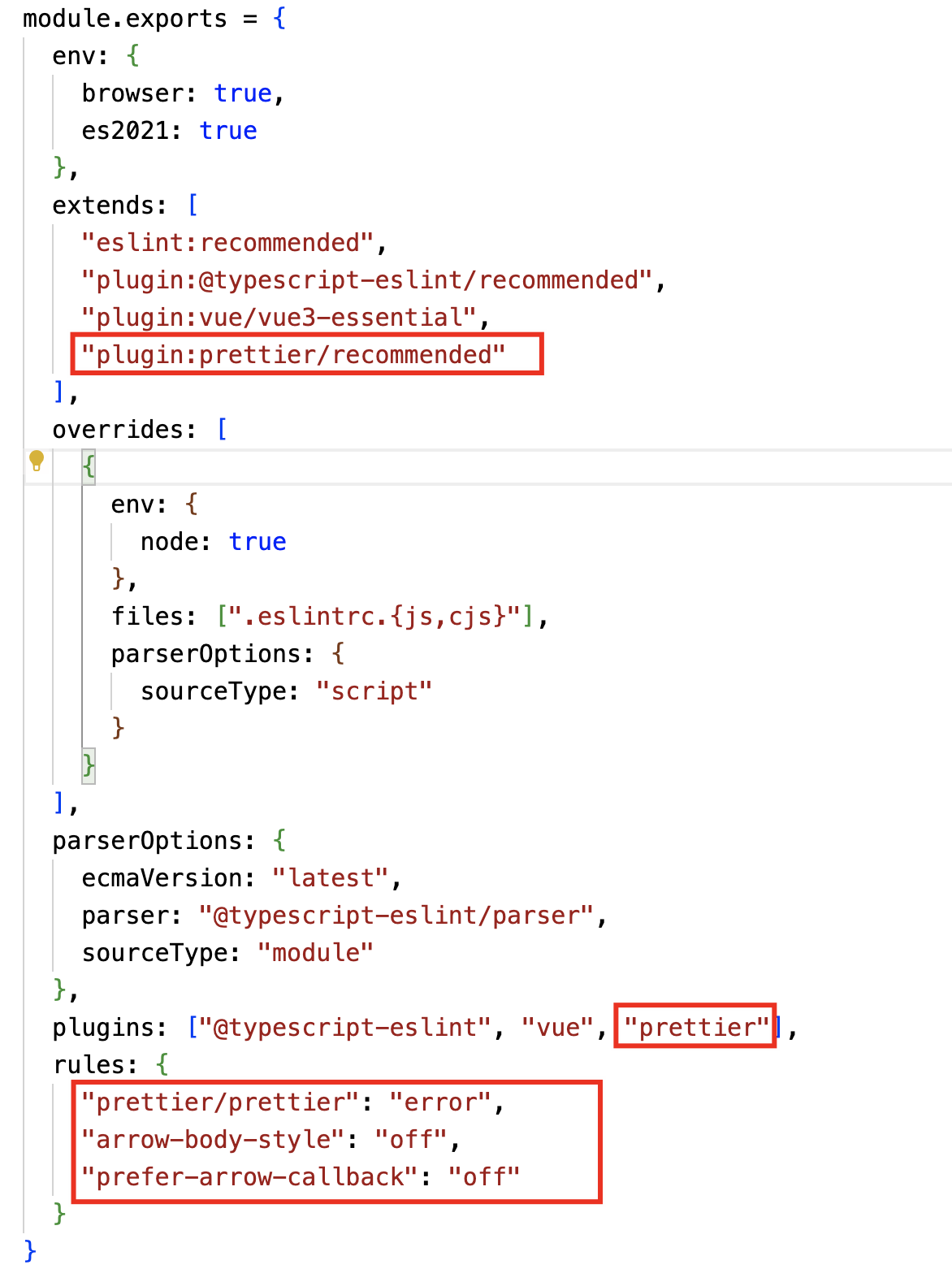
javascript
module.exports = {
  env: {
    browser: true,
    es2021: true
  },
  extends: [
    "eslint:recommended",
    "plugin:@typescript-eslint/recommended",
    "plugin:vue/vue3-essential",
    "plugin:prettier/recommended"
  ],
  overrides: [
    {
      env: {
        node: true
      },
      files: [".eslintrc.{js,cjs}"],
      parserOptions: {
        sourceType: "script"
      }
    }
  ],
  parserOptions: {
    ecmaVersion: "latest",
    parser: "@typescript-eslint/parser",
    sourceType: "module"
  },
  plugins: ["@typescript-eslint", "vue", "prettier"],
  rules: {
    "prettier/prettier": "error",
    "arrow-body-style": "off",
    "prefer-arrow-callback": "off"
  }
}
Ts Router
typescript
import { createRouter, createWebHistory, RouteRecordRaw } from "vue-router"

// 2. 配置路由
const routes: Array<RouteRecordRaw> = [
  {
    path: "/login",
    component: () => import("../components/login.vue")
  },
  {
    path: "/reg",
    component: () => import("../components/reg.vue")
  }
]
// 1.返回一个 router 实列,为函数,里面有配置项(对象) history
const router = createRouter({
  history: createWebHistory(),
  routes
})

// 3导出路由   然后去 main.ts 注册 router.ts
export default router
main.ts 导入
typescript
import { createApp } from 'vue'
import App from './App.vue'


import router from "./router/index"
createApp(App).use(router).mount('#app')
app.vue
Vue SFC
<template>
  <div>
    <h1>APP</h1>
    声明式路由跳转  两种方式 加入 replace 不会留下历史记录
    <router-link replace to="/login"><button>login</button></router-link>
    配置路由的 index 里面添加 name
    <router-link :to="{ name: 'Reg' }" style="margin-left: 10px"><button>reg</button></router-link
    <router-view></router-view>
  </div>
</template>

<script setup lang="" ts></script>

<style></style>
配置别名
修改 vite.config.ts (让程序支持)
typescript
import { defineConfig } from 'vite'
import vue from '@vitejs/plugin-vue'
import path from 'path'

function _resolve(dir: string) {
  return path.resolve(__dirname, dir)
}

// https://vitejs.dev/config/
export default defineConfig({
  plugins: [vue()],
  // 配置项目别名
  resolve: {
    alias: {
      '@': _resolve('src'),
    },
  },
})
修改 tsconfig.json (让编辑器支持),有可能需要出重启编辑器
json
{
  "compilerOptions": {
    "target": "ES2020",
    "useDefineForClassFields": true,
    "module": "ESNext",
    "lib": ["ES2020", "DOM", "DOM.Iterable"],
    "skipLibCheck": true,

    /* Bundler mode */
    "moduleResolution": "bundler",
    "allowImportingTsExtensions": true,
    "resolveJsonModule": true,
    "isolatedModules": true,
    "noEmit": true,
    "jsx": "preserve",

    "importHelpers": true, // 不让同样的辅助函数重复的出现在多个文件中
    "baseUrl": ".", // 非相对模块的导入可以相对于baseUrl或通过下文会讲到的路径映射来进行解析
    "paths": {
      // 配置导出路径(这里根据自己项目执行修改)
      "@/*": ["src/*"],
      "@/stores*": ["./src/stores*"],
      "@/components*": ["./src/components*"],
      "@/modules*": ["./src/modules*"],
      "@/utils*": ["./src/utils*"],
      "@/assets*": ["./src/assets*"]
    },

    /* Linting */
    "strict": true,
    "noUnusedLocals": true,
    "noUnusedParameters": true,
    "noFallthroughCasesInSwitch": true,
    "types": ["element-plus/global"]
  },
  "include": ["src/**/*.ts", "src/**/*.tsx", "src/**/*.vue"],
  "references": [{ "path": "./tsconfig.node.json" }]
}
配置环境变量
vite提供了开发模式(development)和生产模式(product)
项目根目录创建开发环境 .env.dev 文件,文件内容如下
javascript
NODE_ENV=development
VITE_APP_WEB_URL= 'https://www.baidu.com'
项目根目录创建生产环境 .env.prod 文件,文件内容如下
javascript
NODE_ENV=production
VITE_APP_WEB_URL='https://www.goole.com'
package.json
json
{
  "name": "vite-Vue3-Template",
  "private": true,
  "version": "0.0.0",
  "scripts": {
    "dev": "vite --mode dev",
    "build": "vite build",
    "build:dev": "vite build --mode dev",
    "build:prod": "vite build --mode prod",
    "preview": "vite preview",
    "lint": "eslint --ext .js,.vue src",
    "lint:fix": "eslint --fix --ext .js,.vue src"
  },
  "dependencies": {
    "pinia": "^2.0.33",
    "vue": "^3.2.47",
    "vue-router": "^4.1.6"
  },
  "devDependencies": {
    "@vitejs/plugin-vue": "^4.1.0",
    "@vue/eslint-config-airbnb": "^7.0.0",
    "eslint": "^8.37.0",
    "eslint-plugin-vue": "^9.10.0",
    "sass": "^1.61.0",
    "sass-loader": "^13.2.2",
    "vite": "^4.2.0"
  }
}
main.vue
Vue SFC
<script setup>
  import { ref } from 'vue';

  const test = import.meta.env.VITE_APP_WEB_URL;
  console.log(import.meta.env);

  defineProps({
    msg: String,
  });

  const count = ref(0);
</script>

<template>
  <h1>{{ msg }}</h1>
  <div class="title">
    区局样式测试
  </div>
  <p>当前环境:{{ test }}</p>

  <div class="card">
    <button type="button" @click="count++">
      count is {{ count }}
    </button>
    <p>
      Edit
      <code>components/HelloWorld.vue</code> to test HMR
    </p>
  </div>
</template>

<style scoped lang="scss">
  .read-the-docs {
    color: #888;
  }
  .title{
    color:$test-color;
  }
</style>
axios
powershell
pnpm install axios配置 ts 全局类型
新建 types/global.d.ts
tsx
/**
 * 全局类型声明,无需引入直接在 .vue 、.ts 、.tsx 文件使用即可获得类型提示
 */

declare global {
  interface platformConfigs {
    Version?: string
    Title?: string
    FixedHeader?: boolean
    HiddenSideBar?: boolean
    MultiTagsCache?: boolean
    KeepAlive?: boolean
    Locale?: string
    Layout?: string
    Theme?: string
    DarkMode?: boolean
    OverallStyle?: string
    Grey?: boolean
    Weak?: boolean
    HideTabs?: boolean
    HideFooter?: boolean
    SidebarStatus?: boolean
    EpThemeColor?: string
    ShowLogo?: boolean
    ShowModel?: string
    MenuArrowIconNoTransition?: boolean
    CachingAsyncRoutes?: boolean
    TooltipEffect?: Effect
    ResponsiveStorageNameSpace?: string
    MapConfigure?: {
      amapKey?: string
      options: {
        resizeEnable?: boolean
        center?: number[]
        zoom?: number
      }
    }
  }
}
tsconfig.json 中 include 数组中添加 types/*.d.ts
tsx
"include": ["src/**/*.ts", "src/**/*.tsx", "src/**/*.vue", "types/*.d.ts"],安装 vue-i18n
tsx
pnpm install vue-i18n@vueuse/motion
tsx
pnpm install @vueuse/motionmain.ts
tsx
import { createApp } from 'vue'
import { MotionPlugin } from '@vueuse/motion'
import App from './App.vue'

const app = createApp(App)

app.use(MotionPlugin)

app.mount('#app')
如果报 类型找不到 的错误,修改 vueuse/motion 的 package.json 文件
tsx
"exports": {
  ".": {
    + "types": "./dist/index.d.ts",
      "require": "./dist/index.cjs",
      "import": "./dist/index.mjs"
  },
  "./nuxt": {
    +"types": "./dist/nuxt.d.ts",
      "require": "./dist/nuxt.cjs",
      "import": "./dist/nuxt.mjs"
  }
},
typeit
tsx
npm install typeit@vueuse/core
tsx
pnpm install @vueuse/core