SVG(01):JavaScript 交互
使用 SVG
基础知识
SVG (Scalable Vector Graphics) 是一种基于 XML 的矢量图形格式,用于在网页上定义二维矢量图形。HTML5 通过 <svg> 标签原生支持 SVG 图形。
SVG 的特点
- 命名空间:SVG 需要声明 XML 命名空间
xmlns="http://www.w3.org/2000/svg" - 可缩放:SVG 图形可以无损缩放而不失真,适合各种屏幕尺寸和分辨率
- 矢量图形:由点、线、形状等数学公式组成,而非像素,文件通常较小
- DOM 集成:SVG 元素是 DOM 的一部分,可以通过 JavaScript 完全操作
- 交互性:原生支持事件处理,每个元素都可以独立响应交互
- 样式控制:完全支持 CSS,可以使用 CSS 控制 SVG 的外观
- 可访问性:支持文本描述和语义化标记,便于屏幕阅读器访问
- 动画支持:支持 CSS 动画、JavaScript 动画和 SMIL 动画(SMIL 现处维护状态,新项目建议优先 CSS/WAAPI)
SVG 的优势
- 响应式设计:通过
viewBox属性轻松实现响应式布局 - 可维护性:作为文本格式,易于编辑和维护
- 搜索引擎友好:文本内容可以被搜索引擎索引
- 性能:对于少量复杂图形,性能优于 Canvas
- 可复用性:使用
<use>和<symbol>可以轻松复用图形
应用场景
- 图标系统:可缩放的图标,支持多色和动画
- 数据可视化:图表、仪表盘、流程图
- 地图应用:交互式地图和地理信息可视化
- Logo 和品牌标识:需要高质量缩放的图形
- 插图和艺术:矢量插图和艺术作品
- UI 组件:按钮、卡片、装饰性元素
- 动画效果:加载动画、过渡效果
基本语法:
html
<svg width="宽度" height="高度" viewBox="视口坐标" xmlns="http://www.w3.org/2000/svg">
  <!-- SVG 内容 -->
</svg>
常用属性:
width和height:设置 SVG 的显示尺寸viewBox:定义坐标系统,格式为 "min-x min-y width height"preserveAspectRatio:控制图形如何适应容器尺寸version:SVG 版本号(通常不需要指定)
使用方式
在 HTML5 中,SVG 可以通过以下多种方式嵌入网页:
-
直接嵌入 HTML :将 SVG 代码直接写入 HTML 文档
-
外部引用:创建
.svg文件后,通过以下标签插入:<img src="image.svg">(简单引用,不支持交互)<object type="image/svg+xml" data="image.svg"></object>(推荐,支持交互和脚本)<embed src="image.svg" type="image/svg+xml">(兼容旧浏览器)<a href="image.svg">(作为下载链接)
-
CSS 背景
css.element { background-image: url('image.svg'); }
对比说明:
| 方法 | 优点 | 缺点 |
|---|---|---|
| 直接嵌入 | 简单直接,支持交互 | 增加 HTML 文件体积 |
<img> | 简单易用 | 不支持脚本和 CSS 交互 |
<object> | 支持交互,可替换 | 代码稍复杂 |
| CSS 背景 | 样式控制灵活 | 无法直接操作 SVG 元素 |
SVG 渲染流程图
理解 SVG 的渲染流程有助于优化性能和调试问题。下图展示了从 SVG 源码到最终像素输出的完整渲染管线:
图表渲染中…
渲染管线关键节点说明
- 解析阶段:浏览器将 SVG 源码解析为 DOM 树,此阶段会验证语法正确性
- 布局阶段:计算每个元素的几何位置、变换矩阵(CTM)、裁剪区域
- 绘制阶段:将矢量命令转换为底层绘图 API 调用(如 Skia、Cairo)
- 光栅化阶段:将矢量图形转换为像素位图,应用滤镜和合成操作
性能瓶颈通常出现在 布局计算(复杂路径/大量元素)和 光栅化(大型滤镜/渐变)阶段。
示例代码
html
<!DOCTYPE html>
<html lang="en">
  <head>
    <meta charset="UTF-8" />
    <meta name="viewport" content="width=device-width, initial-scale=1.0" />
    <title>SVG 示例卡片</title>
    <style>
      body {
        font-family: Arial, sans-serif;
        margin: 0;
        padding: 20px;
        background-color: #f5f5f5;
      }

      .container {
        display: flex;
        flex-direction: row;
        flex-wrap: wrap;
        gap: 20px;
      }

      .card {
        background: white;
        border-radius: 8px;
        box-shadow: 0 4px 8px rgba(0, 0, 0, 0.1);
        padding: 20px;
        width: 100%;
        max-width: 400px;
        transition: transform 0.3s ease;
      }

      .card:hover {
        transform: translateY(-5px);
      }

      .card h2 {
        margin-top: 0;
        color: #333;
        border-bottom: 1px solid #eee;
        padding-bottom: 10px;
      }

      .card svg {
        display: block;
        margin: 0 auto;
      }

      @media (max-width: 768px) {
        .card {
          max-width: 100%;
        }
      }
    </style>
  </head>
  <body>
    <div class="container">
      <div class="card">
        <h2>基本 svg 图形</h2>
        <svg width="200" height="200" xmlns="http://www.w3.org/2000/svg">
          <!-- 矩形 -->
          <rect x="10" y="10" width="50" height="50" fill="red" stroke="black" stroke-width="2" />

          <!-- 圆形 -->
          <circle cx="100" cy="60" r="30" fill="blue" stroke="black" stroke-width="2" />

          <!-- 椭圆 -->
          <ellipse cx="100" cy="140" rx="40" ry="20" fill="green" stroke="black" stroke-width="2" />

          <!-- 五角星 -->
          <polygon
                   points="160,50 175,90 220,90 185,115 195,160 160,135 125,160 135,115 100,90 145,90"
                   fill="gold"
                   stroke="orange"
                   stroke-width="2" />
        </svg>
      </div>

      <div class="card">
        <h2>使用路径绘制复杂图形</h2>
        <svg width="300" height="200" xmlns="http://www.w3.org/2000/svg">
          <!-- 使用路径绘制一个房子 -->
          <path
                d="M50,150 L150,150 L175,100 L200,150 L300,150 L300,200 L50,200 Z"
                fill="#8B4513"
                stroke="black"
                stroke-width="2" />

          <!-- 屋顶 -->
          <polygon points="50,150 150,80 250,150" fill="#A52A2A" stroke="black" stroke-width="2" />

          <!-- 门 -->
          <rect
                x="130"
                y="120"
                width="40"
                height="30"
                fill="#8B4513"
                stroke="black"
                stroke-width="1" />

          <!-- 窗户 -->
          <rect
                x="70"
                y="120"
                width="20"
                height="20"
                fill="#ADD8E6"
                stroke="black"
                stroke-width="1" />
          <rect
                x="210"
                y="120"
                width="20"
                height="20"
                fill="#ADD8E6"
                stroke="black"
                stroke-width="1" />
        </svg>
      </div>

      <div class="card">
        <h2>使用 svg 文本</h2>
        <svg width="400" height="100" xmlns="http://www.w3.org/2000/svg">
          <text x="20" y="50" font-family="Arial" font-size="24" fill="blue">
            SVG 文本示例
            <tspan x="20" dy="30">这是第二行文本</tspan>
          </text>

          <!-- 带描边的文本 -->
          <text
                x="200"
                y="50"
                font-family="Verdana"
                font-size="20"
                fill="red"
                stroke="black"
                stroke-width="1">
            带描边的文本
          </text>
        </svg>
      </div>

      <div class="card">
        <h2>渐变效果</h2>
        <svg width="300" height="200" xmlns="http://www.w3.org/2000/svg">
          <!-- 定义线性渐变 -->
          <defs>
            <linearGradient id="grad1" x1="0%" y1="0%" x2="100%" y2="0%">
              <stop offset="0%" style="stop-color: rgb(255, 0, 0); stop-opacity: 1" />
              <stop offset="50%" style="stop-color: rgb(255, 255, 0); stop-opacity: 1" />
              <stop offset="100%" style="stop-color: rgb(255, 0, 0); stop-opacity: 1" />
            </linearGradient>

            <!-- 定义径向渐变 -->
            <radialGradient id="grad2" cx="50%" cy="50%" r="50%" fx="50%" fy="50%">
              <stop offset="0%" style="stop-color: rgb(0, 0, 255); stop-opacity: 1" />
              <stop offset="100%" style="stop-color: rgb(0, 0, 128); stop-opacity: 1" />
            </radialGradient>
          </defs>

          <!-- 使用渐变 -->
          <rect
                x="50"
                y="50"
                width="200"
                height="80"
                fill="url(#grad1)"
                stroke="black"
                stroke-width="2" />
          <circle cx="150" cy="150" r="50" fill="url(#grad2)" stroke="black" stroke-width="2" />
        </svg>
      </div>

      <div class="card">
        <h2>动画实例</h2>
        <svg width="200" height="200" xmlns="http://www.w3.org/2000/svg">
          <circle cx="100" cy="100" r="40" fill="red">
            <!-- 简单动画:移动 -->
            <animate attributeName="cx" from="100" to="200" dur="2s" repeatCount="indefinite" />
          </circle>

          <!-- 更复杂的动画:旋转 -->
          <rect x="70" y="70" width="60" height="60" fill="blue">
            <animateTransform
                              attributeName="transform"
                              type="rotate"
                              from="0 100 100"
                              to="360 100 100"
                              dur="3s"
                              repeatCount="indefinite" />
          </rect>
        </svg>
      </div>
    </div>
  </body>
</html>
注意事项
- SVG 与 Canvas 的区别:
- SVG 是基于 XML 的矢量图形,适合需要交互和缩放的场景
- Canvas 是基于像素的位图,适合需要频繁更新的大量图形
- 浏览器兼容性:
- 现代浏览器都支持 SVG,但某些高级特性可能需要前缀或替代方案
- 性能考虑:
- 复杂的 SVG 可能影响渲染性能
- 对于大量静态图形,考虑使用
<use>元素复用
- 响应式设计:
- 使用
viewBox和 CSS 可以轻松创建响应式 SVG
- 使用
绘制基本形状
SVG 提供多种基本形状元素(如 <rect>、<circle>、<ellipse>、 <line>、 <polyline>、<polygon>、 <path> 等),它们共享许多公共属性。这些属性控制着形状的外观、位置、大小和样式等基本特征
html
<!DOCTYPE html>
<html lang="zh-CN">
<!--
  来源章节:基础知识/13-SVG.md - 路径绘制 (path)
  功能说明:SVG path 命令详解,可视化展示 M/L/H/V/C/S/Q/T/A 各命令的效果
-->
<head>
  <meta charset="UTF-8">
  <meta name="viewport" content="width=device-width, initial-scale=1.0">
  <title>【4】SVG Path 命令详解</title>
  <style>
    * { margin: 0; padding: 0; box-sizing: border-box; }
    body { font-family: -apple-system, BlinkMacSystemFont, 'Segoe UI', sans-serif; padding: 20px; background: #f8f9fa; color: #333; }
    .demo-container { max-width: 1100px; margin: 0 auto; background: white; padding: 24px; border-radius: 8px; box-shadow: 0 2px 8px rgba(0,0,0,0.1); }
    .demo-title { margin-bottom: 20px; font-size: 18px; color: #555; border-bottom: 2px solid #007bff; padding-bottom: 8px; }

    .cmd-grid {
      display: grid;
      grid-template-columns: repeat(auto-fit, minmax(320px, 1fr));
      gap: 20px;
      margin-top: 16px;
    }

    .cmd-card {
      background: #f8f9fa;
      border-radius: 10px;
      padding: 20px;
      text-align: center;
      transition: transform 0.3s, box-shadow 0.3s;
      border: 2px solid transparent;
    }
    .cmd-card:hover { transform: translateY(-4px); box-shadow: 0 6px 20px rgba(0,0,0,0.12); border-color: #007bff; }
    .cmd-card h3 { font-size: 16px; color: #007bff; margin-bottom: 12px; display: flex; align-items: center; justify-content: center; gap: 8px; }
    .cmd-badge { background: #007bff; color: white; padding: 2px 8px; border-radius: 4px; font-size: 13px; font-weight: bold; }
    .cmd-desc { font-size: 13px; color: #666; margin-top: 8px; line-height: 1.5; }
    .path-code { font-family: 'Monaco', 'Consolas', monospace; font-size: 11px; background: #fff; padding: 8px; border-radius: 4px; margin-top: 8px; text-align: left; word-break: break-all; color: #d63384; border: 1px solid #dee2e6; }

    svg { display: block; margin: 12px auto; background: white; border-radius: 6px; }
  </style>
</head>
<body>
  <div class="demo-container">
    <div class="demo-title">SVG Path 命令详解 - M/L/H/V/C/S/Q/T/A 各命令可视化演示</div>

    <div class="cmd-grid">

      <!-- M - MoveTo 移动命令 -->
      <div class="cmd-card">
        <h3><span class="cmd-badge">M</span> MoveTo 移动到起点</h3>
        <svg width="280" height="160" xmlns="http://www.w3.org/2000/svg">
          <defs>
            <marker id="arrowM" markerWidth="10" markerHeight="7" refX="9" refY="3.5" orient="auto">
              <polygon points="0 0, 10 3.5, 0 7" fill="#e74c3c" />
            </marker>
          </defs>
          <!-- 网格背景 -->
          <g stroke="#e9ecef" stroke-width="0.5">
            <line x1="0" y1="40" x2="280" y2="40"/>
            <line x1="0" y1="80" x2="280" y2="80"/>
            <line x1="0" y1="120" x2="280" y2="120"/>
            <line x1="70" y1="0" x2="70" y2="160"/>
            <line x1="140" y1="0" x2="140" y2="160"/>
            <line x1="210" y1="0" x2="210" y2="160"/>
          </g>
          <!-- M移动路径 -->
          <circle cx="30" cy="30" r="5" fill="#95a5a6"/>
          <text x="30" y="22" font-size="11" text-anchor="middle" fill="#7f8c8d">起点</text>
          <path d="M30,30 L70,80 L140,40 L210,100 L250,60" stroke="#e74c3c" stroke-width="2.5" fill="none" marker-end="url(#arrowM)"/>
          <circle cx="30" cy="30" r="4" fill="#27ae60"/>
          <circle cx="70" cy="80" r="4" fill="#3498db"/>
          <circle cx="140" cy="40" r="4" fill="#9b59b6"/>
          <circle cx="210" cy="100" r="4" fill="#e67e22"/>
        </svg>
        <div class="path-code">d="M30,30 L70,80 L140,40 L210,100"</div>
        <p class="cmd-desc">M命令将画笔移动到指定坐标,不绘制线条。是所有路径的起始命令。</p>
      </div>

      <!-- L - LineTo 直线命令 -->
      <div class="cmd-card">
        <h3><span class="cmd-badge">L</span> LineTo 绘制直线</h3>
        <svg width="280" height="160" xmlns="http://www.w3.org/2000/svg">
          <g stroke="#e9ecef" stroke-width="0.5">
            <line x1="0" y1="40" x2="280" y2="40"/><line x1="0" y1="80" x2="280" y2="80"/>
            <line x1="0" y1="120" x2="280" y2="120"/><line x1="70" y1="0" x2="70" y2="160"/>
            <line x1="140" y1="0" x2="140" y2="160"/><line x1="210" y1="0" x2="210" y2="160"/>
          </g>
          <!-- L直线 -->
          <path d="M20,130 L60,50 L120,90 L180,30 L240,110 L260,70" stroke="#3498db" stroke-width="3" fill="none" stroke-linecap="round" stroke-linejoin="round"/>
          <!-- 端点标记 -->
          <g fill="#e74c3c">
            <circle cx="20" cy="130" r="4"/><circle cx="60" cy="50" r="4"/>
            <circle cx="120" cy="90" r="4"/><circle cx="180" cy="30" r="4"/>
            <circle cx="240" cy="110" r="4"/><circle cx="260" cy="70" r="4"/>
          </g>
        </svg>
        <div class="path-code">d="M20,130 L60,50 L120,90 L180,30"</div>
        <p class="cmd-desc">L命令从当前位置绘制直线到目标点。l为相对坐标版本。</p>
      </div>

      <!-- H - Horizontal 水平线 -->
      <div class="cmd-card">
        <h3><span class="cmd-badge">H</span> HLineTo 水平线</h3>
        <svg width="280" height="160" xmlns="http://www.w3.org/2000/svg">
          <g stroke="#e9ecef" stroke-width="0.5">
            <line x1="0" y1="40" x2="280" y2="40"/><line x1="0" y1="80" x2="280" y2="80"/>
            <line x1="0" y1="120" x2="280" y2="120"/><line x1="70" y1="0" x2="70" y2="160"/>
            <line x1="140" y1="0" x2="140" y2="160"/><line x1="210" y1="0" x2="210" y2="160"/>
          </g>
          <!-- H水平线 -->
          <path d="M20,40 H100 M20,70 H150 M20,100 H220 M20,130 H260"
                stroke="#9b59b6" stroke-width="3" fill="none" stroke-linecap="round"/>
          <g fill="#e74c3c">
            <circle cx="20" cy="40" r="3"/><circle cx="100" cy="40" r="3"/>
            <circle cx="20" cy="70" r="3"/><circle cx="150" cy="70" r="3"/>
            <circle cx="20" cy="100" r="3"/><circle cx="220" cy="100" r="3"/>
            <circle cx="20" cy="130" r="3"/><circle cx="260" cy="130" r="3"/>
          </g>
        </svg>
        <div class="path-code">d="M20,40 H100 M20,70 H150"</div>
        <p class="cmd-desc">H命令绘制水平线,只指定x坐标。h为相对坐标版本。</p>
      </div>

      <!-- V - Vertical 垂直线 -->
      <div class="cmd-card">
        <h3><span class="cmd-badge">V</span> VLineTo 垂直线</h3>
        <svg width="280" height="160" xmlns="http://www.w3.org/2000/svg">
          <g stroke="#e9ecef" stroke-width="0.5">
            <line x1="0" y1="40" x2="280" y2="40"/><line x1="0" y1="80" x2="280" y2="80"/>
            <line x1="0" y1="120" x2="280" y2="120"/><line x1="70" y1="0" x2="70" y2="160"/>
            <line x1="140" y1="0" x2="140" y2="160"/><line x1="210" y1="0" x2="210" y2="160"/>
          </g>
          <!-- V垂直线 -->
          <path d="M40,20 V140 M90,35 V125 M140,50 V115 M190,25 V135 M240,45 V105"
                stroke="#e67e22" stroke-width="3" fill="none" stroke-linecap="round"/>
          <g fill="#27ae60">
            <circle cx="40" cy="20" r="3"/><circle cx="40" cy="140" r="3"/>
            <circle cx="90" cy="35" r="3"/><circle cx="90" cy="125" r="3"/>
            <circle cx="140" cy="50" r="3"/><circle cx="140" cy="115" r="3"/>
          </g>
        </svg>
        <div class="path-code">d="M40,20 V140 M90,35 V125"</div>
        <p class="cmd-desc">V命令绘制垂直线,只指定y坐标。v为相对坐标版本。</p>
      </div>

      <!-- C - Cubic Bezier 三次贝塞尔曲线 -->
      <div class="cmd-card">
        <h3><span class="cmd-badge">C</span> CurveTo 三次贝塞尔曲线</h3>
        <svg width="280" height="160" xmlns="http://www.w3.org/2000/svg">
          <g stroke="#e9ecef" stroke-width="0.5">
            <line x1="0" y1="40" x2="280" y2="40"/><line x1="0" y1="80" x2="280" y2="80"/>
            <line x1="0" y1="120" x2="280" y2="120"/><line x1="70" y1="0" x2="70" y2="160"/>
            <line x1="140" y1="0" x2="140" y2="160"/><line x1="210" y1="0" x2="210" y2="160"/>
          </g>
          <!-- C三次贝塞尔曲线 -->
          <path d="M20,130 C60,20 140,150 250,50" stroke="#e74c3c" stroke-width="3" fill="none"/>
          <!-- 控制点和控制线 -->
          <line x1="20" y1="130" x2="60" y2="20" stroke="#95a5a6" stroke-width="1" stroke-dasharray="4,2"/>
          <line x1="250" y1="50" x2="140" y2="150" stroke="#95a5a6" stroke-width="1" stroke-dasharray="4,2"/>
          <circle cx="20" cy="130" r="4" fill="#27ae60"/>
          <circle cx="250" cy="50" r="4" fill="#27ae60"/>
          <circle cx="60" cy="20" r="4" fill="#3498db"/>
          <circle cx="140" cy="150" r="4" fill="#3498db"/>
          <text x="55" y="15" font-size="10" fill="#3498db">C1</text>
          <text x="145" y="155" font-size="10" fill="#3498db">C2</text>
        </svg>
        <div class="path-code">d="M20,130 C60,20 140,150 250,50"</div>
        <p class="cmd-desc">C命令需要两个控制点和一个终点,可绘制平滑的S形曲线。</p>
      </div>

      <!-- S - Smooth Cubic 平滑三次贝塞尔 -->
      <div class="cmd-card">
        <h3><span class="cmd-badge">S</span> SmoothCurve 平滑三次贝塞尔</h3>
        <svg width="280" height="160" xmlns="http://www.w3.org/2000/svg">
          <g stroke="#e9ecef" stroke-width="0.5">
            <line x1="0" y1="40" x2="280" y2="40"/><line x1="0" y1="80" x2="280" y2="80"/>
            <line x1="0" y1="120" x2="280" y2="120"/><line x1="70" y1="0" x2="70" y2="160"/>
            <line x1="140" y1="0" x2="140" y2="160"/><line x1="210" y1="0" x2="210" y2="160"/>
          </g>
          <!-- S平滑曲线 -->
          <path d="M20,80 C60,20 100,140 140,80 S220,20 260,80"
                stroke="#16a085" stroke-width="3" fill="none"/>
          <!-- 控制点 -->
          <circle cx="20" cy="80" r="3" fill="#27ae60"/>
          <circle cx="140" cy="80" r="3" fill="#e74c3c"/>
          <circle cx="260" cy="80" r="3" fill="#27ae60"/>
          <circle cx="60" cy="20" r="3" fill="#3498db"/>
          <circle cx="100" cy="140" r="3" fill="#3498db"/>
          <!-- 自动计算的反射控制点 -->
          <circle cx="180" cy="20" r="3" fill="#9b59b6" stroke-dasharray="2"/>
          <text x="175" y="15" font-size="9" fill="#9b59b6">自动C1'</text>
        </svg>
        <div class="path-code">d="M20,80 C60,20 100,140 140,80 S220,20 260,80"</div>
        <p class="cmd-desc">S命令自动反射前一个C命令的第二个控制点,实现平滑连接。</p>
      </div>

      <!-- Q - Quadratic 二次贝塞尔曲线 -->
      <div class="cmd-card">
        <h3><span class="cmd-badge">Q</span> QuadCurve 二次贝塞尔曲线</h3>
        <svg width="280" height="160" xmlns="http://www.w3.org/2000/svg">
          <g stroke="#e9ecef" stroke-width="0.5">
            <line x1="0" y1="40" x2="280" y2="40"/><line x1="0" y1="80" x2="280" y2="80"/>
            <line x1="0" y1="120" x2="280" y2="120"/><line x1="70" y1="0" x2="70" y2="160"/>
            <line x1="140" y1="0" x2="140" y2="160"/><line x1="210" y1="0" x2="210" y2="160"/>
          </g>
          <!-- Q二次贝塞尔曲线 -->
          <path d="M20,130 Q140,20 260,130" stroke="#8e44ad" stroke-width="3" fill="none"/>
          <!-- 控制线和控制点 -->
          <line x1="20" y1="130" x2="140" y2="20" stroke="#95a5a6" stroke-width="1" stroke-dasharray="4,2"/>
          <line x1="140" y1="20" x2="260" y2="130" stroke="#95a5a6" stroke-width="1" stroke-dasharray="4,2"/>
          <circle cx="20" cy="130" r="4" fill="#27ae60"/>
          <circle cx="260" cy="130" r="4" fill="#27ae60"/>
          <circle cx="140" cy="20" r="5" fill="#e74c3c"/>
          <text x="135" y="15" font-size="10" fill="#e74c3c">控制点</text>
        </svg>
        <div class="path-code">d="M20,130 Q140,20 260,130"</div>
        <p class="cmd-desc">Q命令使用一个控制点绘制抛物线形状的曲线。</p>
      </div>

      <!-- T - Smooth Quad 平滑二次贝塞尔 -->
      <div class="cmd-card">
        <h3><span class="cmd-badge">T</span> SmoothQuad 平滑二次贝塞尔</h3>
        <svg width="280" height="160" xmlns="http://www.w3.org/2000/svg">
          <g stroke="#e9ecef" stroke-width="0.5">
            <line x1="0" y1="40" x2="280" y2="40"/><line x1="0" y1="80" x2="280" y2="80"/>
            <line x1="0" y1="120" x2="280" y2="120"/><line x1="70" y1="0" x2="70" y2="160"/>
            <line x1="140" y1="0" x2="140" y2="160"/><line x1="210" y1="0" x2="210" y2="160"/>
          </g>
          <!-- T平滑二次曲线 -->
          <path d="M20,100 Q80,20 140,100 T260,100" stroke="#c0392b" stroke-width="3" fill="none"/>
          <circle cx="20" cy="100" r="3" fill="#27ae60"/>
          <circle cx="140" cy="100" r="3" fill="#e74c3c"/>
          <circle cx="260" cy="100" r="3" fill="#27ae60"/>
          <circle cx="80" cy="20" r="3" fill="#3498db"/>
          <text x="75" y="15" font-size="9" fill="#3498db">Q控制点</text>
          <text x="195" y="85" font-size="9" fill="#9b59b6">T自动计算控制点</text>
        </svg>
        <div class="path-code">d="M20,100 Q80,20 140,100 T260,100"</div>
        <p class="cmd-desc">T命令自动反射前一个Q命令的控制点,实现平滑过渡。</p>
      </div>

      <!-- A - Arc 圆弧命令 -->
      <div class="cmd-card">
        <h3><span class="cmd-badge">A</span> Arc 圆弧</h3>
        <svg width="280" height="160" xmlns="http://www.w3.org/2000/svg">
          <g stroke="#e9ecef" stroke-width="0.5">
            <line x1="0" y1="40" x2="280" y2="40"/><line x1="0" y1="80" x2="280" y2="80"/>
            <line x1="0" y1="120" x2="280" y2="120"/><line x1="70" y1="0" x2="70" y2="160"/>
            <line x1="140" y1="0" x2="140" y2="160"/><line x1="210" y1="0" x2="210" y2="160"/>
          </g>
          <!-- A圆弧 - 各种弧线 -->
          <path d="M30,130 A50,50 0 0,1 130,130" stroke="#2980b9" stroke-width="3" fill="none"/>
          <path d="M140,130 A50,50 0 0,0 240,130" stroke="#27ae60" stroke-width="3" fill="none"/>
          <path d="M30,80 A40,30 0 1,1 110,80" stroke="#e74c3c" stroke-width="3" fill="none"/>
          <path d="M150,80 A40,30 0 1,0 230,80" stroke="#f39c12" stroke-width="3" fill="none"/>
          <!-- 标注 -->
          <text x="70" y="148" font-size="10" text-anchor="middle" fill="#2980b9">sweep=1</text>
          <text x="190" y="148" font-size="10" text-anchor="middle" fill="#27ae60">sweep=0</text>
        </svg>
        <div class="path-code">A rx,ry x-axis-rotation large-arc-flag sweep-flag x,y</div>
        <p class="cmd-desc">A命令绘制椭圆弧。参数:rx ry 旋转 大弧标志 方向标志 终点坐标。</p>
      </div>

      <!-- Z - ClosePath 闭合路径 -->
      <div class="cmd-card">
        <h3><span class="cmd-badge">Z</span> ClosePath 闭合路径</h3>
        <svg width="280" height="160" xmlns="http://www.w3.org/2000/svg">
          <g stroke="#e9ecef" stroke-width="0.5">
            <line x1="0" y1="40" x2="280" y2="40"/><line x1="0" y1="80" x2="280" y2="80"/>
            <line x1="0" y1="120" x2="280" y2="120"/><line x1="70" y1="0" x2="70" y2="160"/>
            <line x1="140" y1="0" x2="140" y2="160"/><line x1="210" y1="0" x2="210" y2="160"/>
          </g>
          <!-- Z闭合图形 -->
          <path d="M140,20 L220,70 L190,140 L90,140 L60,70 Z"
                fill="#3498db" fill-opacity="0.3" stroke="#2980b9" stroke-width="2.5"/>
          <path d="M140,40 L195,75 L175,125 L105,125 L85,75 Z"
                fill="#e74c3c" fill-opacity="0.3" stroke="#c0392b" stroke-width="2"/>
          <!-- 顶点标注 -->
          <g fill="#2c3e50" font-size="9">
            <text x="140" y="17" text-anchor="middle">顶点1</text>
            <text x="225" y="73" text-anchor="start">顶点2</text>
            <text x="195" y="152" text-anchor="middle">顶点3</text>
            <text x="85" y="152" text-anchor="middle">顶点4</text>
            <text x="48" y="73" text-anchor="end">顶点5</text>
          </g>
        </svg>
        <div class="path-code">d="M140,20 L220,70 L190,140 L90,140 L60,70 Z"</div>
        <p class="cmd-desc">Z命令闭合路径,从当前点直线连接回起点。可形成可填充区域。</p>
      </div>

      <!-- 综合示例:心形 -->
      <div class="cmd-card">
        <h3>💖 综合示例:心形路径</h3>
        <svg width="280" height="160" xmlns="http://www.w3.org/2000/svg">
          <defs>
            <linearGradient id="heartGrad" x1="0%" y1="0%" x2="100%" y2="100%">
              <stop offset="0%" style="stop-color:#ff6b6b"/>
              <stop offset="100%" style="stop-color:#ee5a5a"/>
            </linearGradient>
          </defs>
          <!-- 心形路径 (使用C和Z) -->
          <path d="M140,145
                   C140,145 65,95 65,55
                   C65,30 90,15 115,30
                   C128,38 135,50 140,62
                   C145,50 152,38 165,30
                   C190,15 215,30 215,55
                   C215,95 140,145 140,145 Z"
                fill="url(#heartGrad)" stroke="#c0392b" stroke-width="2"/>
          <text x="140" y="158" font-size="10" text-anchor="middle" fill="#666">由 C 和 Z 命令组成</text>
        </svg>
        <div class="path-code">使用 C(三次贝塞尔) + Z(闭合) 绘制心形</div>
        <p class="cmd-desc">综合运用多个path命令可以绘制任意复杂图形。</p>
      </div>

      <!-- 综合示例:波浪 -->
      <div class="cmd-card">
        <h3>🌊 综合示例:波浪路径动画</h3>
        <svg width="280" height="160" xmlns="http://www.w3.org/2000/svg">
          <defs>
            <linearGradient id="waveGrad" x1="0%" y1="0%" x2="0%" y2="100%">
              <stop offset="0%" style="stop-color:#4facfe"/>
              <stop offset="100%" style="stop-color:#00f2fe"/>
            </linearGradient>
          </defs>
          <!-- 波浪路径 -->
          <path id="wave1" d="M0,80 Q35,50 70,80 T140,80 T210,80 T280,80 V160 H0 Z"
                fill="url(#waveGrad)" opacity="0.7">
            <animate attributeName="d"
                     values="M0,80 Q35,50 70,80 T140,80 T210,80 T280,80 V160 H0 Z;
                             M0,80 Q35,110 70,80 T140,80 T210,80 T280,80 V160 H0 Z;
                             M0,80 Q35,50 70,80 T140,80 T210,80 T280,80 V160 H0 Z"
                     dur="3s" repeatCount="indefinite"/>
          </path>
          <path d="M0,100 Q35,70 70,100 T140,100 T210,100 T280,100 V160 H0 Z"
                fill="url(#waveGrad)" opacity="0.4">
            <animate attributeName="d"
                     values="M0,100 Q35,70 70,100 T140,100 T210,100 T280,100 V160 H0 Z;
                             M0,100 Q35,130 70,100 T140,100 T210,100 T280,100 V160 H0 Z;
                             M0,100 Q35,70 70,100 T140,100 T210,100 T280,100 V160 H0 Z"
                     dur="2.5s" repeatCount="indefinite"/>
          </path>
        </svg>
        <div class="path-code">使用 Q(二次贝塞尔) + SMIL 动画实现波浪效果</div>
        <p class="cmd-desc">结合SMIL动画可以让静态路径产生动态效果。</p>
      </div>

    </div>
  </div>
</body>
</html>
SVG 元素分类思维导图
下图展示了 SVG 元素的完整分类体系,帮助理解各类元素的用途和关系:
图表渲染中…
公共属性
坐标定位属性
| 属性 | 适用元素 | 描述 | 取值 | 默认值 |
|---|---|---|---|---|
x | <rect>、<image>、 <text>、 <line>、 <polygon> 等 | 元素左上角或起点的 x 坐标 | 数值(像素) | 0 |
y | <rect>、 <image>、<text>、 <line> 、<polygon> 等 | 元素左上角或起点的 y 坐标 | 数值(像素) | 0 |
cx | <circle>、 <ellipse> | 圆心或椭圆中心的 x 坐标 | 数值(像素) | 0 |
cy | <circle> 、<ellipse> | 圆心或椭圆中心的 y 坐标 | 数值(像素) | 0 |
x1, y1 | <line>、<polyline>、<polygon> | 线段起点坐标 | 数值(像素) | 0 |
x2, y2 | <line> | 线段终点坐标 | 数值(像素) | 0 |
示例:
html
<svg width="200" height="200">
  <!-- 使用 x、y 定位的矩形 -->
  <rect x="10" y="10" width="50" height="50" fill="red" />

  <!-- 使用 cx、cy 定位的圆形 -->
  <circle cx="100" cy="100" r="40" fill="blue" />
</svg>
尺寸属性
| 属性 | 适用元素 | 描述 | 取值 | 默认值 |
|---|---|---|---|---|
width | <rect>、<image>、 <svg> 等 | 元素宽度 | 正数值(像素) | 必需 |
height | <rect>、<image>、 <svg> 等 | 元素高度 | 正数值(像素) | 必需 |
r | <circle>、<radialGradient> | 圆形半径 | 正数值(像素) | 必需 |
rx、 ry | <rect>、 <ellipse> | 圆角矩形的水平和垂直半径 | 非负数值 | 0 |
rx | <ellipse> | 椭圆的 x 轴半径 | 正数值 | 0 |
ry | <ellipse> | 椭圆的 y 轴半径 | 正数值 | 0 |
示例:
html
<svg width="200" height="200">
  <!-- 指定尺寸的矩形 -->
  <rect x="10" y="10" width="80" height="60" fill="green" />

  <!-- 圆角矩形 -->
  <rect x="10" y="80" width="80" height="60" rx="10" ry="20" fill="orange" />
</svg>
填充属性
| 属性 | 描述 | 取值 | 默认值 |
|---|---|---|---|
fill | 设置形状内部填充颜色 | 颜色名称、十六进制、RGB、RGBA 或继承 | "black" |
fill-opacity | 设置填充透明度 | 0(透明)到 1(不透明) | 1 |
fill-rule | 定义填充规则 | "nonzero"(非零环绕)或 "evenodd"(奇偶环绕) | "nonzero" |
示例:
html
<svg width="200" height="200">
  <!-- 不同填充方式的形状 -->
  <rect x="10" y="10" width="50" height="50" fill="red" />
  <circle cx="80" cy="35" r="25" fill="blue" fill-opacity="0.5" />

  <!-- 使用 evenodd 规则的五角星 -->
  <polygon points="150,10 165,40 200,40 170,60 180,90 150,70 120,90 130,60 100,40 135,40"
           fill="green" fill-rule="evenodd" />
</svg>
描边属性
| 属性 | 描述 | 取值 | 默认值 |
|---|---|---|---|
stroke | 设置形状描边颜色 | 颜色名称、十六进制、RGB、RGBA 或继承 | "none" |
stroke-width | 设置描边宽度 | 正数值(像素) | 1 |
stroke-opacity | 设置描边透明度 | 0(透明)到 1(不透明) | 1 |
stroke-linecap | 设置线条端点样式 | "butt"(平头)、"round"(圆头)、"square"(方头) | "butt" |
stroke-linejoin | 设置线条连接处样式 | "miter"(尖角)、"round"(圆角)、"bevel"(斜角) | "miter" |
stroke-dasharray | 设置虚线模式 | 数值列表(如 "5,5" 表示5px实线5px空白) | none |
stroke-dashoffset | 设置虚线偏移量 | 数值(像素) | 0 |
示例:
html
<svg width="200" height="200">
  <!-- 不同描边样式的形状 -->
  <rect x="10" y="10" width="50" height="50" stroke="black" stroke-width="2" stroke-linejoin="round" />

  <!-- 虚线矩形 -->
  <rect x="70" y="10" width="50" height="50" stroke="blue" stroke-width="2" stroke-dasharray="5,3" />

  <!-- 圆头线条的三角形 -->
  <polygon points="150,10 180,60 120,60" fill="none" stroke="red" stroke-width="3" stroke-linecap="round" />
</svg>
变换属性
| 属性 | 描述 | 取值 | 默认值 |
|---|---|---|---|
transform | 应用变换 | translate(), rotate(), scale(), skewX(), skewY(), matrix() | 无 |
示例:
html
<rect x="10" y="10" width="50" height="50" transform="translate(20, 30)" />

<!-- 第三个和第四个参数是旋转中心点 -->
<circle cx="100" cy="100" r="40" transform="rotate(45 100 100)" />

<rect x="10" y="10" width="50" height="50" transform="scale(1.5)" />

<rect x="10" y="10" width="50" height="50" transform="translate(20, 30) rotate(45) scale(1.5)" />
裁剪与遮罩属性
| 属性 | 描述 | 取值 | 默认值 |
|---|---|---|---|
clip-path | 裁剪路径 | url(#clipId) 或 inset(), circle()、ellipse()、polygon() 等 | none |
mask | 遮罩 | url(#maskId) | none |
示例:
html
<svg width="200" height="200">
  <!-- 定义裁剪路径 -->
  <defs>
    <clipPath id="circleClip">
      <circle cx="100" cy="100" r="50" />
    </clipPath>
  </defs>

  <!-- 被裁剪的图像 -->
  <image href="https://via.placeholder.com/200" x="0" y="0" width="200" height="200" clip-path="url(#circleClip)" />

  <!-- 定义遮罩 -->
  <defs>
    <mask id="fadeMask">
      <rect x="0" y="0" width="200" height="200" fill="white" />
      <circle cx="100" cy="100" r="50" fill="black" />
    </mask>
  </defs>

  <!-- 使用遮罩的矩形 -->
  <rect x="0" y="0" width="200" height="200" fill="blue" mask="url(#fadeMask)" />
</svg>
其他常用属性
| 属性 | 描述 | 取值 | 默认值 |
|---|---|---|---|
id | 元素唯一标识符 | 字符串 | 无 |
class | CSS 类名 | 字符串 | 无 |
style | 内联样式 | CSS 样式字符串 | 无 |
opacity | 整体透明度 | 0(透明)到 1(不透明) | 1 |
visibility | 可见性 | "visible"(可见)、"hidden"(隐藏)、"collapse"(折叠) | "visible" |
pointer-events | 指针事件行为 | "visiblePainted", "visibleFill", "visibleStroke", "visible", "painted", "fill", "stroke", "all", "none" | "visiblePainted" |
示例:
html
<svg width="200" height="200">
  <!-- 使用 id 和 class 的矩形 -->
  <rect id="myRect" class="highlight" x="10" y="10" width="50" height="50" fill="red" />

  <!-- 使用内联样式的圆形 -->
  <circle cx="80" cy="35" r="25" style="fill:blue; stroke:black; stroke-width:2;" />

  <!-- 设置透明度的多边形 -->
  <polygon points="150,10 180,60 120,60" fill="green" opacity="0.5" />

  <!-- 隐藏的矩形 -->
  <rect x="10" y="100" width="50" height="50" fill="purple" visibility="hidden" />
</svg>
矩形 rect
<rect> 是 SVG 中最基础的形状元素之一,用于绘制矩形或正方形。它是 SVG 图形设计中最常用的元素之一,可以创建各种矩形形状,包括圆角矩形
html
<rect
  x="x坐标"
  y="y坐标"
  width="宽度"
  height="高度"
  [rx="圆角水平半径"]
  [ry="圆角垂直半径"]
  [其他属性...]
/>
圆角属性:
| 属性 | 描述 | 取值 | 默认值 |
|---|---|---|---|
rx | 圆角的水平半径 | 非负数值 | 0 |
ry | 圆角的垂直半径 | 非负数值 | 0 |
注意:
- 如果只设置
rx,则ry会自动等于rx,创建正圆角 - 如果
rx或ry大于矩形宽度或高度的一半,则会被限制为最大可能值
html
<svg width="200" height="200">
  <!-- 圆角矩形 -->
  <rect x="10" y="10" width="100" height="80" rx="10" ry="10" fill="green" />

  <!-- 正圆角矩形(rx=ry) -->
  <rect x="10" y="110" width="100" height="80" rx="15" fill="orange" />
</svg>圆形 circle
<circle> 是 SVG 中用于绘制圆形的基本形状元素,是 SVG 图形设计中最常用的元素之一。它可以创建完美的圆形,并支持丰富的样式和动画效果
html
<circle cx="圆心x坐标" cy="圆心y坐标" r="半径" [其他属性...]/>

<svg width="200" height="200">
  <!-- 基本圆形 -->
  <circle cx="100" cy="100" r="50" fill="blue" />
</svg>
DANGER
r 是必需属性,没有默认值。如果 r 设置为 0,则不会渲染任何内容。负值的 r 会被视为无效
完整示例:
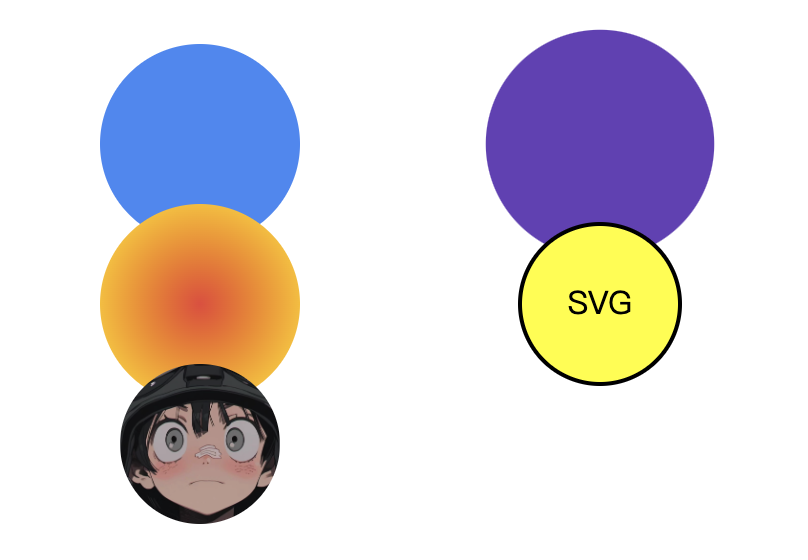
html
<svg width="400" height="300" xmlns="http://www.w3.org/2000/svg">
  <!-- 基本圆形 -->
  <circle cx="100" cy="100" r="50" fill="#4285F4" />

  <!-- 渐变填充圆形 -->
  <defs>
    <radialGradient id="grad1" cx="50%" cy="50%" r="50%" fx="50%" fy="50%">
      <stop offset="0%" style="stop-color:#EA4335;stop-opacity:1" />
      <stop offset="100%" style="stop-color:#FBBC05;stop-opacity:1" />
    </radialGradient>
  </defs>
  <circle cx="100" cy="180" r="50" fill="url(#grad1)" />

  <!-- 动画圆形 -->
  <circle cx="300" cy="100" r="50" fill="#673AB7">
    <animate attributeName="r" values="50;70;50" dur="3s" repeatCount="indefinite" />
  </circle>

  <!-- 圆形与文字组合 -->
  <circle cx="300" cy="180" r="40" fill="yellow" stroke="black" stroke-width="2" />
  <text x="300" y="185" text-anchor="middle" fill="black" font-size="16">SVG</text>

  <!-- 圆形裁剪示例 -->
  <defs>
    <clipPath id="circleClip">
      <circle cx="100" cy="250" r="40" />
    </clipPath>
  </defs>
  <image href="https://via.placeholder.com/100" x="60" y="210" width="80" height="80" clip-path="url(#circleClip)" />
</svg>
椭圆 ellipse
<ellipse> 是 SVG 中用于绘制椭圆的基本形状元素,是 SVG 图形设计中继 <circle> 之后最常用的形状之一。它可以创建完美的椭圆(包括圆形作为特殊情况),并支持丰富的样式和动画效果。
html
<ellipse
  cx="椭圆中心x坐标"
  cy="椭圆中心y坐标"
  rx="水平半径"
  ry="垂直半径"
  [其他属性...]
/>
注意:
rx和ry都是必需属性,没有默认值- 如果
rx和ry相等,则绘制的是圆形 - 如果任一半径为 0,则不会渲染任何内容
- 负值的半径会被视为无效
html
<svg width="200" height="200">
  <!-- 基本椭圆 -->
  <ellipse cx="100" cy="100" rx="80" ry="50" fill="blue" />

  <!-- 圆形(特殊椭圆) -->
  <ellipse cx="100" cy="180" rx="50" ry="50" fill="red" />
</svg>
示例:
<img src="https://zhangzhengyang.oss-cn-beijing.aliyuncs.com/images/202505271649887.png" alt="image-20250527164906964" style="zoom:50%;" />html
<svg width="400" height="300" xmlns="http://www.w3.org/2000/svg">
  <!-- 基本椭圆 -->
  <ellipse cx="100" cy="100" rx="60" ry="40" fill="#4285F4" />

  <!-- 渐变填充椭圆 -->
  <defs>
    <radialGradient id="grad1" cx="50%" cy="50%" r="50%" fx="50%" fy="50%">
      <stop offset="0%" style="stop-color:#EA4335;stop-opacity:1" />
      <stop offset="100%" style="stop-color:#FBBC05;stop-opacity:1" />
    </radialGradient>
  </defs>
  <ellipse cx="100" cy="180" rx="60" ry="40" fill="url(#grad1)" />

  <!-- 动画椭圆 -->
  <ellipse cx="300" cy="100" rx="60" ry="40" fill="#673AB7">
    <animate attributeName="rx" values="60;80;60" dur="3s" repeatCount="indefinite" />
    <animate attributeName="ry" values="40;20;40" dur="4s" repeatCount="indefinite" />
  </ellipse>

  <!-- 椭圆与文字组合 -->
  <ellipse cx="300" cy="180" rx="40" ry="30" fill="yellow" stroke="black" stroke-width="2" />
  <text x="300" y="185" text-anchor="middle" fill="black" font-size="16">SVG</text>

  <!-- 椭圆裁剪示例 -->
  <defs>
    <clipPath id="ellipseClip">
      <ellipse cx="100" cy="250" rx="40" ry="30" />
    </clipPath>
  </defs>
  <image href="https://via.placeholder.com/100" x="60" y="235" width="80" height="60" clip-path="url(#ellipseClip)" />
</svg>
多边形 polygon
<polygon> 是 SVG 中用于绘制多边形的基本形状元素,可以创建任意边数的闭合多边形。它是 SVG 图形设计中非常灵活的工具,适用于创建各种几何形状、星形、自定义图案等
html
<polygon
  points="x1,y1 x2,y2 x3,y3 ..."
  [other attributes...]/>
顶点定义属性:
| 属性 | 描述 | 取值 | 默认值 |
|---|---|---|---|
points | 定义多边形的所有顶点坐标 | 一系列由空格分隔的 x,y 坐标对 | 必需 |
注意:
points是必需属性,没有默认值- 每个顶点由
x,y坐标对表示 - 顶点之间用空格分隔
- 最后一个顶点会自动与第一个顶点连接形成闭合路径
- 坐标值可以是整数或浮点数
示例:
<img src="https://zhangzhengyang.oss-cn-beijing.aliyuncs.com/images/202505271658288.png" alt="image-20250527165830810" style="zoom:50%;" />示例:
html
<!DOCTYPE html>
<html lang="en">
  <head>
    <meta charset="UTF-8" />
    <meta name="viewport" content="width=device-width, initial-scale=1.0" />
    <title>Document</title>
  </head>
  <body>
    <svg width="400" height="400" xmlns="http://www.w3.org/2000/svg">
      <!-- 基本三角形 -->
      <polygon points="50,250 150,100 250,250" fill="#4285F4" />

      <!-- 五边形 -->
      <polygon points="50,150 110,80 170,150 110,220 50,150" fill="#34A853" />

      <!-- 星形 -->
      <polygon
        points="250,50 270,90 310,90 280,120 290,160 250,140 210,160 220,120 190,90 230,90"
        fill="#FBBC05" />

      <!-- 自定义形状 -->
      <polygon
        points="250,180 280,150 320,180 320,220 280,250 250,220 220,250 220,220"
        fill="#EA4335" />

      <!-- 复杂多边形 -->
      <polygon
        points="50,280 100,250 150,280 200,250 250,280 220,310 180,280 130,310 100,280"
        fill="none"
        stroke="black"
        stroke-width="2" />
    </svg>
  </body>
</html>
直线 line
<line> 是 SVG 中用于绘制直线的基本形状元素,是创建几何图形、图表、框架和其他线性结构的基础组件。它以最简单的方式定义两点之间的直线段
html
<line
  x1="起点x坐标"
  y1="起点y坐标"
  x2="终点x坐标"
  y2="终点y坐标"
  [其他属性...]
/>
示例:
综合示例:
<img src="https://zhangzhengyang.oss-cn-beijing.aliyuncs.com/images/202505271707917.png" alt="image-20250527170756553" style="zoom:50%;" />html
<!DOCTYPE html>
<html lang="en">
  <head>
    <meta charset="UTF-8" />
    <meta name="viewport" content="width=device-width, initial-scale=1.0" />
    <title>Document</title>
  </head>
  <body>
    <svg width="400" height="300" xmlns="http://www.w3.org/2000/svg">
      <!-- 基本直线 -->
      <line x1="50" y1="50" x2="350" y2="50" stroke="#4285F4" stroke-width="3" />

      <!-- 对角线 -->
      <line
            x1="50"
            y1="100"
            x2="350"
            y2="300"
            stroke="#34A853"
            stroke-width="2"
            stroke-dasharray="5,3" />

      <!-- 垂直线 -->
      <line
            x1="200"
            y1="150"
            x2="200"
            y2="250"
            stroke="#FBBC05"
            stroke-width="4"
            stroke-linecap="round" />

      <!-- 带箭头的线(使用路径模拟) -->
      <path
            d="M50,200 L150,200 L140,190 M150,200 L140,210"
            stroke="#EA4335"
            stroke-width="2"
            fill="none" />

      <!-- 多条线组合 -->
      <line x1="50" y1="250" x2="150" y2="250" stroke="#673AB7" stroke-width="1" />
      <line x1="170" y1="250" x2="270" y2="250" stroke="#673AB7" stroke-width="1" />
      <line x1="290" y1="250" x2="350" y2="250" stroke="#673AB7" stroke-width="1" />

      <!-- 文字标注 -->
      <text x="200" y="230" text-anchor="middle" fill="black">多条平行线</text>
    </svg>
  </body>
</html>
绘制折线 polyline
<polyline> 是 SVG 中用于绘制由多条直线段连接而成的折线的基本形状元素。与 <polygon> 类似,但它不会自动闭合路径,适合创建开放的折线图形
html
<polyline
  points="x1,y1 x2,y2 x3,y3 ..."
  [其他属性...]
/>
注意:
points是必需属性,没有默认值- 每个顶点由 x、y 坐标对表示
- 顶点之间用空格分隔
- 坐标值可以是整数或浮点数
- 不会自动闭合路径(与
<polygon>不同)
综合示例:
<img src="https://zhangzhengyang.oss-cn-beijing.aliyuncs.com/images/202505271716621.gif" alt="iShot_2025-05-27_17.16.06" style="zoom:80%;" />html
<!DOCTYPE html>
<html lang="en">
  <head>
    <meta charset="UTF-8" />
    <meta name="viewport" content="width=device-width, initial-scale=1.0" />
    <title>Document</title>
  </head>
  <body>
    <svg width="500" height="300" xmlns="http://www.w3.org/2000/svg">
      <!-- 基本折线 -->
      <polyline
        points="50,50 100,80 150,60 200,90 250,70 300,100"
        fill="none"
        stroke="#4285F4"
        stroke-width="2" />

      <!-- 带标记的折线 -->
      <polyline
        points="50,120 100,150 150,130 200,160 250,140 300,170"
        fill="none"
        stroke="#EA4335"
        stroke-width="2">
        <animate
          attributeName="stroke-dasharray"
          values="0,1000; 500,500; 1000,0"
          dur="5s"
          repeatCount="indefinite" />
      </polyline>

      <!-- 多组折线 -->
      <polyline
        points="80,190 120,220 160,200 200,230 240,210 280,240"
        fill="none"
        stroke="#34A853"
        stroke-width="1.5" />

      <polyline
        points="80,210 120,190 160,210 200,190 240,210 280,190"
        fill="none"
        stroke="#FBBC05"
        stroke-width="1.5" />

      <!-- 图例 -->
      <rect x="240" y="270" width="15" height="15" fill="#4285F4" />
      <text x="262" y="283">温度</text>

      <rect x="300" y="270" width="15" height="15" fill="#EA4335" />
      <text x="322" y="283">湿度</text>

      <rect x="360" y="270" width="15" height="15" fill="#34A853" />
      <text x="382" y="283">气压</text>

      <rect x="420" y="270" width="15" height="15" fill="#FBBC05" />
      <text x="442" y="283">风速</text>
    </svg>
  </body>
</html>
绘制路径 path
<path> 是 SVG 中最强大、最灵活的绘图元素,可以创建几乎任何复杂的矢量图形。它通过一系列命令和坐标来定义路径,支持直线、曲线、弧线等多种绘制方式。
html
<path d="路径数据" [其他属性...] />路径数据属性:
| 属性 | 描述 | 取值 | 默认值 |
|---|---|---|---|
d | 定义路径的命令和坐标 | 路径命令字符串 | 必需 |
路径命令分为两类:
- 绝对坐标命令(大写字母):以画布坐标系为基准
- 相对坐标命令(小写字母):以前一个点为基准
Path 命令速查决策树
根据绘图需求快速选择合适的 path 命令:
图表渲染中…
常用路径命令
| 命令 | 描述 | 示例 | 说明 |
|---|---|---|---|
M/m | 移动到 | M10,10 或 m10,10 | 移动到指定点,不绘制线条 |
L/l | 直线到 | L100,100 或 l50,50 | 从当前点画直线到指定点 |
H/h | 水平线 | H200 或 h100 | 画水平线到指定x坐标 |
V/v | 垂直线 | V150 或 v50 | 画垂直线到指定y坐标 |
Z/z | 闭合路径 | Z 或 z | 从当前点画直线到路径起点 |
C/c | 三次贝塞尔曲线 | C100,50 150,150 200,100 | 从当前点到指定点绘制三次贝塞尔曲线 |
S/s | 平滑三次贝塞尔曲线 | S200,200 250,150 | 相对前一个控制点的对称点绘制曲线 |
Q/q | 二次贝塞尔曲线 | Q150,100 200,150 | 从当前点到指定点绘制二次贝塞尔曲线 |
T/t | 平滑二次贝塞尔曲线 | T250,200 | 相对前一个点的对称点绘制曲线 |
A/a | 椭圆弧线 | A50,30 0 0 1 200,100 | 绘制椭圆弧线 |
基本用法
<img src="https://zhangzhengyang.oss-cn-beijing.aliyuncs.com/images/202505271725427.png" alt="image-20250527172527471" style="zoom:80%;" />高级用法
综合示例:
<img src="https://zhangzhengyang.oss-cn-beijing.aliyuncs.com/images/202505271729245.png" alt="image-20250527172920712" style="zoom:67%;" />html
<svg width="400" height="300" xmlns="http://www.w3.org/2000/svg">
  <!-- 基本路径 -->
  <path d="M50,50 L150,50 L150,150 L50,150 Z"
        fill="#4285F4"
        stroke="black"
        stroke-width="2" />

  <!-- 复杂路径 -->
  <path d="M200,50
           C250,20 300,80 300,150
           S250,220 200,180
           Q150,200 100,180
           T50,150"
        fill="none"
        stroke="#EA4335"
        stroke-width="3" />

  <!-- 带箭头的路径 -->
  <defs>
    <marker id="arrowhead" markerWidth="10" markerHeight="7"
            refX="9" refY="3.5" orient="auto">
      <polygon points="0 0, 10 3.5, 0 7" fill="black" />
    </marker>
  </defs>

  <path d="M50,200 L350,200"
        fill="none"
        stroke="green"
        stroke-width="2"
        marker-end="url(#arrowhead)" />

  <!-- 贝塞尔曲线示例 -->
  <path d="M50,250 C100,200 200,300 250,250 S350,200 400,250"
        fill="none"
        stroke="purple"
        stroke-width="2" />
</svg>
文本 text
<text> 是 SVG 中用于绘制文本的基本元素,它允许在 SVG 图形中添加可编辑、可选择和可样式化的文本内容。与 HTML 中的普通文本不同,SVG 的 <text> 是矢量图形的一部分,可以无损缩放而不失真
html
<text
  x="起始x坐标"
  y="起始y坐标"
  [其他属性...]>
  文本内容
</text>
文本定位属性
| 属性 | 描述 | 取值 | 默认值 |
|---|---|---|---|
x | 文本基线起点的 x 坐标 | 数值(像素) | 0 |
y | 文本基线起点的 y 坐标 | 数值(像素) | 0 |
dx | 相对于 x的水平偏移量 | 数值(像素) | 0 |
dy | 相对于 y的垂直偏移量 | 数值(像素) | 0 |
text-anchor | 文本水平对齐方式 | "start"(左对齐)、"middle"(居中)、"end"(右对齐) | "start" |
dominant-baseline | 文本垂直对齐方式 | "auto"、"text-bottom"、"alphabetic"、"ideographic"、"middle"、"central"、"mathematical"、"hanging"、"text-top" | "alphabetic" |
注意:
x和y定义文本基线的起始位置dx和dy是相对于x和y的偏移量text-anchor控制文本的水平对齐方式dominant-baseline控制文本的垂直对齐方式
示例:
html
<svg width="400" height="200">
  <!-- 基本文本 -->
  <text x="50" y="50">左对齐文本</text>

  <!-- 居中对齐文本 -->
  <text x="200" y="50" text-anchor="middle">居中对齐文本</text>

  <!-- 右对齐文本 -->
  <text x="350" y="50" text-anchor="end">右对齐文本</text>

  <!-- 垂直对齐示例 -->
  <text x="50" y="100" dominant-baseline="text-top">顶部对齐</text>
  <text x="50" y="130" dominant-baseline="middle">中间对齐</text>
  <text x="50" y="160" dominant-baseline="text-bottom">底部对齐</text>
</svg>
文本样式属性
| 属性 | 描述 | 取值 | 默认值 |
|---|---|---|---|
font-family | 字体族 | 字体名称或通用字体族(如 "serif", "sans-serif") | "serif" |
font-size | 字体大小 | 数值(像素)或 "small", "medium", "large" 等 | "medium" |
font-weight | 字体粗细 | "normal", "bold", "bolder", "lighter" 或数值 | "normal" |
font-style | 字体样式 | "normal", "italic", "oblique" | "normal" |
fill | 文本填充颜色 | 颜色名称、十六进制、RGB、RGBA 或继承 | "black" |
stroke | 文本描边颜色 | 同 fill | "none" |
stroke-width | 文本描边宽度 | 正数值 | 0 |
text-decoration | 文本装饰 | "none", "underline", "overline", "line-through" | "none" |
letter-spacing | 字符间距 | 数值(像素) | 0 |
word-spacing | 单词间距 | 数值(像素) | 0 |
text-transform | 文本转换 | "none", "capitalize", "uppercase", "lowercase" | "none" |
示例:
html
<svg width="400" height="300">
  <!-- 基本样式文本 -->
  <text x="50" y="50" font-family="Arial" font-size="20" fill="blue">蓝色文本</text>

  <!-- 加粗斜体文本 -->
  <text x="50" y="90" font-weight="bold" font-style="italic">加粗斜体</text>

  <!-- 带描边的文本 -->
  <text x="50" y="130" fill="red" stroke="black" stroke-width="1">带描边文本</text>

  <!-- 装饰文本 -->
  <text x="50" y="170" text-decoration="underline">下划线</text>
  <text x="50" y="200" text-decoration="overline">上划线</text>
  <text x="50" y="230" text-decoration="line-through">删除线</text>

  <!-- 大小写转换 -->
  <text x="50" y="270" text-transform="uppercase">转换为 大写</text>
</svg>
文本路径与定位
| 属性 | 描述 | 取值 | 默认值 |
|---|---|---|---|
transform | 应用变换 | translate(), rotate(), scale(), skewX(), skewY(), matrix() | 无 |
xml:space | 空白处理 | "default"(合并空白)、"preserve"(保留空白) | "default" |
示例:
html
<svg width="400" height="300">
  <!-- 旋转文本 -->
  <text x="200" y="100" transform="rotate(45 200 100)">旋转45度</text>

  <!-- 缩放文本 -->
  <text x="200" y="150" transform="scale(1.5)">放大文本</text>

  <!-- 保留空白 -->
  <text x="50" y="200" xml:space="preserve">
    这是   带有    多个     空格的    文本
  </text>
</svg>
综合示例:
<img src="https://zhangzhengyang.oss-cn-beijing.aliyuncs.com/images/202505271820539.png" alt="image-20250527182056637" style="zoom:80%;" />html
<!DOCTYPE html>
<html lang="en">
  <head>
    <meta charset="UTF-8" />
    <meta name="viewport" content="width=device-width, initial-scale=1.0" />
    <title>Document</title>
  </head>
  <body>
    <svg width="500" height="400" xmlns="http://www.w3.org/2000/svg">
      <!-- 基本文本 -->
      <text x="50" y="50" font-family="Arial" font-size="20" fill="blue">基本文本示例</text>

      <!-- 样式化文本 -->
      <text
        x="50"
        y="100"
        font-family="Georgia"
        font-size="18"
        font-weight="bold"
        font-style="italic"
        fill="green">
        加粗斜体文本
      </text>

      <!-- 带描边的文本 -->
      <text
        x="50"
        y="150"
        font-family="Verdana"
        font-size="32"
        fill="red"
        stroke="yellow"
        stroke-width="1">
        带描边文本
      </text>

      <!-- 文本路径 -->
      <defs>
        <path id="curvePath" d="M100,250 Q150,200 200,250 T300,250" />
      </defs>
      <text font-family="Courier New" font-size="18" fill="purple">
        <textPath href="#curvePath" startOffset="10%">
          这是沿曲线排列的文本,可以沿着任意路径排列
        </textPath>
      </text>

      <!-- 多行文本 -->
      <text x="50" y="300" font-family="Times New Roman" font-size="16">
        第一行文本
        <tspan x="50" dy="25">第二行文本</tspan>
        <tspan x="50" dy="25">第三行文本</tspan>
      </text>

      <!-- 右对齐文本 -->
      <text x="450" y="350" font-family="Arial" font-size="16" text-anchor="end" fill="orange">
        右对齐文本
      </text>
    </svg>
  </body>
</html>
滤镜
SVG 滤镜是 SVG 中强大的视觉效果工具,可以创建各种复杂的图形效果,如模糊、发光、阴影、颜色调整等。滤镜通过 <filter> 元素定义,并可以应用于 SVG 中的任何图形元素
<filter> 是定义滤镜效果的容器元素,所有滤镜效果都在其中定义:
html
<filter id="filterId" [属性...]><!-- 滤镜效果定义 --></filter>常用属性:
| 属性 | 描述 | 取值 | 默认值 |
|---|---|---|---|
id | 滤镜唯一标识符 | 字符串 | 必需 |
x | 滤镜应用区域的左边界 | 数值(默认为-10%) | -10% |
y | 滤镜应用区域的上边界 | 数值(默认为-10%) | -10% |
width | 滤镜应用区域的宽度 | 数值(默认为120%) | 120% |
height | 滤镜应用区域的高度 | 数值(默认为120%) | 120% |
filterUnits | 坐标系单位 | "userSpaceOnUse" 或 "objectBoundingBox" | "objectBoundingBox" |
primitiveUnits | 原始单位 | "userSpaceOnUse" 或 "objectBoundingBox" | "userSpaceOnUse" |
示例:
html
<svg width="400" height="300">
  <defs>
    <filter id="myFilter" x="-20%" y="-20%" width="140%" height="140%"><!-- 滤镜效果将在这里定义 --></filter>
  </defs>

  <rect x="50" y="50" width="300" height="200" fill="blue" filter="url(#myFilter)" />
</svg>html
<!DOCTYPE html>
<html lang="zh-CN">
<!--
来源章节:基础知识/13-SVG.md - 滤镜效果
功能说明:SVG 滤镜效果完整演示,包括 feGaussianBlur / feDropShadow / feColorMatrix / feBlend 等
-->
<head>
<meta charset="UTF-8">
<meta name="viewport" content="width=device-width, initial-scale=1.0">
<title>【6】SVG 滤镜效果</title>
<style>
* { margin: 0; padding: 0; box-sizing: border-box; }
body { font-family: -apple-system, BlinkMacSystemFont, 'Segoe UI', sans-serif; padding: 20px; background: #f8f9fa; color: #333; }
.demo-container { max-width: 1100px; margin: 0 auto; background: white; padding: 24px; border-radius: 8px; box-shadow: 0 2px 8px rgba(0,0,0,0.1); }
.demo-title { margin-bottom: 20px; font-size: 18px; color: #555; border-bottom: 2px solid #007bff; padding-bottom: 8px; }
.filter-grid {
display: grid;
grid-template-columns: repeat(auto-fit, minmax(320px, 1fr));
gap: 20px;
margin-top: 16px;
}
.filter-card {
background: #f8f9fa;
border-radius: 10px;
padding: 20px;
text-align: center;
transition: transform 0.3s, box-shadow 0.3s;
}
.filter-card:hover { transform: translateY(-4px); box-shadow: 0 6px 20px rgba(0,0,0,0.12); }
.filter-card h3 { font-size: 15px; color: #e74c3c; margin-bottom: 12px; }
.filter-name { font-size: 12px; color: #888; font-family: 'Monaco', monospace; background: #eee; padding: 2px 8px; border-radius: 4px; margin-left: 6px; }
.code-block { font-family: 'Monaco', monospace; font-size: 10px; background: #2d3748; color: #a0aec0; padding: 8px 10px; border-radius: 6px; margin-top: 10px; text-align: left; line-height: 1.5; }
.compare-box {
display: flex;
gap: 12px;
justify-content: center;
align-items: center;
margin: 10px 0;
}
.compare-item {
text-align: center;
}
.compare-label {
font-size: 10px;
color: #888;
margin-top: 4px;
}
svg { display: inline-block; vertical-align: middle; border-radius: 6px; }
</style>
</head>
<body>
<div class="demo-container">
<div class="demo-title">SVG 滤镜效果 - feGaussianBlur / feDropShadow / feColorMatrix / feBlend 等</div>
<div class="filter-grid">
<!-- feGaussianBlur 高斯模糊 -->
<div class="filter-card">
<h3>高斯模糊 <span class="filter-name">feGaussianBlur</span></h3>
<div class="compare-box">
<div class="compare-item">
<svg width="100" height="100" xmlns="http://www.w3.org/2000/svg">
<rect x="15" y="15" width="70" height="70" rx="10" fill="#3498db"/>
</svg>
<div class="compare-label">原图</div>
</div>
<div class="compare-item">→</div>
<div class="compare-item">
<svg width="100" height="100" xmlns="http://www.w3.org/2000/svg">
<defs>
<filter id="blur1"><feGaussianBlur in="SourceGraphic" stdDeviation="3"/></filter>
</defs>
<rect x="15" y="15" width="70" height="70" rx="10" fill="#3498db" filter="url(#blur1)"/>
</svg>
<div class="compare-label">stdDeviation=3</div>
</div>
<div class="compare-item">
<svg width="100" height="100" xmlns="http://www.w3.org/2000/svg">
<defs>
<filter id="blur2"><feGaussianBlur in="SourceGraphic" stdDeviation="6"/></filter>
</defs>
<rect x="15" y="15" width="70" height="70" rx="10" fill="#3498db" filter="url(#blur2)"/>
</svg>
<div class="compare-label">stdDeviation=6</div>
</div>
</div>
<div class="code-block"><filter>
<feGaussianBlur stdDeviation="3"/>
</filter></div>
</div>
<!-- feDropShadow 投影 -->
<div class="filter-card">
<h3>投影效果 <span class="filter-name">feDropShadow</span></h3>
<div class="compare-box">
<div class="compare-item">
<svg width="110" height="110" xmlns="http://www.w3.org/2000/svg">
<rect x="20" y="20" width="70" height="70" rx="12" fill="#e74c3c"/>
</svg>
<div class="compare-label">无阴影</div>
</div>
<div class="compare-item">
<svg width="110" height="110" xmlns="http://www.w3.org/2000/svg">
<defs>
<filter id="shadow1"><feDropShadow dx="3" dy="3" stdDeviation="3" flood-color="#000" flood-opacity="0.3"/></filter>
</defs>
<rect x="20" y="20" width="70" height="70" rx="12" fill="#e74c3c" filter="url(#shadow1)"/>
</svg>
<div class="compare-label">基础投影</div>
</div>
<div class="compare-item">
<svg width="110" height="110" xmlns="http://www.w3.org/2000/svg">
<defs>
<filter id="shadow2"><feDropShadow dx="0" dy="8" stdDeviation="6" flood-color="#e74c3c" flood-opacity="0.5"/></filter>
</defs>
<rect x="20" y="20" width="70" height="70" rx="12" fill="#fff" filter="url(#shadow2)"/>
</svg>
<div class="compare-label">彩色投影</div>
</div>
</div>
<div class="code-block"><feDropShadow dx="3" dy="3"
stdDeviation="3"
flood-color="#000"
flood-opacity="0.3"/></div>
</div>
<!-- feColorMatrix 颜色矩阵 -->
<div class="filter-card">
<h3>颜色矩阵变换 <span class="filter-name">feColorMatrix</span></h3>
<svg width="320" height="160" xmlns="http://www.w3.org/2000/svg">
<defs>
<filter id="grayScale">
<feColorMatrix type="matrix" values="
0.33 0.33 0.33 0 0
0.33 0.33 0.33 0 0
0.33 0.33 0.33 0 0
0 0 0 1 0"/>
</filter>
<filter id="sepia">
<feColorMatrix type="matrix" values="
0.393 0.769 0.189 0 0
0.349 0.686 0.168 0 0
0.272 0.534 0.131 0 0
0 0 0 1 0"/>
</filter>
<filter id="invert">
<feColorMatrix type="matrix" values="
-1 0 0 0 1
0 -1 0 0 1
0 0 -1 0 1
0 0 0 1 0"/>
</filter>
<filter id="brightness">
<feColorMatrix type="matrix" values="
1.5 0 0 0 0
0 1.5 0 0 0
0 0 1.5 0 0
0 0 0 1 0"/>
</filter>
</defs>
<!-- 原图 -->
<g transform="translate(10, 10)">
<rect width="60" height="60" rx="8" fill="#e74c3c"/>
<circle cx="30" cy="30" r="18" fill="#3498db"/>
<text x="30" y="72" font-size="9" text-anchor="middle" fill="#666">原图</text>
</g>
<!-- 灰度 -->
<g transform="translate(85, 10)" filter="url(#grayScale)">
<rect width="60" height="60" rx="8" fill="#e74c3c"/>
<circle cx="30" cy="30" r="18" fill="#3498db"/>
</g>
<text x="115" y="82" font-size="9" text-anchor="middle" fill="#666">灰度</text>
<!-- 复古 -->
<g transform="translate(160, 10)" filter="url(#sepia)">
<rect width="60" height="60" rx="8" fill="#e74c3c"/>
<circle cx="30" cy="30" r="18" fill="#3498db"/>
</g>
<text x="190" y="82" font-size="9" text-anchor="middle" fill="#666">复古</text>
<!-- 反转 -->
<g transform="translate(235, 10)" filter="url(#invert)">
<rect width="60" height="60" rx="8" fill="#e74c3c"/>
<circle cx="30" cy="30" r="18" fill="#3498db"/>
</g>
<text x="265" y="82" font-size="9" text-anchor="middle" fill="#666">反转</text>
<!-- 高亮 -->
<g transform="translate(47, 95)" filter="url(#brightness)">
<rect width="60" height="60" rx="8" fill="#e74c3c"/>
<circle cx="30" cy="30" r="18" fill="#3498db"/>
</g>
<text x="77" y="167" font-size="9" text-anchor="middle" fill="#666">提亮1.5x</text>
</svg>
<div class="code-block">type="matrix" values="<br/> R通道 G通道 B通道 A 偏移<br/> 5×4 矩阵控制颜色变换</div>
</div>
<!-- feBlend 混合模式 -->
<div class="filter-card">
<h3>混合模式 <span class="filter-name">feBlend</span></h3>
<svg width="320" height="160" xmlns="http://www.w3.org/2000/svg">
<defs>
<filter id="blendMultiply">
<feBlend mode="multiply" in="SourceGraphic" in2="BackgroundImage"/>
</filter>
<filter id="blendScreen">
<feBlend mode="screen" in="SourceGraphic" in2="BackgroundImage"/>
</filter>
<filter id="blendOverlay">
<feBlend mode="overlay" in="SourceGraphic" in2="BackgroundImage"/>
</filter>
</defs>
<!-- multiply -->
<g transform="translate(10, 15)">
<rect width="80" height="60" fill="#ff6b6b"/>
<circle cx="55" cy="35" r="30" fill="#4ecdc4" style="mix-blend-mode: multiply;"/>
<text x="40" y="78" font-size="10" text-anchor="middle" fill="#666">multiply 正片叠底</text>
</g>
<!-- screen -->
<g transform="translate(115, 15)">
<rect width="80" height="60" fill="#ff6b6b"/>
<circle cx="55" cy="35" r="30" fill="#4ecdc4" style="mix-blend-mode: screen;"/>
<text x="40" y="78" font-size="10" text-anchor="middle" fill="#666">screen 滤色</text>
</g>
<!-- overlay -->
<g transform="translate(220, 15)">
<rect width="80" height="60" fill="#ff6b6b"/>
<circle cx="55" cy="35" r="30" fill="#4ecdc4" style="mix-blend-mode: overlay;"/>
<text x="40" y="78" font-size="10" text-anchor="middle" fill="#666">overlay 叠加</text>
</g>
<!-- 使用 feBlend -->
<g transform="translate(60, 95)">
<rect width="80" height="50" fill="#ffd93d"/>
<ellipse cx="55" cy="30" rx="35" ry="22" fill="#6c5ce7" opacity="0.7"/>
<text x="40" y="64" font-size="10" text-anchor="middle" fill="#666">默认混合 (alpha)</text>
</g>
<g transform="translate(175, 95)">
<rect width="80" height="50" fill="#ffd93d"/>
<ellipse cx="55" cy="30" rx="35" ry="22" fill="#00cec9" style="mix-blend-mode: difference;"/>
<text x="40" y="64" font-size="10" text-anchor="middle" fill="#666">difference 差值</text>
</g>
</svg>
<div class="code-block">mode 可选值:<br/>normal | multiply | screen |<br/>overlay | darken | lighten |<br/>color-dodge | color-burn |...</div>
</div>
<!-- feFlood + feComposite + feMerge -->
<div class="filter-card">
<h3>复合滤镜:内发光效果</h3>
<svg width="320" height="160" xmlns="http://www.w3.org/2000/svg">
<defs>
<filter id="innerGlow" x="-20%" y="-20%" width="140%" height="140%">
<feGaussianBlur in="SourceAlpha" stdDeviation="4" result="blur"/>
<feOffset dx="0" dy="0"/>
<feComposite in="blur" in2="SourceAlpha" operator="arithmetic" k2="-1" k3="2" result="glow"/>
<feFlood flood-color="#ffd700" flood-opacity="0.8" result="color"/>
<feComposite in="color" in2="glow" operator="in" result="innerGlow"/>
<feMerge>
<feMergeNode in="SourceGraphic"/>
<feMergeNode in="innerGlow"/>
</feMerge>
</filter>
<filter id="outerGlow" x="-50%" y="-50%" width="200%" height="200%">
<feGaussianBlur in="SourceAlpha" stdDeviation="6" result="blur"/>
<feFlood flood-color="#00ffff" flood-opacity="0.8" result="color"/>
<feComposite in="color" in2="blur" operator="in" result="glow"/>
<feMerge>
<feMergeNode in="glow"/>
<feMergeNode in="SourceGraphic"/>
</feMerge>
</filter>
</defs>
<rect x="30" y="25" width="110" height="110" rx="16" fill="#2d3436" filter="url(#innerGlow)"/>
<text x="85" y="155" font-size="11" text-anchor="middle" fill="#666">内发光 Inner Glow</text>
<rect x="180" y="25" width="110" height="110" rx="16" fill="#2d3436" filter="url(#outerGlow)"/>
<text x="235" y="155" font-size="11" text-anchor="middle" fill="#666">外发光 Outer Glow</text>
</svg>
<div class="code-block">核心原理:<br/>feGaussianBlur → 模糊<br/>feFlood → 填充颜色<br/>feComposite → 合成<br/>feMerge → 合并图层</div>
</div>
<!-- feTurbulence 噪声纹理 -->
<div class="filter-card">
<h3>噪声纹理 <span class="filter-name">feTurbulence</span></h3>
<svg width="320" height="160" xmlns="http://www.w3.org/2000/svg">
<defs>
<filter id="turbulence1">
<feTurbulence type="fractalNoise" baseFrequency="0.01" numOctaves="3" result="noise"/>
<feColorMatrix type="matrix" values="1 0 0 0 0 0 0.8 0 0 0 0 0 1 0 0 0 0 0 0.4 0" in="noise"/>
</filter>
<filter id="turbulence2">
<feTurbulence type="turbulence" baseFrequency="0.05" numOctaves="2" result="noise"/>
<feColorMatrix type="matrix" values="0 0 0 0 0.1 0 0.5 0 0 0 0 0 1 0 0 0 0 0 0.5 0" in="noise"/>
</filter>
<filter id="cloud">
<feTurbulence type="fractalNoise" baseFrequency="0.02" numOctaves="4" result="noise"/>
<feDisplacementMap in="SourceGraphic" in2="noise" scale="15" xChannelSelector="R" yChannelSelector="G"/>
</filter>
</defs>
<rect x="10" y="10" width="140" height="65" rx="8" filter="url(#turbulence1)"/>
<text x="80" y="88" font-size="10" text-anchor="middle" fill="#666">fractalNoise 分形噪声</text>
<rect x="170" y="10" width="140" height="65" rx="8" filter="url(#turbulence2)"/>
<text x="240" y="88" font-size="10" text-anchor="middle" fill="#666">turbulence 湍流噪声</text>
<g filter="url(#cloud)" transform="translate(60, 100)">
<text x="100" y="25" font-size="20" font-weight="bold" fill="#e74c3c" text-anchor="middle">云雾文字</text>
</g>
<text x="160" y="143" font-size="10" text-anchor="middle" fill="#666">feDisplacementMap 扭曲变形</text>
</svg>
<div class="code-block"><feTurbulence type="fractalNoise"<br/> baseFrequency="0.01"<br/> numOctaves="3"/></div>
</div>
<!-- feMorphology 形态学 -->
<div class="filter-card">
<h3>形态学操作 <span class="filter-name">feMorphology</span></h3>
<svg width="320" height="160" xmlns="http://www.w3.org/2000/svg">
<defs>
<filter id="dilate">
<feMorphology operator="dilate" radius="2"/>
</filter>
<filter id="erode">
<feMorphology operator="erode" radius="2"/>
</filter>
</defs>
<!-- 原图 -->
<g transform="translate(15, 15)">
<text x="40" y="35" font-size="28" font-weight="bold" fill="#2d3436">SVG</text>
<circle cx="40" cy="55" r="15" fill="none" stroke="#e74c3c" stroke-width="3"/>
<text x="40" y="88" font-size="10" text-anchor="middle" fill="#666">原图</text>
</g>
<!-- 膨胀 -->
<g transform="translate(115, 15)" filter="url(#dilate)">
<text x="40" y="35" font-size="28" font-weight="bold" fill="#2d3436">SVG</text>
<circle cx="40" cy="55" r="15" fill="none" stroke="#e74c3c" stroke-width="3"/>
</g>
<text x="155" y="88" font-size="10" text-anchor="middle" fill="#666">dilate 膨胀</text>
<!-- 腐蚀 -->
<g transform="translate(215, 15)" filter="url(#erode)">
<text x="40" y="35" font-size="28" font-weight="bold" fill="#2d3436">SVG</text>
<circle cx="40" cy="55" r="15" fill="none" stroke="#e74c3c" stroke-width="3"/>
</g>
<text x="255" y="88" font-size="10" text-anchor="middle" fill="#666">erode 腐蚀</text>
<!-- 应用于图像 -->
<g transform="translate(40, 100)">
<rect width="50" height="35" rx="4" fill="#3498db"/>
<g transform="translate(80, 0)" filter="url(#erode)">
<rect width="50" height="35" rx="4" fill="#3498db"/>
</g>
<g transform="translate(160, 0)" filter="url(#dilate)">
<rect width="50" height="35" rx="4" fill="#3498db"/>
</g>
<text x="25" y="48" font-size="9" text-anchor="middle" fill="#888">原图</text>
<text x="105" y="48" font-size="9" text-anchor="middle" fill="#888">腐蚀变细</text>
<text x="185" y="48" font-size="9" text-anchor="middle" fill="#888">膨胀变粗</text>
</g>
</svg>
<div class="code-block">operator="dilate" → 膨胀变粗<br/>operator="erode" → 腐蚀变细<br/>radius="2" → 操作半径</div>
</div>
<!-- 实战:毛玻璃效果 -->
<div class="filter-card">
<h3>实战:毛玻璃效果 (Glassmorphism)</h3>
<svg width="320" height="180" xmlns="http://www.w3.org/2000/svg">
<defs>
<!-- 背景图案 -->
<pattern id="bgPattern" patternUnits="userSpaceOnUse" width="40" height="40">
<rect width="40" height="40" fill="#667eea"/>
<circle cx="20" cy="20" r="10" fill="#764ba2" opacity="0.5"/>
</pattern>
<!-- 毛玻璃滤镜 -->
<filter id="glassmorphism" x="-10%" y="-10%" width="120%" height="120%">
<feGaussianBlur in="SourceGraphic" stdDeviation="8" result="blur"/>
<feColorMatrix type="matrix" values="1 0 0 0 0 0 1 0 0 0 0 0 1 0 0 0 0 0 0.25 0" in="blur"/>
</filter>
</defs>
<!-- 背景 -->
<rect width="320" height="180" fill="url(#bgPattern)"/>
<!-- 毛玻璃卡片 -->
<g transform="translate(60, 25)">
<!-- 模糊背景层 -->
<rect width="200" height="130" rx="16" fill="white" opacity="0.15" filter="url(#glassmorphism)"/>
<!-- 半透明白色叠加 -->
<rect width="200" height="130" rx="16" fill="white" opacity="0.2"/>
<!-- 边框 -->
<rect width="200" height="130" rx="16" fill="none" stroke="white" stroke-width="1.5" opacity="0.3"/>
<!-- 内容 -->
<text x="100" y="55" font-size="18" font-weight="bold" fill="white" text-anchor="middle">Glass Card</text>
<text x="100" y="80" font-size="12" fill="rgba(255,255,255,0.8)" text-anchor="middle">毛玻璃效果</text>
<rect x="50" y="95" width="100" height="20" rx="10" fill="rgba(255,255,255,0.25)"/>
</g>
</svg>
<div class="code-block">实现步骤:<br/>1. feGaussianBlur 模糊背景<br/>2. feColorMatrix 降低不透明度<br/>3. 半透明白色叠加层<br/>4. 白色细边框增强边缘</div>
</div>
<!-- 实战:霓虹灯效果 -->
<div class="filter-card">
<h3>实战:霓虹灯发光效果</h3>
<svg width="320" height="180" xmlns="http://www.w3.org/2000/svg">
<defs>
<filter id="neonRed" x="-50%" y="-50%" width="200%" height="200%">
<feGaussianBlur in="SourceGraphic" stdDeviation="2" result="blur1"/>
<feGaussianBlur in="SourceGraphic" stdDeviation="6" result="blur2"/>
<feGaussianBlur in="SourceGraphic" stdDeviation="12" result="blur3"/>
<feMerge>
<feMergeNode in="blur3"/>
<feMergeNode in="blur2"/>
<feMergeNode in="blur1"/>
<feMergeNode in="SourceGraphic"/>
</feMerge>
</filter>
<filter id="neonBlue" x="-50%" y="-50%" width="200%" height="200%">
<feGaussianBlur in="SourceGraphic" stdDeviation="2" result="blur1"/>
<feGaussianBlur in="SourceGraphic" stdDeviation="5" result="blur2"/>
<feGaussianBlur in="SourceGraphic" stdDeviation="10" result="blur3"/>
<feMerge>
<feMergeNode in="blur3"/>
<feMergeNode in="blur2"/>
<feMergeNode in="blur1"/>
<feMergeNode in="SourceGraphic"/>
</feMerge>
</filter>
</defs>
<!-- 深色背景 -->
<rect width="320" height="180" fill="#0a0a1a"/>
<!-- 霓虹文字 -->
<text x="160" y="70" font-size="36" font-weight="bold" fill="#ff0080" filter="url(#neonRed)" text-anchor="middle" letter-spacing="4">NEON</text>
<text x="160" y="115" font-size="28" font-weight="bold" fill="#00ffff" filter="url(#neonBlue)" text-anchor="middle" letter-spacing="6">LIGHT</text>
<!-- 霓虹图形 -->
<circle cx="60" cy="150" r="15" fill="none" stroke="#ff0080" stroke-width="2" filter="url(#neonRed)"/>
<polygon points="160,135 175,165 145,165" fill="none" stroke="#00ffff" stroke-width="2" filter="url(#neonBlue)"/>
<rect x="220" y="137" width="30" height="26" rx="4" fill="none" stroke="#ffff00" stroke-width="2" filter="url(#neonBlue)"/>
<text x="260" y="155" font-size="9" fill="#666">多层模糊叠加</text>
</svg>
<div class="code-block">多层 GaussianBlur 叠加:<br/>stdDeviation: 2 + 6 + 12<br/>通过 feMerge 合并三层<br/>产生柔和的辉光扩散</div>
</div>
</div>
</div>
</body>
</html>滤镜管道架构
理解 SVG 滤镜的数据流架构对于构建复杂滤镜效果至关重要。下图展示了滤镜原语(Filter Primitives)如何串联和并联工作:
图表渲染中…
滤镜原语数据流规则
- 隐式输入:如果不指定
in属性,默认使用上一个原语的输出 - 显式输入:通过
in="SourceGraphic"或in="resultName"指定输入源 - 结果命名:使用
result="name"命名中间结果,供后续原语引用 - 并行分支:多个独立的结果可以最后通过
feMerge合并
颜色调整滤镜
feColorMatrix 颜色矩阵变换
功能: 通过矩阵变换调整颜色通道
属性:
| 属性 | 描述 | 取值 |
|---|---|---|
type | 滤镜类型 | "matrix" |
values | 4x5 矩阵值 | 20个数值,用空格分隔 |
示例:
<img src="https://zhangzhengyang.oss-cn-beijing.aliyuncs.com/images/202505271830730.png" alt="image-20250527183049766" style="zoom:50%;" />html
<svg width="400" height="300">
  <defs>
    <filter id="grayscale">
      <feColorMatrix type="matrix"
        values="0.33 0.33 0.33 0 0
                0.33 0.33 0.33 0 0
                0.33 0.33 0.33 0 0
                0    0    0    1 0" />
    </filter>

    <filter id="sepia">
      <feColorMatrix type="matrix"
        values="0.393 0.769 0.189 0 0
                0.349 0.686 0.168 0 0
                0.272 0.534 0.131 0 0
                0     0     0     1 0" />
    </filter>
  </defs>

  <rect x="50" y="50" width="150" height="150" fill="red" filter="url(#grayscale)" />
  <rect x="250" y="50" width="150" height="150" fill="red" filter="url(#sepia)" />
</svg>
feComponentTransfer 颜色分量传递
功能: 调整颜色的各个分量(红、绿、蓝、透明度)
子元素:
feFuncR- 红色分量调整feFuncG- 绿色分量调整feFuncB- 蓝色分量调整feFuncA- 透明度分量调整
类型属性:
| 类型 | 描述 |
|---|---|
| linear | 线性变换 |
| table | 表格查找 |
| discrete | 离散值 |
| gamma | 伽马校正 |
示例:
<img src="https://zhangzhengyang.oss-cn-beijing.aliyuncs.com/images/202505271832385.png" alt="image-20250527183243678" style="zoom:50%;" />html
<svg width="400" height="300">
  <defs>
    <filter id="brightness">
      <feComponentTransfer>
        <feFuncR type="linear" slope="1.5" intercept="-0.2" />
        <feFuncG type="linear" slope="1.5" intercept="-0.2" />
        <feFuncB type="linear" slope="1.5" intercept="-0.2" />
      </feComponentTransfer>
    </filter>

    <filter id="contrast">
      <feComponentTransfer>
        <feFuncR type="linear" slope="2" intercept="-0.5" />
        <feFuncG type="linear" slope="2" intercept="-0.5" />
        <feFuncB type="linear" slope="2" intercept="-0.5" />
      </feComponentTransfer>
    </filter>
  </defs>

  <rect x="50" y="50" width="150" height="150" fill="blue" filter="url(#brightness)" />
  <rect x="250" y="50" width="150" height="150" fill="blue" filter="url(#contrast)" />
</svg>
模糊与锐化滤镜
feGaussianBlur 高斯模糊
功能: 创建模糊效果
| 属性 | 描述 | 取值 |
|---|---|---|
stdDeviation | 标准差(模糊程度) | 数值或 "x y" |
示例:
<img src="https://zhangzhengyang.oss-cn-beijing.aliyuncs.com/images/202505271839304.png" alt="image-20250527183905538" style="zoom:50%;" />html
<svg width="400" height="300">
  <defs>
    <filter id="blur">
      <feGaussianBlur stdDeviation="5" />
    </filter>

    <filter id="motionBlur">
      <feGaussianBlur in="SourceGraphic" stdDeviation="10 0" result="blurX" />
      <feGaussianBlur in="SourceGraphic" stdDeviation="0 10" result="blurY" />
      <feMerge>
        <feMergeNode in="blurX" />
        <feMergeNode in="blurY" />
      </feMerge>
    </filter>
  </defs>

  <rect x="50" y="50" width="150" height="150" fill="green" filter="url(#blur)" />
  <rect x="250" y="50" width="150" height="150" fill="green" filter="url(#motionBlur)" />
</svg>
feConvolveMatrix 卷积矩阵
功能: 高级模糊和锐化效果
| 属性 | 描述 | 取值 |
|---|---|---|
kernelMatrix | 卷积核矩阵 | 数值矩阵 |
divisor | 除数 | 数值(默认为矩阵元素和) |
bias | 偏移量 | 数值(默认为0) |
示例:
<img src="https://zhangzhengyang.oss-cn-beijing.aliyuncs.com/images/202505271840471.png" alt="image-20250527184013679" style="zoom:50%;" />html
<svg width="400" height="300">
  <defs>
    <!-- 锐化滤镜 -->
    <filter id="sharpen">
      <feConvolveMatrix order="3"
        kernelMatrix="0 -1 0 -1 5 -1 0 -1 0"
        divisor="1" />
    </filter>

    <!-- 边缘检测 -->
    <filter id="edgeDetect">
      <feConvolveMatrix order="3"
        kernelMatrix="0 1 0 1 -4 1 0 1 0"
        divisor="-1" />
    </filter>
  </defs>

  <rect x="50" y="50" width="150" height="150" fill="purple" filter="url(#sharpen)" />
  <rect x="250" y="50" width="150" height="150" fill="purple" filter="url(#edgeDetect)" />
</svg>
阴影与发光滤镜
feDropShadow 阴影(SVG2)
功能: 创建阴影效果
| 属性 | 描述 | 取值 |
|---|---|---|
dx | 阴影水平偏移 | 数值 |
dy | 阴影垂直偏移 | 数值 |
stdDeviation | 模糊程度 | 数值 |
flood-color | 阴影颜色 | 颜色值 |
flood-opacity | 阴影透明度 | 0-1 |
示例:
<img src="https://zhangzhengyang.oss-cn-beijing.aliyuncs.com/images/202505271841577.png" alt="image-20250527184133172" style="zoom:50%;" />html
<svg width="400" height="300">
  <defs>
    <filter id="shadow" x="-20%" y="-20%" width="140%" height="140%">
      <feDropShadow dx="5" dy="5" stdDeviation="3" flood-color="black" flood-opacity="0.5" />
    </filter>

    <filter id="glow">
      <feDropShadow dx="0" dy="0" stdDeviation="5" flood-color="yellow" flood-opacity="0.8" />
    </filter>
  </defs>

  <rect x="50" y="50" width="150" height="150" fill="orange" filter="url(#shadow)" />
  <circle cx="200" cy="150" r="70" fill="red" filter="url(#glow)" />
</svg>
发光效果(组合滤镜实现)
功能: 创建发光效果(通过组合滤镜实现)
<img src="https://zhangzhengyang.oss-cn-beijing.aliyuncs.com/images/202505271842180.png" alt="image-20250527184255682" style="zoom:50%;" />html
<svg width="400" height="300">
  <defs>
    <filter id="glowEffect">
      <feGaussianBlur in="SourceAlpha" stdDeviation="4" result="blur" />
      <feComposite in="SourceGraphic" in2="blur" operator="over" />
      <feFlood flood-color="yellow" flood-opacity="0.8" result="glowColor" />
      <feComposite in="glowColor" in2="blur" operator="in" result="coloredBlur" />
      <feMerge>
        <feMergeNode in="coloredBlur" />
        <feMergeNode in="SourceGraphic" />
      </feMerge>
    </filter>
  </defs>

  <circle cx="200" cy="150" r="70" fill="red" filter="url(#glowEffect)" />
</svg>
混合与遮罩滤镜
feBlend - 混合模式
功能: 混合两个输入源
| 属性 | 描述 | 取值 |
|---|---|---|
mode | 混合模式 | "normal", "multiply", "screen", "darken", "lighten", "overlay", "color-dodge", "color-burn", "hard-light", "soft-light", "difference", "exclusion", "hue", "saturation", "color", "luminosity" |
示例:
html
<svg width="400" height="300">
  <defs>
    <filter id="blend">
      <feBlend in="SourceGraphic" in2="BackgroundImage" mode="multiply" />
    </filter>

    <filter id="screenBlend">
      <feBlend in="SourceGraphic" in2="BackgroundImage" mode="screen" />
    </filter>
  </defs>

  <!-- 注意:BackgroundImage需要特殊设置才能工作 -->
  <rect x="50" y="50" width="150" height="150" fill="blue" filter="url(#blend)">
    <animate attributeName="filter" values="url(#blend);none;url(#blend)" dur="3s" repeatCount="indefinite" />
  </rect>

  <rect x="250" y="50" width="150" height="150" fill="red" filter="url(#screenBlend)">
    <animate attributeName="filter" values="url(#screenBlend);none;url(#screenBlend)" dur="3s" repeatCount="indefinite" />
  </rect>
</svg>
注意: feBlend 的 BackgroundImage 输入通常需要特殊设置才能工作,实际应用中更常用的是 feComposite 或 feMerge。
feComposite - 复合操作
功能: 根据特定规则组合两个输入源
属性:
| 属性 | 描述 | 取值 |
|---|---|---|
operator | 操作类型 | "over", "in", "out", "atop", "xor", "arithmetic" |
示例:
<img src="https://zhangzhengyang.oss-cn-beijing.aliyuncs.com/images/202505271845613.png" alt="image-20250527184521889" style="zoom:50%;" />html
<svg width="400" height="300">
  <defs>
    <filter id="composite">
      <feGaussianBlur in="SourceAlpha" stdDeviation="5" result="blur" />
      <feComposite in="SourceGraphic" in2="blur" operator="over" />
    </filter>

    <filter id="arithmeticComposite">
      <feGaussianBlur in="SourceAlpha" stdDeviation="5" result="blur" />
      <feComposite in="SourceGraphic" in2="blur" operator="arithmetic" k1="0" k2="1" k3="1" k4="0" />
    </filter>
  </defs>

  <rect x="50" y="50" width="150" height="150" fill="green" filter="url(#composite)" />
  <rect x="250" y="50" width="150" height="150" fill="purple" filter="url(#arithmeticComposite)" />
</svg>
高级滤镜组合
<img src="https://zhangzhengyang.oss-cn-beijing.aliyuncs.com/images/202505271854399.gif" alt="iShot_2025-05-27_18.53.34" style="zoom:67%;" />滤镜应用技巧
滤镜性能优化:
- 限制滤镜区域:通过设置
x,y,width,height属性减少处理区域 - 简化滤镜链:减少滤镜数量和复杂度
- 缓存结果:
filterRes属性已从 SVG 2 移除,不建议再使用 - 分层处理:将复杂滤镜分解为多个简单滤镜
滤镜组合技巧:
- 使用
feMerge合并结果:
html
<filter id="combined">
  <feGaussianBlur in="SourceGraphic" stdDeviation="3" result="blur" />
  <feColorMatrix in="blur" type="matrix" values="..." result="colorized" />
  <feMerge>
    <feMergeNode in="colorized" />
    <feMergeNode in="SourceGraphic" />
  </feMerge>
</filter>- 使用
feComposite控制混合:
html
<filter id="compositeEffect">
  <feGaussianBlur in="SourceAlpha" stdDeviation="5" result="blur" />
  <feFlood flood-color="yellow" flood-opacity="0.5" result="glow" />
  <feComposite in="glow" in2="blur" operator="in" result="coloredBlur" />
  <feComposite in="SourceGraphic" in2="coloredBlur" operator="over" />
</filter>滤镜与动画结合:示例:动态发光效果
html
<svg width="400" height="300">
  <defs>
    <filter id="animatedGlow">
      <feGaussianBlur in="SourceAlpha" stdDeviation="3" result="blur">
        <animate attributeName="stdDeviation" values="3;5;3" dur="2s" repeatCount="indefinite" />
      </feGaussianBlur>
      <feFlood flood-color="red" flood-opacity="0.5" result="glowColor" />
      <feComposite in="glowColor" in2="blur" operator="in" result="coloredBlur" />
      <feMerge>
        <feMergeNode in="coloredBlur" />
        <feMergeNode in="SourceGraphic" />
      </feMerge>
    </filter>
  </defs>

  <circle cx="200" cy="150" r="70" fill="blue" filter="url(#animatedGlow)" />
</svg>
综合示例:
<img src="https://zhangzhengyang.oss-cn-beijing.aliyuncs.com/images/202505271905767.gif" alt="iShot_2025-05-27_19.04.55" style="zoom:50%;" />动画
SVG 提供多种动画元素来实现丰富的动态效果
<h4>003-svg-animation.html</h4>html
<!DOCTYPE html>
<html lang="zh-CN">
<head>
  <meta charset="UTF-8">
  <meta name="viewport" content="width=device-width, initial-scale=1.0">
  <title>【3】SVG 动画效果</title>
  <style>
    * { margin: 0; padding: 0; box-sizing: border-box; }
    body { font-family: -apple-system, BlinkMacSystemFont, 'Segoe UI', sans-serif; padding: 20px; background: linear-gradient(135deg, #1a1a2e 0%, #16213e 100%); color: #fff; min-height: 100vh; }
    .demo-container { max-width: 850px; margin: 0 auto; background: rgba(255,255,255,0.05); backdrop-filter: blur(10px); padding: 24px; border-radius: 16px; border: 1px solid rgba(255,255,255,0.1); }
    .demo-title { margin-bottom: 20px; font-size: 18px; color: #e94560; border-bottom: 2px solid #e94560; padding-bottom: 8px; }

    svg { display: block; margin: 0 auto; }

    .animation-row {
      display: flex;
      gap: 20px;
      justify-content: center;
      flex-wrap: wrap;
      margin-top: 20px;
    }

    .anim-card {
      background: rgba(0,0,0,0.3);
      border-radius: 12px;
      padding: 20px;
      text-align: center;
      width: 240px;
    }
    .anim-card h3 { font-size: 13px; color: #aaa; margin-bottom: 12px; }
  </style>
</head>
<body>
  <div class="demo-container">
    <div class="demo-title">示例:SVG 动画(SMIL + CSS 动画)</div>

    <div class="animation-row">
      <!-- 弹跳球 -->
      <div class="anim-card">
        <h3>弹跳动画 (animate)</h3>
        <svg width="200" height="160" viewBox="0 0 200 160" xmlns="http://www.w3.org/2000/svg">
          <line x1="20" y1="140" x2="180" y2="140" stroke="#555" stroke-width="2"/>
          <circle r="18" fill="#e94560">
            <animate attributeName="cy" values="122;40;122" dur="0.8s" repeatCount="indefinite" calcMode="spline" keySplines="0.42 0 1 1;0 0 0.58 1"/>
            <animate attributeName="cx" values="40;160" dur="2.4s" repeatCount="indefinite"/>
            <animate attributeName="r" values="18;20;17;19;18" dur="0.8s" repeatCount="indefinite"/>
          </circle>
        </svg>
      </div>

      <!-- 旋转方块 -->
      <div class="anim-card">
        <h3>旋转动画 (animateTransform)</h3>
        <svg width="200" height="160" viewBox="0 0 200 160" xmlns="http://www.w3.org/2000/svg">
          <g transform="translate(100,80)">
            <rect x="-35" y="-35" width="70" height="70" rx="8" fill="#0f3460" stroke="#e94560" stroke-width="2">
              <animateTransform attributeName="transform" type="rotate" from="0" to="360" dur="3s" repeatCount="indefinite"/>
            </rect>
            <rect x="-20" y="-20" width="40" height="40" rx="4" fill="#e94560">
              <animateTransform attributeName="transform" type="rotate" from="360" to="0" dur="2s" repeatCount="indefinite"/>
            </rect>
          </g>
        </svg>
      </div>

      <!-- 脉冲圆环 -->
      <div class="anim-card">
        <h3>脉冲动画 (CSS Animation)</h3>
        <svg width="200" height="160" viewBox="0 0 200 160" xmlns="http://www.w3.org/2000/svg">
          <style>
            @keyframes pulse {
              0% { r: 20; opacity: 1; }
              100% { r: 55; opacity: 0; }
            }
            .pulse-ring { animation: pulse 2s ease-out infinite; transform-origin: center; }
            .ring2 { animation-delay: 0.67s; }
            .ring3 { animation-delay: 1.33s; }
          </style>
          <circle cx="100" cy="80" r="20" fill="#e94560"/>
          <circle cx="100" cy="80" r="20" fill="none" stroke="#e94560" stroke-width="2" class="pulse-ring"/>
          <circle cx="100" cy="80" r="20" fill="none" stroke="#e94560" stroke-width="2" class="pulse-ring ring2"/>
          <circle cx="100" cy="80" r="20" fill="none" stroke="#e94560" stroke-width="2" class="pulse-ring ring3"/>
        </svg>
      </div>

      <!-- 路径动画 -->
      <div class="anim-card">
        <h3>路径动画 (animateMotion)</h3>
        <svg width="200" height="160" viewBox="0 0 200 160" xmlns="http://www.w3.org/2000/svg">
          <path d="M20,130 Q60,20 100,80 T180,50" fill="none" stroke="#333" stroke-width="2" stroke-dasharray="6,4"/>
          <circle r="10" fill="#ffd93d">
            <animateMotion dur="3s" repeatCount="indefinite" calcMode="spline" keySplines="0.4 0 0.6 1; 0.4 0 0.6 1" keyTimes="0;0.5;1">
              <mpath href="#motionPath"/>
            </animateMotion>
          </circle>
          <path id="motionPath" d="M20,130 Q60,20 100,80 T180,50" fill="none" stroke="none"/>
        </svg>
      </div>

      <!-- 颜色变换 -->
      <div class="anim-card">
        <h3>颜色渐变动画</h3>
        <svg width="200" height="160" viewBox="0 0 200 160" xmlns="http://www.w3.org/2000/svg">
          <rect x="40" y="30" width="120" height="100" rx="12">
            <animate attributeName="fill" values="#e94560;#0f3460;#e94560" dur="4s" repeatCount="indefinite"/>
            <animate attributeName="rx" values="12;40;12" dur="4s" repeatCount="indefinite"/>
            <animate attributeName="ry" values="12;50;12" dur="4s" repeatCount="indefinite"/>
          </rect>
          <text x="100" y="88" text-anchor="middle" fill="white" font-size="14" font-weight="bold">Color Morph</text>
        </svg>
      </div>

      <!-- 描边绘制 -->
      <div class="anim-card">
        <h3>描边动画 (stroke-dashoffset)</h3>
        <svg width="200" height="160" viewBox="0 0 200 160" xmlns="http://www.w3.org/2000/svg">
          <style>
            @keyframes draw {
              to { stroke-dashoffset: 0; }
            }
            .draw-path {
              stroke-dasharray: 400;
              stroke-dashoffset: 400;
              animation: draw 3s ease-in-out infinite alternate;
            }
          </style>
          <polygon class="draw-path" points="100,20 125,70 180,76 140,114 152,168 100,140 48,168 60,114 20,76 75,70"
                   fill="rgba(233,69,96,0.15)" stroke="#e94560" stroke-width="2.5" stroke-linejoin="round"/>
        </svg>
      </div>
    </div>
  </div>
</body>
</html>```

### SVG 动画技术对比

现代 Web 开发中有多种实现 SVG 动画的技术方案,各有优劣:

```mermaid
flowchart LR
    subgraph CSS["CSS Animation"]
        C1[声明式语法]
        C2[硬件加速]
        C3[性能优异]
        C4[有限属性支持]
    end

    subgraph JS["JS requestAnimationFrame"]
        J1[完全控制]
        J2[复杂逻辑]
        J3[手动优化]
        J4[代码量大]
    end

    subgraph SMIL["SMIL Animation"]
        S1[声明式内联]
        S2[路径动画]
        S3[处于维护状态]
        S4[兼容性风险]
    end

    subgraph WAAPI["Web Animations API"]
        W1[现代API]
        W2[时间轴控制]
        W3[良好性能]
        W4[较新标准]
    end

    CSS -->|"简单过渡/循环"| Recommend1["✅ 推荐"]
    JS -->|"复杂交互/游戏"| Recommend2["✅ 推荐"]
    SMIL -->|"简单演示"| Caution["⚠️ 谨慎使用"]
    WAAPI -->|"现代项目"| Recommend3["🌟 未来趋势"]
技术选型建议
| 技术 | 优点 | 缺点 | 适用场景 |
|---|---|---|---|
| CSS Animation | 硬件加速、声明式、性能好 | 仅支持可动画属性 | hover 效果、loading 动画、简单过渡 |
| requestAnimationFrame | 完全可控、支持复杂逻辑 | 需手动优化、代码量大 | 游戏、数据可视化、物理模拟 |
| SMIL | 内联声明、路径动画原生支持 | 仍受支持但处于维护状态,生态上建议优先 CSS/WAAPI | 快速原型、独立 SVG 文件 |
| Web Animations API | 现代 API、时间轴控制、可序列化 | 较新、IE 不支持 | 现代 Web App、复杂动画编排 |
animate 元素
<animate> 元素用于在指定时间内修改元素的属性值,实现属性动画效果
| 属性 | 含义 |
|---|---|
| attributeType | 目标属性的类型,其属性值可以是 XML、CSS 或者 auto(由浏览器确定) |
| attributeName | 目标属性的名称,即参与动画的属性,只能设置一个属性,如果想要为多个属性设置动画,需要定义多个动画 |
| from | 目标属性的起始值,一个数值,可以为负值,单位为像素 |
| to | 目标属性的结束值,一个数值,可以为负值,单位为像素 |
| dur | 目标动画持续的时间,例如,10s 表示持续时间为 10 秒 |
| repeatCount | 动画播放的次数,其属性值可以是 infinite(无限次)或具体的次数 |
xml
<animate
  attributeName="属性名"
  from="起始值"
  to="结束值"
  dur="持续时间"
  begin="开始时间"
  repeatCount="重复次数"
/>
示例:
animateMotion 元素
<animateMotion> 元素用于让元素沿着指定的路径移动
| 属性 | 含义 |
|---|---|
| calcMode | 动画的插值模式。其值可以是 discrete(规定每个片段平均划分动画时间,但是没有动画效果,而是顺势完成)、linear(默认值,规定每一个动画片段都匀速进行)、paced(规定动画始终匀速进行,如果指定了 paced,则 keyTimes 或 key Splines 将被忽略)、spline(自定义动画效果,使用 keySplines 属性定义各动画的过渡效果) |
| path | 目标对象的运动路径 |
| keyPoints | 表示在[0,1]范围内,每个 key Times 关联值的对象在路径中的距离 |
| keyTimes | 动画对象目前动画片段的持续时间 |
| rotate | 让动画对象旋转,其属性值为 auto(让元素随路径切线方向旋转,指向运动方向)、auto-reverse(在 auto 的基础上再旋转 180 度)或者具体的旋转角度 |
| xlink:href | 应用动画路径的对象 |
xml
<animateMotion
  path="路径数据"
  dur="持续时间"
  repeatCount="重复次数"
  rotate="auto|auto-reverse"
/>示例:沿路径移动的圆形;rotate="auto" 会让元素自动旋转以匹配运动方向
html
<svg width="400" height="200">
  <path id="motionPath" d="M50,100 C150,50 250,150 350,100" stroke="gray" fill="none" />

  <circle r="10" fill="red">
    <animateMotion
      path="M50,100 C150,50 250,150 350,100"
      dur="4s"
      repeatCount="indefinite"
      rotate="auto" />
  </circle>

  <!-- 为了可视化路径,添加了隐藏的路径 -->
  <use href="#motionPath" stroke="transparent" stroke-dasharray="5,5" />
</svg>
示例:
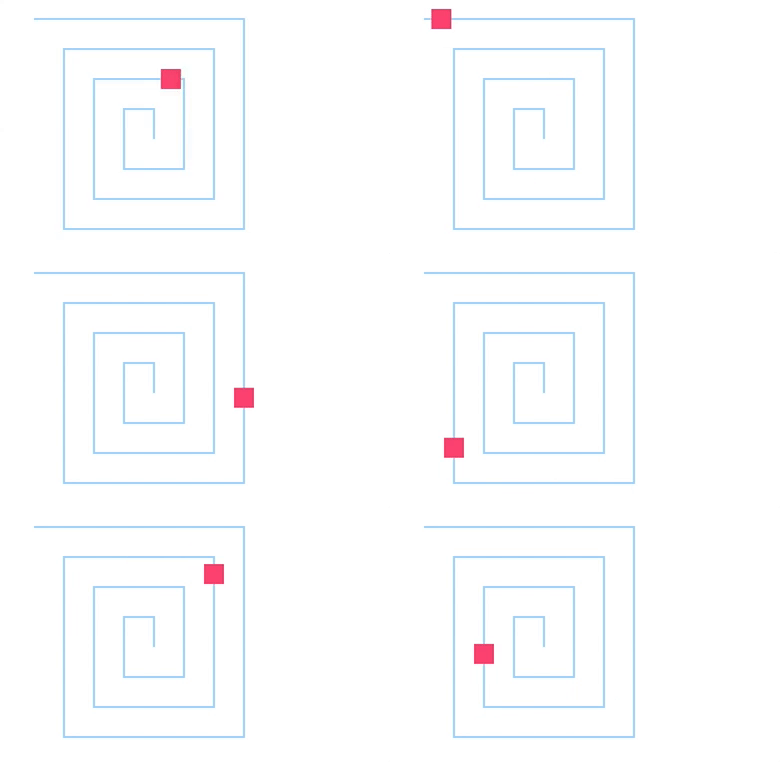
html
<!DOCTYPE html>
<html>
  <head>
    <meta charset="UTF-8" />
    <title>小方块沿着矩形旋涡移动的动画</title>
  </head>

  <body>
    <svg xmlns="http://www.w3.org/2000/svg" version="2.0" width="300" height="250">
      <path
        id="path1"
        d="M30,30 L240 ,30 L240,240 L60,240 L60,60 L210,60 L210,210 L90,210 L90,90 L180,90,
    L180,180 L120,180  L120,120, L150,120 L150,150"
        fill="none"
        stroke="#a5d9ff"
        stroke-width="2" />
      <rect x="-10" y="-10" width="20" height="20" fill="#fd4b7b" id="rect" />
      <animateMotion
        dur="15s"
        repeatCount="indefinite"
        fill="remove"
        xlink:href="#rect"
        calcMode="linear">
        <mpath xlink:href="#path1" />
      </animateMotion>
    </svg>
  </body>
</html>
animateTransform 元素
<animateTransform> 元素专门用于对元素应用变换(如旋转、缩放、平移等)动画
| 属性 | 含义 |
|---|---|
| attributeName | 属性值固定为 transform |
| type | 动画类型,属性值为 translate(平移)、scale(缩放)、rotate(旋转)等 |
| from | 动画的起始值。例如:在平移动画中,设置 from="0 0",表示从点 (0,0) 开始;在旋转动画中,设置 from="0",表示旋转的起始度数为 0;在缩放动画中,设置 from="1 1",表示在 x 轴和 y 轴上都不缩放 |
| to | 动画的结束值。例如:在平移动画中,设置 to="100 0",表示到点 (100,0) 结束;在旋转动画中,设置 to="30",表示整个坐标系旋转 30°;在缩放动画中,设置 to="0.5 1",表示在 x 轴上缩小一半,在 y 轴上不缩放 |
| begin | 动画的起始时间,例如,5s 表示过 5 秒后开始 |
| dur | 动画持续的时间,例如,10s 表示持续时间为 10 秒 |
| repeatCount | 动画播放的次数,其属性值可以是 infinite(无限次),也可以是具体的次数 |
xml
<animateTransform
  attributeName="transform"
  type="变换类型"
  from="起始值"
  to="结束值"
  dur="持续时间"
  repeatCount="重复次数"
/>
示例: from="0 100 100" 和 to="360 100 100" 中的 100,100 是旋转中心点坐标
html
<!DOCTYPE html>
<html lang="en">
  <head>
    <meta charset="UTF-8" />
    <meta name="viewport" content="width=device-width, initial-scale=1.0" />
    <title>Document</title>
  </head>
  <body>
    <svg width="200" height="200">
      <rect x="50" y="50" width="50" height="50" fill="green">
        <animateTransform
          attributeName="transform"
          type="rotate"
          from="0 100 100"
          to="360 100 100"
          dur="2s"
          repeatCount="indefinite" />
      </rect>
    </svg>

    <svg width="200" height="200">
      <rect x="50" y="50" width="50" height="50" fill="purple">
        <animateTransform
          attributeName="transform"
          type="scale"
          from="1"
          to="2"
          dur="2s"
          repeatCount="indefinite"
          additive="sum" />
      </rect>
    </svg>

    <svg width="300" height="300">
      <rect x="50" y="250" width="50" height="50" fill="orange">
        <animateTransform
          attributeName="transform"
          type="translate"
          from="0 0"
          to="100 -50"
          dur="2s"
          repeatCount="indefinite"
          additive="sum" />
        <animateTransform
          attributeName="transform"
          type="rotate"
          from="0 100 75"
          to="360 100 75"
          dur="4s"
          repeatCount="indefinite"
          additive="sum" />
      </rect>
    </svg>
  </body>
</html>
示例:实现文字逐个下落的动画

html
<!DOCTYPE html>
<html>
  <head>
    <meta charset="UTF-8" />
    <title>实现文字逐个下落的动画</title>
  </head>
  <body>
    <svg xmlns="http://www.w3.org/2000/svg" version="2.0" width="800" height="200">
      <text x="20" y="-10" fill="red" style="font: bold 40px/20px ''" id="txt1">愿</text>
      <text x="60" y="-10" fill="red" style="font: bold 40px/20px ''" id="txt2">你</text>
      <text x="100" y="-10" fill="red" style="font: bold 40px/20px ''" id="txt3">的</text>
      <text x="140" y="-10" fill="red" style="font: bold 40px/20px ''" id="txt4">青</text>
      <text x="180" y="-10" fill="red" style="font: bold 40px/20px ''" id="txt5">春</text>
      <text x="220" y="-10" fill="red" style="font: bold 40px/20px ''" id="txt6">不</text>
      <text x="260" y="-10" fill="red" style="font: bold 40px/20px ''" id="txt7">负</text>
      <text x="300" y="-10" fill="red" style="font: bold 40px/20px ''" id="txt8">梦</text>
      <text x="340" y="-10" fill="red" style="font: bold 40px/20px ''" id="txt9">想</text>
      <animateTransform
        dur="0.5s"
        attributeName="transform"
        begin="0s"
        xlink:href="#txt1"
        type="translate"
        from="20,-10"
        to="20 150"
        repeatCount="1"
        fill="freeze" />
      <animateTransform
        dur="0.5s"
        attributeName="transform"
        begin="1s"
        xlink:href="#txt2"
        type="translate"
        from="60,-10"
        to="60 150"
        repeatCount="1"
        fill="freeze" />
      <animateTransform
        dur="0.5s"
        attributeName="transform"
        begin="1.5s"
        xlink:href="#txt3"
        type="translate"
        from="100,-10"
        to="100 150"
        repeatCount="1"
        fill="freeze" />
      <animateTransform
        dur="0.5s"
        attributeName="transform"
        begin="2s"
        xlink:href="#txt4"
        type="translate"
        from="140,-10"
        to="140 150"
        repeatCount="1"
        fill="freeze" />
      <animateTransform
        dur="0.5s"
        attributeName="transform"
        begin="2.5s"
        xlink:href="#txt5"
        type="translate"
        from="180,-10"
        to="180 150"
        repeatCount="1"
        fill="freeze" />
      <animateTransform
        dur="0.5s"
        attributeName="transform"
        begin="3s"
        xlink:href="#txt6"
        type="translate"
        from="220,-10"
        to="220 150"
        repeatCount="1"
        fill="freeze" />
      <animateTransform
        dur="0.5s"
        attributeName="transform"
        begin="3.5s"
        xlink:href="#txt7"
        type="translate"
        from="260,-10"
        to="260 150"
        repeatCount="1"
        fill="freeze" />
      <animateTransform
        dur="0.5s"
        attributeName="transform"
        begin="4s"
        xlink:href="#txt8"
        type="translate"
        from="300,-10"
        to="300 150"
        repeatCount="1"
        fill="freeze" />
      <animateTransform
        dur="0.5s"
        attributeName="transform"
        begin="4.5s"
        xlink:href="#txt9"
        type="translate"
        from="340,-10"
        to="340 150"
        repeatCount="1"
        fill="freeze" />
    </svg>
  </body>
</html>
注意事项
- 坐标系统:SVG 动画基于元素的本地坐标系,除非特别指定
- 性能考虑:复杂的动画可能会影响性能,特别是在移动设备上
- SMIL 支持:
<animate>系列元素使用 SMIL (Synchronized Multimedia Integration Language),主流浏览器目前仍支持但该技术处于维护状态,推荐使用 CSS 动画或 Web Animations API 作为替代方案。 - 路径动画:
<animateMotion>是实现沿路径动画的最佳选择。
虽然 SVG 动画功能强大,但在现代 Web 开发中,CSS 动画和 JavaScript 动画(如 GSAP)通常更灵活且性能更好。不过,了解 SVG 动画对于处理矢量图形动画仍然很有价值。
渐变
线性渐变 (linearGradient)
线性渐变沿着一条直线在两个或多个颜色之间过渡
xml
<linearGradient
                id="gradientID"
                x1="起点x" y1="起点y"
                x2="终点x" y2="终点y"
                gradientUnits="userSpaceOnUse|objectBoundingBox"
                gradientTransform="transform"
                >
  <stop offset="0%" stop-color="颜色1" />
  <stop offset="100%" stop-color="颜色2" />
</linearGradient>
属性说明:
id: 渐变的唯一标识符,用于引用x1,y1: 渐变起点坐标(默认为0%,0%)x2,y2: 渐变终点坐标(默认为100%,0%)gradientUnits:userSpaceOnUse: 使用绝对坐标objectBoundingBox(默认): 使用相对坐标(相对于应用渐变的元素)
gradientTransform: 对渐变应用变换
径向渐变 (radialGradient)
径向渐变从中心点向外辐射,在同心圆之间过渡颜色。
xml
<radialGradient
  id="gradientID"
  cx="中心x" cy="中心y"
  r="半径"
  fx="焦点x" fy="焦点y"
  gradientUnits="userSpaceOnUse|objectBoundingBox"
  gradientTransform="transform"
>
  <stop offset="0%" stop-color="颜色1" />
  <stop offset="100%" stop-color="颜色2" />
</radialGradient>
属性说明:
cx,cy: 渐变中心点坐标(默认为50%,50%)r: 渐变半径(默认为50%)fx,fy: 渐变焦点坐标(默认与中心点相同)- 其他属性与线性渐变相同
综合示例:
<img src="https://zhangzhengyang.oss-cn-beijing.aliyuncs.com/images/202505271957835.png" alt="image-20250527195720088" style="zoom:50%;" />html
<!DOCTYPE html>
<html lang="zh-CN">
  <head>
    <meta charset="UTF-8" />
    <meta name="viewport" content="width=device-width, initial-scale=1.0" />
    <title>SVG 渐变高级特性与实际应用示例</title>
    <style>
      body {
        font-family: Arial, sans-serif;
        margin: 20px;
        background-color: #f5f5f5;
      }
      h1,
      h2 {
        color: #333;
      }
      .container {
        display: flex;
        flex-wrap: wrap;
        gap: 30px;
      }
      .section {
        display: flex;
        flex-direction: row;
        gap: 20px;
      }
      .card {
        background-color: white;
        padding: 20px;
        border-radius: 8px;
        box-shadow: 0 2px 4px rgba(0, 0, 0, 0.1);
        width: 300px;
      }
      svg {
        max-width: 100%;
        height: auto;
        border: 1px solid #ddd;
        margin-top: 10px;
      }
      .code-block {
        background-color: #f8f9fa;
        padding: 15px;
        border-radius: 5px;
        overflow-x: auto;
        margin-top: 15px;
      }
      pre {
        margin: 0;
      }
    </style>
  </head>
  <body>
    <div class="container">
      <!-- 渐变高级特性部分 -->
      <div class="section">
        <!-- 颜色插值示例 -->
        <div class="card">
          <h3>3.1 颜色插值</h3>
          <p>通过多个颜色停止点创建平滑的渐变过渡。</p>
          <svg width="300" height="100">
            <defs>
              <linearGradient id="multiStopGradient">
                <stop offset="0%" stop-color="red" />
                <stop offset="30%" stop-color="orange" />
                <stop offset="60%" stop-color="yellow" />
                <stop offset="100%" stop-color="green" />
              </linearGradient>
            </defs>
            <rect x="50" y="20" width="200" height="60" fill="url(#multiStopGradient)" />
          </svg>
        </div>

        <!-- 渐变变换示例 -->
        <div class="card">
          <h3>3.2 渐变变换</h3>
          <p>通过动画让渐变旋转,创造动态效果。</p>
          <svg width="300" height="300">
            <defs>
              <radialGradient id="transformedGradient" cx="50%" cy="50%" r="50%">
                <stop offset="0%" stop-color="white" />
                <stop offset="100%" stop-color="black" />
                <animateTransform
                  attributeName="gradientTransform"
                  type="rotate"
                  from="0 150 150"
                  to="360 150 150"
                  dur="5s"
                  repeatCount="indefinite" />
              </radialGradient>
            </defs>
            <circle cx="150" cy="150" r="100" fill="url(#transformedGradient)" />
          </svg>
        </div>

        <!-- 扩展和重复渐变示例 -->
        <div class="card">
          <h3>3.3 扩展和重复</h3>
          <p>通过动画让渐变扩展或重复,创造动态效果。</p>
          <svg width="300" height="100">
            <defs>
              <!-- 重复渐变 -->
              <linearGradient id="repeatGradient" x1="0%" y1="0%" x2="100%" y2="0%">
                <stop offset="0%" stop-color="red" />
                <stop offset="50%" stop-color="yellow" />
                <stop offset="100%" stop-color="green" />
                <animate attributeName="x1" values="0%;100%;0%" dur="4s" repeatCount="indefinite" />
              </linearGradient>

              <!-- 扩展渐变 -->
              <linearGradient id="spreadGradient" x1="0%" y1="0%" x2="0%" y2="100%">
                <stop offset="0%" stop-color="blue" />
                <stop offset="100%" stop-color="purple" />
                <animate attributeName="x2" values="0%;100%;0%" dur="4s" repeatCount="indefinite" />
              </linearGradient>
            </defs>

            <rect x="50" y="20" width="200" height="60" fill="url(#repeatGradient)" />
            <rect x="50" y="100" width="200" height="60" fill="url(#spreadGradient)" />
          </svg>
        </div>
      </div>

      <!-- 实际应用示例部分 -->
      <div class="section">
        <!-- 渐变按钮示例 -->
        <div class="card">
          <h3>渐变按钮</h3>
          <p>使用线性渐变创建一个按钮效果。</p>
          <svg width="200" height="60">
            <defs>
              <linearGradient id="buttonGradient" x1="0%" y1="0%" x2="0%" y2="100%">
                <stop offset="0%" stop-color="#4a90e2" />
                <stop offset="100%" stop-color="#2a70d2" />
              </linearGradient>
              <linearGradient id="buttonHover" x1="0%" y1="0%" x2="0%" y2="100%">
                <stop offset="0%" stop-color="#5a9eec" />
                <stop offset="100%" stop-color="#3a80e2" />
              </linearGradient>
            </defs>

            <rect
              x="10"
              y="10"
              width="180"
              height="40"
              rx="5"
              fill="url(#buttonGradient)"
              stroke="#1a5fb2"
              stroke-width="1" />
            <text
              x="100"
              y="35"
              font-family="Arial"
              font-size="16"
              fill="white"
              text-anchor="middle">
              Click Me
            </text>
          </svg>
        </div>

        <!-- 渐变背景示例 -->
        <div class="card">
          <h3>渐变背景</h3>
          <p>使用线性渐变创建一个页面背景效果。</p>
          <svg width="100%" height="200">
            <defs>
              <linearGradient id="bgGradient" x1="0%" y1="0%" x2="100%" y2="100%">
                <stop offset="0%" stop-color="#f0f8ff" />
                <stop offset="100%" stop-color="#e6eeff" />
              </linearGradient>
            </defs>
            <rect width="100%" height="100%" fill="url(#bgGradient)" />
          </svg>
        </div>
      </div>
    </div>
  </body>
</html>
JavaScript 交互
SVG 元素是 DOM 的一部分,可以通过 JavaScript 进行完全的操作和交互。
获取和操作 SVG 元素
javascript
// 获取 SVG 元素
const svg = document.querySelector('svg');
const circle = document.getElementById('myCircle');
const rect = document.querySelector('rect');

// 修改属性
circle.setAttribute('r', '60');
circle.setAttribute('fill', 'blue');
rect.style.fill = 'red'; // 使用 style 属性

// 获取属性
const radius = circle.getAttribute('r');
const fillColor = circle.getAttribute('fill');
动态创建 SVG 元素
javascript
// 创建 SVG 元素
const svg = document.createElementNS('http://www.w3.org/2000/svg', 'svg');
svg.setAttribute('width', '400');
svg.setAttribute('height', '300');

// 创建圆形
const circle = document.createElementNS('http://www.w3.org/2000/svg', 'circle');
circle.setAttribute('cx', '200');
circle.setAttribute('cy', '150');
circle.setAttribute('r', '50');
circle.setAttribute('fill', 'blue');

// 添加到 SVG
svg.appendChild(circle);
document.body.appendChild(svg);
使用 JavaScript 操作 SVG 的完整示例
html
<svg id="interactiveSvg" width="400" height="300" xmlns="http://www.w3.org/2000/svg">
  <circle id="myCircle" cx="200" cy="150" r="50" fill="blue" />
  <rect id="myRect" x="100" y="100" width="100" height="80" fill="red" />
</svg>

<button onclick="changeColor()">改变颜色</button>
<button onclick="animateCircle()">动画圆形</button>
<button onclick="addShape()">添加形状</button>

<script>
  const circle = document.getElementById('myCircle');
  const rect = document.getElementById('myRect');

  function changeColor() {
    const colors = ['red', 'blue', 'green', 'yellow', 'purple'];
    const randomColor = colors[Math.floor(Math.random() * colors.length)];
    circle.setAttribute('fill', randomColor);
  }

  function animateCircle() {
    let radius = 50;
    const interval = setInterval(() => {
      radius += 5;
      circle.setAttribute('r', radius);
      if (radius > 100) {
        clearInterval(interval);
        circle.setAttribute('r', '50');
      }
    }, 50);
  }

  function addShape() {
    const svg = document.getElementById('interactiveSvg');
    const newCircle = document.createElementNS('http://www.w3.org/2000/svg', 'circle');
    newCircle.setAttribute('cx', Math.random() * 400);
    newCircle.setAttribute('cy', Math.random() * 300);
    newCircle.setAttribute('r', '20');
    newCircle.setAttribute('fill', 'orange');
    svg.appendChild(newCircle);
  }
</script>