数组常见操作
本章聚焦数组操作的实战技巧,涵盖判断、初始化、过滤、去重、扁平化、查找、排序、分组等常见场景,提供多种实现方案和性能对比。
本章概览
本章汇总了实际开发中最常见的数组操作场景,提供详细的实现方法和最佳实践建议。
code
数组常见操作
├── 基础操作
│   ├── 判断空数组 - 多种判断方式及优劣
│   ├── 初始化数组 - 一维/二维数组初始化技巧
│   └── 类型转换 - 字符串/数字转换
├── 过滤与查找
│   ├── 过滤假值 - filter(Boolean)等技巧
│   ├── 查找元素 - find/filter/findIndex选择
│   └── indexOf简化 - includes vs indexOf
├── 数组变形
│   ├── 扁平化 - 6种实现方式对比
│   ├── 去重 - 8种去重方法及性能对比
│   └── 深浅拷贝 - 多种实现方案
├── 统计计算
│   ├── 最大最小值 - 4种实现方式
│   ├── 数组求和 - 多种求和方案
│   └── 统计分析 - 计数、分组、聚合
├── 集合运算
│   ├── 数组分组 - 按属性分组
│   ├── 数组分块 - chunk实现
│   └── 集合运算 - 交集、并集、差集
└── 特殊操作
    ├── 数组乱序 - Fisher-Yates洗牌算法
    └── 深度操作 - 多级排序、复杂数据处理
相关章节导航
判断数组是否为空
判断数组是否为空有多种方式,需要注意区分空数组和 null/undefined:
javascript
// 方法 1:检查长度
const isNotEmpty = (arr) => Array.isArray(arr) && arr.length > 0
isNotEmpty([1, 2, 3]) // true
isNotEmpty([]) // false
isNotEmpty(null) // false

// 方法 2:使用可选链(ES2020)
const isEmpty = (arr) => !arr?.length
isEmpty([]) // true
isEmpty([1, 2, 3]) // false

// 方法 3:检查是否存在且长度大于 0
const hasItems = (arr) => arr && arr.length > 0
hasItems([1, 2, 3]) // true
hasItems([]) // false
hasItems(null) // false
⚠️ 注意区分:
[]- 空数组,长度为 0null- null 值undefined- 未定义null和undefined不是数组,使用数组方法会报错
初始化数组
一维数组
如果想要初始化一个指定长度的一维数组,并指定默认值,可以这样:
javascript
// 方法 1:使用 fill(推荐)
const array = Array(6).fill("")
// ['', '', '', '', '', '']

// 方法 2:使用 Array.from
const array2 = Array.from({ length: 6 }, () => "")
// ['', '', '', '', '', '']

// 方法 3:使用 Array.from 带索引
const array3 = Array.from({ length: 6 }, (_, i) => i)
// [0, 1, 2, 3, 4, 5]

// 方法 4:使用扩展运算符(不推荐,性能较差)
const array4 = [...Array(6)].map(() => "")
💡 性能对比:
Array(n).fill(value)- 最快,推荐使用Array.from({ length: n }, fn)- 灵活,支持索引[...Array(n)].map(fn)- 最慢,不推荐
二维数组(矩阵)
如果想要初始化一个指定长度的二维数组,并指定默认值,可以这样:
javascript
// 方法 1:使用 fill + map(推荐)
const matrix = Array(6)
  .fill(0)
  .map(() => Array(5).fill(0))
// [[0, 0, 0, 0, 0],
//  [0, 0, 0, 0, 0],
//  [0, 0, 0, 0, 0],
//  [0, 0, 0, 0, 0],
//  [0, 0, 0, 0, 0],
//  [0, 0, 0, 0, 0]]

// 方法 2:使用 Array.from
const matrix2 = Array.from({ length: 6 }, () => Array(5).fill(0))

// 方法 3:使用 Array.from 带索引
const matrix3 = Array.from({ length: 6 }, (_, i) => Array.from({ length: 5 }, (_, j) => i * 5 + j))
// [[0, 1, 2, 3, 4],
//  [5, 6, 7, 8, 9],
//  ...]
⚠️ 注意:使用
fill()填充对象或数组时,所有元素会引用同一个对象:
javascript
// 错误示例:所有子数组引用同一个对象
const wrong = Array(3).fill([])
wrong[0].push(1)
console.log(wrong) // [[1], [1], [1]] - 所有子数组都被修改了

// 正确示例:使用 map 创建新数组
const correct = Array(3)
  .fill(0)
  .map(() => [])
correct[0].push(1)
console.log(correct) // [[1], [], []] - 只有第一个子数组被修改
过滤错误值与类型转换
过滤假值
如果想过滤数组中的 false、0、null、undefined、NaN、"" 等假值,可以这样:
javascript
const array = [1, 0, undefined, 6, 7, "", false, null, NaN]

// 方法 1:使用 Boolean 构造函数(会过滤所有假值)
const filtered1 = array.filter(Boolean)
console.log(filtered1) // [1, 6, 7]

// 方法 2:只过滤 null 和 undefined
const filtered2 = array.filter((item) => item != null)
console.log(filtered2) // [1, 0, 6, 7, "", false, NaN]

// 方法 3:自定义过滤条件
const filtered3 = array.filter((item) => item !== null && item !== undefined && item !== "")
console.log(filtered3) // [1, 0, 6, 7, false, NaN]
类型转换
字符串转数字
如果有一个数组,想要把数组中的元素转化为数字,可以使用 map 方法来实现:
javascript
const array = ["12", "1", "3.1415", "-10.01"]

// 方法 1:使用 Number 构造函数
const numbers1 = array.map(Number)
console.log(numbers1) // [12, 1, 3.1415, -10.01]

// 方法 2:使用一元加号运算符
const numbers2 = array.map((item) => +item)
console.log(numbers2) // [12, 1, 3.1415, -10.01]

// 方法 3:使用 parseInt(只取整数部分)
const integers = array.map((item) => parseInt(item, 10))
console.log(integers) // [12, 1, 3, -10]

// 方法 4:使用 parseFloat(保留小数)
const floats = array.map(parseFloat)
console.log(floats) // [12, 1, 3.1415, -10.01]
数字转字符串
javascript
const numbers = [12, 1, 3.1415, -10.01]

// 方法 1:使用 String 构造函数
const strings1 = numbers.map(String)
console.log(strings1) // ['12', '1', '3.1415', '-10.01']

// 方法 2:使用 toString
const strings2 = numbers.map((n) => n.toString())
console.log(strings2) // ['12', '1', '3.1415', '-10.01']

// 方法 3:使用模板字符串
const strings3 = numbers.map((n) => `${n}`)
console.log(strings3) // ['12', '1', '3.1415', '-10.01']
数组查找简化
当我们有一个对象数组,并想根据对象属性找到特定对象,find 方法会非常有用。
使用 find 查找单个元素
javascript
const data = [
  {
    type: "test1",
    name: "abc"
  },
  {
    type: "test2",
    name: "cde"
  },
  {
    type: "test1",
    name: "fgh"
  }
]

const filteredData = data.find((item) => item.type === "test1" && item.name === "fgh")
console.log(filteredData) // { type: 'test1', name: 'fgh' }

// 如果找不到,返回 undefined
const notFound = data.find((item) => item.name === "xyz")
console.log(notFound) // undefined
使用 filter 查找多个元素
如果需要查找所有满足条件的元素,使用 filter:
javascript
// 查找所有 type 为 "test1" 的元素
const allTest1 = data.filter((item) => item.type === "test1")
console.log(allTest1)
// [{ type: 'test1', name: 'abc' }, { type: 'test1', name: 'fgh' }]
使用 findIndex 查找索引
如果需要查找元素的索引,使用 findIndex:
javascript
const index = data.findIndex((item) => item.type === "test1" && item.name === "fgh")
console.log(index) // 2

// 如果找不到,返回 -1
const notFoundIndex = data.findIndex((item) => item.name === "xyz")
console.log(notFoundIndex) // -1
💡 方法选择:
find()- 查找第一个匹配的元素,返回元素本身findIndex()- 查找第一个匹配的元素,返回索引filter()- 查找所有匹配的元素,返回数组
indexOf 的按位操作简化
在查找数组的某个值时,我们可以使用 indexOf() 方法。但有一些更简洁的写法:
按位非运算符 ~
javascript
// 传统写法
if (arr.indexOf(item) > -1) {
  // item found
}
if (arr.indexOf(item) === -1) {
  // item not found
}

// 简化写法:使用按位非运算符
if (~arr.indexOf(item)) {
  // item found
}
if (!~arr.indexOf(item)) {
  // item not found
}
ℹ️ 按位非运算符
~的工作原理:
~(-1)=0(假值)~0=-1(真值)~1=-2(真值)- 因为
indexOf找不到时返回-1,所以~(-1)=0(假值),找到了返回其他值(真值)
使用 includes() 方法(推荐)
javascript
// 最简洁的方式:使用 includes
if (arr.includes(item)) {
  // true if the item found
}

// 检查不包含
if (!arr.includes(item)) {
  // true if the item not found
}
💡 推荐使用
includes()方法:
- 代码更简洁、可读性更好
- 语义更清晰
- 支持
NaN的查找(indexOf不支持)- 不需要理解按位运算符 性能对比:
includes()- 现代方法,推荐使用indexOf() > -1- 兼容性好~indexOf()- 不推荐,可读性差
数组扁平化
所谓扁平化,其实就是将一个嵌套多层的数组 array(嵌套可以是任何层数)转换为只有一层的数组。举个简单的例子,假设有个名为 flatten 的函数可以做到数组扁平化
javascript
let arr = [1, [2, [3, 4, 5]]]
console.log(flatten(arr)) // [1, 2, 3, 4, 5]
简单来说就是把多维的数组"拍平",输出最后的一维数组。下面来看看实现 flatten 函数的方式。
递归实现
普通的递归思路很容易理解,就是通过循环递归的方式,一项一项地去遍历,如果某一项还是一个数组,那么就继续往下遍历,利用递归来实现数组的每一项的连接
javascript
let arr = [1, [2, [3, 4, 5]]]
function flatten(arr) {
  let result = []

  for (let i = 0; i < arr.length; i++) {
    if (Array.isArray(arr[i])) {
      result = result.concat(flatten(arr[i]))
    } else {
      result.push(arr[i])
    }
  }
  return result
}
flatten(arr) // [1, 2, 3, 4, 5]
reduce 函数迭代
从上面的递归函数可以看出,其实就是对数组的每一项进行处理,那么其实也可以用 reduce 来实现数组的拼接,从而简化上面方法的代码,改造后的代码如下
javascript
let arr = [1, [2, [3, 4]]]
function flatten(arr) {
  return arr.reduce(function (prev, next) {
    return prev.concat(Array.isArray(next) ? flatten(next) : next)
  }, [])
}
console.log(flatten(arr)) // [1, 2, 3, 4]
或者使用箭头函数:
javascript
const flattenDeep = (arr) => (Array.isArray(arr) ? arr.reduce((a, b) => [...a, ...flattenDeep(b)], []) : [arr])

flattenDeep([1, [[2], [3, [4]], 5]]) // [1, 2, 3, 4, 5]
扩展运算符实现
这个方法的实现,采用了扩展运算符和 some 的方法,两者共同使用,达到数组扁平化的目的
- 先用数组的
some方法把数组中仍然是数组的项过滤出来,然后执行concat操作 - 利用 ES6 的展开运算符,将其拼接到原数组中,最后返回原数组,达到了预期的效果
javascript
let arr = [1, [2, [3, 4]]]
function flatten(arr) {
  while (arr.some((item) => Array.isArray(item))) {
    arr = [].concat(...arr)
  }
  return arr
}
console.log(flatten(arr)) // [1, 2, 3, 4]
⚠️ 注意:这种方法会修改原数组。如果需要保留原数组,应该先复制:
javascript
function flatten(arr) {
  let result = [...arr] // 复制数组
  while (result.some((item) => Array.isArray(item))) {
    result = [].concat(...result)
  }
  return result
}
split 和 toString
可以通过 split 和 toString 两个方法来共同实现数组扁平化,由于数组会默认带一个 toString 的方法,所以可以把数组直接转换成逗号分隔的字符串,然后再用 split 方法把字符串重新转换为数组
javascript
// 方法2(注意:该方法会把所有元素都转成数字)
var arr = [1, "1", 2, "2"]
function flatten(arr) {
  return arr
    .toString()
    .split(",")
    .map(function (item) {
      return +item // +的作用是把string转换为number
    })
}

console.log(flatten(arr))
然而这种方法使用的场景却非常有限,如果数组是 [1, '1', 2, '2'] 的话,返回 [1, 1, 2, 2] ,改变了原来的数组数据。但万一数组元素是 {x: 100} 等引用类型,就不可以了
ES6 中的 flat
直接调用 ES6 中的 flat 方法来实现数组扁平化。flat 方法的语法:arr.flat([depth]) 。其中 depth 是 flat 的参数,depth 是可以传递数组的展开深度(默认不填、数值是 1),即展开一层数组。如果层数不确定,参数可以传进 Infinity,代表不论多少层都要展开
javascript
let arr = [1, [2, [3, 4]]]
function flatten(arr) {
  return arr.flat(Infinity)
}
console.log(flatten(arr)) // [1, 2, 3, 4]

// 或者直接使用
const flattened = [1, [2, [3, 4]]].flat(Infinity)
console.log(flattened) // [1, 2, 3, 4]
💡 ES6
flat()方法是最推荐的方式:
- 代码最简洁
- 性能最好(原生实现)
- 支持指定深度
- 不会修改原数组
正则和 JSON 方法
在第 4 种方法中已经使用 toString 方法,其中仍然采用了将 JSON.stringify 的方法先转换为字符串,然后通过正则表达式过滤掉字符串中的数组的方括号,最后再利用 JSON.parse 把它转换成数组
javascript
let arr = [1, [2, [3, [4, 5]]], 6]
function flatten(arr) {
  let str = JSON.stringify(arr)
  str = str.replace(/(\[|\])/g, "")
  str = "[" + str + "]"
  return JSON.parse(str)
}
console.log(flatten(arr)) // [1, 2, 3, 4, 5, 6]
数组去重
去除无序数组中的重复元素并且返回新的无重复数组
双层 for 循环
使用循环嵌套,最外层循环 array,里面循环 res,如果 array[i] 的值跟 res[j] 的值相等,就跳出循环,如果都不等于,说明元素是唯一的,这时候 j 的值就会等于 res 的长度,根据这个特点进行判断,将值添加进 res
javascript
let array = [1, 1, "1", "1"]

function unique(array) {
  let res = []
  for (let i = 0, arrayLen = array.length; i < arrayLen; i++) {
    for (var j = 0, resLen = res.length; j < resLen; j++) {
      if (array[i] === res[j]) {
        break
      }
    }
    // 如果array[i]是唯一的,那么执行完循环,j等于resLen
    if (j === resLen) {
      res.push(array[i])
    }
  }
  return res
}

console.log(unique(array)) // [1, "1"]
javascript
function unique(arr) {
  for (var i = 0; i < arr.length; i++) {
    for (var j = i + 1; j < arr.length; j++) {
      if (arr[i] === arr[j]) {
        arr.splice(j, 1)
        j--
      }
    }
  }
  return arr
}

var arr = [1, 1, "true", "true", true, true, 15, 15, false, false, undefined, undefined]

console.log(unique(arr))
// [ 1, 'true', true, 15, false, undefined ]
indexOf
用 indexOf 简化内层的循环
javascript
var array = [1, 1, "1"]

function unique2(array) {
  const res = []
  for (let i = 0, len = array.length; i < len; i++) {
    const current = array[i]
    if (res.indexOf(current) === -1) {
      res.push(current)
    }
  }
  return res
}

console.log(unique2(array))
排序后去重
- 先将要去重的数组使用 sort 方法排序后,相同的值就会被排在一起,然后我们就可以只判断当前元素与上一个元素是否相同
- 如果我们对一个已经排好序的数组去重,这种方法效率肯定高于使用 indexOf
javascript
var array = [1, 1, "1"]

function unique3(array) {
  const res = []
  const sortedArray = array.concat().sort()
  let seen
  let i = 0,
    len = sortedArray.length
  for (; i < len; i++) {
    // 如果是第一个元素或者相邻的元素不相同 !0为true;这样做是为了兼容第一个
    if (!i || seen !== sortedArray[i]) {
      res.push(sortedArray[i])
    }
    seen = sortedArray[i]
  }
  return res
}
console.log(unique3(array))
javascript
function unique(arr) {
  if (!Array.isArray(arr)) {
    console.log("type error!")
    return
  }
  arr = arr.sort()
  var arrry = [arr[0]]
  for (var i = 1; i < arr.length; i++) {
    if (arr[i] !== arr[i - 1]) {
      arrry.push(arr[i])
    }
  }
  return arrry
}

var arr = [1, 1, "true", "true", true, true, 15, 15, false, false, undefined, undefined]

console.log(unique(arr))
// [ 1, 15, false, 'true', true, undefined ](排序会改变元素顺序)
includes
javascript
function unique(arr) {
  if (!Array.isArray(arr)) {
    console.log("type error!")
    return
  }
  var array = []
  for (var i = 0; i < arr.length; i++) {
    if (!array.includes(arr[i])) {
      array.push(arr[i])
    }
  }
  return array
}

var arr = [1, 1, "true", "true", true, true, 15, 15, false, false, undefined, undefined]

console.log(unique(arr))
// [ 1, 'true', true, 15, false, undefined ]
自定义 unique 函数
知道了这两种方法后,我们可以去尝试写一个名为 unique 的工具函数,我们根据一个参数 isSorted 判断传入的数组是否是已排序的,如果为 true,我们就判断相邻元素是否相同,如果为 false,我们就使用 indexOf 进行判断
javascript
var array1 = [1, 2, "1", 2, 1]
var array2 = [1, 1, "1", 2, 2]

// 第一版
function unique(array, isSorted) {
  var res = []
  var seen = []

  for (var i = 0, len = array.length; i < len; i++) {
    var value = array[i]
    if (isSorted) {
      if (!i || seen !== value) {
        res.push(value)
      }
      seen = value
    } else if (res.indexOf(value) === -1) {
      res.push(value)
    }
  }
  return res
}

console.log(unique(array1)) // [1, 2, "1"]
console.log(unique(array2, true)) // [1, "1", 2]
尽管 unique 已经可以实现去重功能,但是为了让这个 API 更加强大,我们来考虑一个需求:新需求:字母的大小写视为一致,比如 'a' 和 'A',保留一个就可以了!
虽然我们可以先处理数组中的所有数据,比如将所有的字母转成小写,然后再传入 unique 函数,但是有没有方法可以省掉处理数组的这一遍循环,直接就在去重的循环中做呢?
函数传递三个参数:
- array:表示要去重的数组,必填
- isSorted:表示函数传入的数组是否已排过序,如果为 true,将会采用更快的方法进行去重
- iteratee:传入一个函数,可以对每个元素进行重新的计算,然后根据处理的结果进行去重
javascript
var array3 = [1, 1, "a", "A", 2, 2]

function unique(array, isSorted, iteratee) {
  var res = []
  var seen = []

  for (var i = 0, len = array.length; i < len; i++) {
    var value = array[i]
    var computed = iteratee ? iteratee(value, i, array) : value
    if (isSorted) {
      if (!i || seen !== computed) {
        res.push(value)
      }
      seen = computed
    } else if (iteratee) {
      if (seen.indexOf(computed) === -1) {
        seen.push(computed)
        res.push(value)
      }
    } else if (res.indexOf(value) === -1) {
      res.push(value)
    }
  }
  return res
}

console.log(
  unique(array3, false, function (item) {
    return typeof item == "string" ? item.toLowerCase() : item
  })
) // [1, "a", 2]
filter
ES5 提供了 filter 方法,我们可以用来简化外层循环:比如使用 indexOf 的方法:
javascript
var array = [1, 2, 1, 1, "1"]

function unique(array) {
  var res = array.filter(function (item, index, array) {
    return array.indexOf(item) === index
  })
  return res
}

console.log(unique(array))
排序去重的方法:
javascript
var array = [1, 2, 1, 1, "1"]

function unique(array) {
  return array
    .concat()
    .sort()
    .filter(function (item, index, array) {
      // !0 为 true
      return !index || item !== array[index - 1]
    })
}

console.log(unique(array))
Object 键值对
这种方法是利用一个空的 Object 对象,我们把数组的值存成 Object 的 key 值,比如 Object[value1] = true,在判断另一个值的时候,如果 Object[value2] 存在的话,就说明该值是重复的。示例代码如下:
javascript
var array = [1, 2, 1, 1, "1"]

function unique(array) {
  var obj = {}
  return array.filter(function (item, index, array) {
    return obj.hasOwnProperty(item) ? false : (obj[item] = true)
  })
}

console.log(unique(array)) // [1, 2]
我们可以发现,是有问题的,因为 1 和 '1' 是不同的,但是这种方法会判断为同一个值,这是因为对象的键值只能是字符串,所以我们可以使用 typeof item + item 拼成字符串作为 key 值来避免这个问题:
javascript
var array = [1, 2, 1, 1, "1"]

function unique(array) {
  var obj = {}
  return array.filter(function (item, index, array) {
    return obj.hasOwnProperty(typeof item + item) ? false : (obj[typeof item + item] = true)
  })
}

console.log(unique(array)) // [1, 2, "1"]
然而,即便如此,我们依然无法正确区分出两个对象,比如 {value: 1} 和 {value: 2},因为 typeof item + item 的结果都会是 object[object Object],不过我们可以使用 JSON.stringify 将对象序列化:
javascript
var array = [{ value: 1 }, { value: 1 }, { value: 2 }]

function unique(array) {
  var obj = {}
  return array.filter(function (item, index, array) {
    console.log(typeof item + JSON.stringify(item))
    return obj.hasOwnProperty(typeof item + JSON.stringify(item)) ? false : (obj[typeof item + JSON.stringify(item)] = true)
  })
}

console.log(unique(array)) // [{value: 1}, {value: 2}]
ES6
可以使用 Set 和 Map 数据结构,以 Set 为例,ES6 提供了新的数据结构 Set。它类似于数组,但是成员的值都是唯一的,没有重复的值。
javascript
var array = [1, 2, 1, 1, "1"]

function unique(array) {
  return Array.from(new Set(array))
}

console.log(unique(array)) // [1, 2, "1"]
甚至可以再简化下:
javascript
function unique(array) {
  return [...new Set(array)]
}

var unique = (a) => [...new Set(a)]
此外,如果用 Map 的话:
javascript
const array = [1, 2, 3, 5, 1, 5, 9, 1, 2, 8]

function uniqueArray(array) {
  let map = {}
  let res = []
  for (var i = 0; i < array.length; i++) {
    if (!map.hasOwnProperty([array[i]])) {
      map[array[i]] = 1
      res.push(array[i])
    }
  }
  return res
}

uniqueArray(array) // [1, 2, 3, 5, 9, 8]
我们可以看到,去重方法从原始的 14 行代码到 ES6 的 1 行代码,其实也说明了 JavaScript 这门语言在不停的进步,相信以后的开发也会越来越高效
特殊类型比较
去重的方法就到此结束了,然而要去重的元素类型可能是多种多样,除了例子中简单的 1 和 '1' 之外,其实还有 null、undefined、NaN、对象等,那么对于这些元素,之前的这些方法的去重结果又是怎样呢?
javascript
var str1 = "1"
var str2 = new String("1")

console.log(str1 == str2) // true
console.log(str1 === str2) // false

console.log(null == null) // true
console.log(null === null) // true

console.log(undefined == undefined) // true
console.log(undefined === undefined) // true

console.log(NaN == NaN) // false
console.log(NaN === NaN) // false

console.log(/a/ == /a/) // false
console.log(/a/ === /a/) // false

console.log({} == {}) // false
console.log({} === {}) // false
那么,对于这样一个数组
javascript
var array = [1, 1, "1", "1", null, null, undefined, undefined, new String("1"), new String("1"), /a/, /a/, NaN, NaN]我特地整理了一个列表,我们重点关注下对象和 NaN 的去重情况:
| 方法 | 结果 | 说明 |
|---|---|---|
| for 循环 | [1, "1", null, undefined, String, String, /a/, /a/, NaN, NaN] | 对象和 NaN 不去重 |
| indexOf | [1, "1", null, undefined, String, String, /a/, /a/, NaN, NaN] | 对象和 NaN 不去重 |
| sort | [/a/, /a/, "1", 1, String, 1, String, NaN, NaN, null, undefined] | 对象和 NaN 不去重 数字 1 也不去重 |
| filter + indexOf | [1, "1", null, undefined, String, String, /a/, /a/] | 对象不去重 NaN 会被忽略掉 |
| filter + sort | [/a/, /a/, "1", 1, String, 1, String, NaN, NaN, null, undefined] | 对象和 NaN 不去重 数字 1 不去重 |
| 优化后的键值对方法 | [1, "1", null, undefined, String, /a/, NaN] | 全部去重 |
| Set | [1, "1", null, undefined, String, String, /a/, /a/, NaN] | 对象不去重 NaN 去重 |
javascript
// demo1
var arr = [1, 2, NaN]
arr.indexOf(NaN) // -1
indexOf 底层还是使用 === 进行判断,因为 NaN === NaN 的结果为 false,所以使用 indexOf 查找不到 NaN 元素。Set 认为尽管 NaN === NaN 为 false,但是这两个元素是重复的。
javascript
// demo2
function unique(array) {
  return Array.from(new Set(array))
}
console.log(unique([NaN, NaN])) // [NaN]
数组的深浅拷贝
数组的浅拷贝
concat 和 slice
如果是数组,我们可以利用数组的一些方法比如:slice、concat 返回一个新数组的特性来实现拷贝
javascript
let arr = ["old", 1, true, null, undefined]
let new_arr = arr.concat()
new_arr[0] = "new"

console.log(arr) // ["old", 1, true, null, undefined]
console.log(new_arr) // ["new", 1, true, null, undefined]
用 slice 可以这样做:
javascript
let new_arr = arr.slice()但是如果数组嵌套了对象或者数组的话,比如:
javascript
let arr = [{ old: "old" }, ["old"]]
let new_arr = arr.concat()

arr[0].old = "new"
arr[1][0] = "new"

console.log(arr) // [{old: 'new'}, ['new']]
console.log(new_arr) // [{old: 'new'}, ['new']]
我们会发现,无论是新数组还是旧数组都发生了变化,也就是说使用 concat 方法,克隆的并不彻底。
ℹ️ 浅拷贝的特点: 如果数组元素是基本类型,就会拷贝一份,互不影响,而如果是对象或者数组,就会只拷贝对象和数组的引用,这样我们无论在新旧数组进行了修改,两者都会发生变化。 把这种复制引用的拷贝方法称之为浅拷贝,与之对应的就是深拷贝,深拷贝就是指完全的拷贝一个对象,即使嵌套了对象,两者也相互分离,修改一个对象的属性,也不会影响另一个。
Object.assign
javascript
let a = {
  age: 1
}

let b = Object.assign({}, a)
a.age = 2
console.log(b.age) // 1
展开运算符
javascript
let a = {
  age: 1
}

let b = { ...a }
a.age = 2
console.log(b.age) // 1
通常浅拷⻉就能解决⼤部分问题了,但是当我们遇到如下情况就需要使⽤到深拷⻉了
javascript
let a = {
  age: 1,
  jobs: {
    first: "FE"
  }
}

let b = { ...a }
a.jobs.first = "native"
console.log(b.jobs.first) // native
数组的深拷贝
JSON.parse(JSON.stringify(object))
深拷贝不仅适用于数组还适用于对象
javascript
let arr = ["old", 1, true, ["old1", "old2"], { old: 1 }]
let new_arr = JSON.parse(JSON.stringify(arr))
console.log(new_arr)
是一个简单粗暴的好方法,就是有一个问题,不能拷贝函数
javascript
var arr = [
  function () {
    console.log(a)
  },
  {
    b: function () {
      console.log(b)
    }
  }
]

var new_arr = JSON.parse(JSON.stringify(arr))

console.log(new_arr)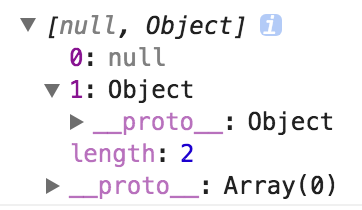
该⽅法也是有局限性的
- 会忽略 undefined
- 会忽略 symbol
- 不能序列化函数
- 不能解决循环引⽤的对象
实现拷贝
以上三个方法 concat、slice、JSON.stringify 都算是技巧类,可以根据实际项目情况选择使用,实现一个对象或者数组的浅拷贝
javascript
var shallowCopy = function (obj) {
  // 只拷贝对象
  if (typeof obj !== "object") return

  // 根据obj的类型判断是新建一个数组还是对象
  var newObj = obj instanceof Array ? [] : {}

  // 遍历obj,并且判断是obj的属性才拷贝
  for (var key in obj) {
    if (obj.hasOwnProperty(key)) {
      newObj[key] = obj[key]
    }
  }
  return newObj
}
实现一个深拷贝,在拷贝的时候判断一下属性值的类型,如果是对象,我们递归调用深拷贝函数
javascript
var deepCopy = function (obj) {
  if (typeof obj !== "object") return

  var newObj = obj instanceof Array ? [] : {}

  for (var key in obj) {
    if (obj.hasOwnProperty(key)) {
      newObj[key] = typeof obj[key] === "object" ? deepCopy(obj[key]) : obj[key]
    }
  }
  return newObj
}
尽管使用深拷贝会完全的克隆一个新对象,不会产生副作用,但是深拷贝因为使用递归,性能会不如浅拷贝,在开发中,还是要根据实际情况进行选择
解决递归爆栈
我们使⽤递归的⽅法对数据进⾏拷⻉,但是这也会出现⼀个问题,递归的深度的深度太深就会引发栈内存的溢出,我们使⽤下⾯的⽅法来解决递归爆栈的问题:将待拷⻉的对象放⼊栈中,循环直⾄栈为空
javascript
function cloneLoop(x) {
  const root = {}
  // 栈
  const loopList = [
    {
      parent: root,
      key: undefined,
      data: x
    }
  ]
  while (loopList.length) {
    // 深度优先
    const node = loopList.pop()
    const parent = node.parent
    const key = node.key
    const data = node.data

    // 初始化赋值目标,key 为 undefined 则拷贝到父元素,否则拷贝到子元素
    if (key === undefined) {
      Object.assign(parent, data)
    } else {
      parent[key] = data
    }

    // 下一次循环
    for (let k in data) {
      // 如果是对象就准备打包拷贝
      if (typeof data[k] === "object") {
        loopList.push({
          parent: parent[key] || (parent[key] = {}),
          key: k,
          data: data[k]
        })
      }
    }
  }
  return root
}
这样我们就解决了递归爆栈的问题,但是循环引⽤的问题依然存在。
解决循环引⽤
举例:当 a 对象的中的某属性值为 a 对象,这样就会造成循环引⽤。
我们使⽤暴⼒破解的⽅法来解决循环引⽤的问题。
思路:引⼊⼀个数组 uniqueList ⽤来存储已经拷⻉的数组,每次循环遍历时,先判断对象是否在 uniqueList 中了,如果在的话就不执⾏拷⻉逻辑
javascript
function cloneForce(x) {
  const uniqueList = [] // ⽤来去重
  let root = {}
  const loopList = [
    {
      parent: root,
      key: undefined,
      data: x
    }
  ]
  while (loopList.length) {
    // 深度优先
    const node = loopList.pop()
    const parent = node.parent
    const key = node.key
    const data = node.data

    // 初始化赋值目标,key 为 undefined 则拷贝到父元素,否则拷贝到子元素
    let res = parent
    if (key !== undefined) {
      res = parent[key] = {}
    }

    // 数据已经存在,说明出现了循环引用
    let uniqueData = find(uniqueList, data)
    if (uniqueData) {
      parent[key] = uniqueData.target
      continue // 破坏循环,跳过本次循环,进入下一次循环
    }

    // 数据不存在,记录源数据以及拷贝目标
    uniqueList.push({
      source: data,
      target: res
    })

    for (let k in data) {
      if (data.hasOwnProperty(k)) {
        if (typeof data[k] === "object") {
          // 下一次循环
          loopList.push({
            parent: res,
            key: k,
            data: data[k]
          })
        } else {
          // 拷贝
          res[k] = data[k]
        }
      }
    }
  }
  return root
}

function find(arr, item) {
  for (var i = 0; i < arr.length; i++) {
    if (arr[i].source === item) {
      return arr[i]
    }
  }
  return null
}
数组中查找指定元素
在开发中,我们经常会遇到在数组中查找指定元素的需求,可能大家觉得这个需求过于简单,然而如何优雅的去实现一个 findIndex 和 findLastIndex、indexOf 和 lastIndexOf 方法却是很少人去思考的
在实现前,先看看 ES6 的 findIndex 方法,让大家了解 findIndex 的使用方法。
findIndex 和 findLastIndex
ES6 对数组新增了 findIndex 方法,它会返回数组中满足提供的函数的第一个元素的索引,否则返回 -1。findIndex 会找出第一个满足“大于等于 15”的元素的下标,所以最后返回 3
javascript
function isBigEnough(element) {
  return element >= 15
}

let aa = [12, 5, 8, 130, 44].findIndex(isBigEnough)
console.log(aa) // 3

let bb = [12, 5, 8, 130, 44].findIndex(function (element) {
  return element >= 15
})
console.log(bb)
实现 findIndex 思路自然很明了,遍历一遍,返回符合要求的值的下标即可
javascript
function findIndex(array, predicate, context) {
  console.log(predicate) // 是那个函数
  console.log(context) // 没有传值过来,默认是 undefined
  for (var i = 0; i < array.length; i++) {
    if (predicate.call(context, array[i], i, array)) {
      return i
    }
  }
  return -1
}

let aa = findIndex([1, 2, 3, 4], function (item, i, array) {
  if (item == 3) return true
})
console.log(aa)
实现一个倒序查找的 findLastIndex 函数
javascript
function findLastIndex(array, predicate, context) {
  var length = array.length
  for (var i = length - 1; i >= 0; i--) {
    if (predicate.call(context, array[i], i, array)) {
      return i
    }
  }
  return -1
}

console.log(
  findLastIndex([1, 2, 3, 4], function (item, index, array) {
    if (item == 1) return true
  })
) // 0
合并 findIndex 与 findLastIndex 。根据参数的不同,在同一个循环中,实现正序和倒序遍历
javascript
function createIndexFinder(dir) {
  return function (array, predicate, context) {
    var length = array.length
    var index = dir > 0 ? 0 : length - 1
    // index+=dir  --->  index=index+dir
    for (; index >= 0 && index < length; index += dir) {
      if (predicate.call(context, array[index], index, array)) {
        return index
      }
    }

    return -1
  }
}

// 这里的正负 1 不仅区别正序还是倒序;还可以在循环中,控制步数
var findIndex = createIndexFinder(1)
var findLastIndex = createIndexFinder(-1)
sortedIndex
findIndex 和 findLastIndex 的需求算是结束了,但是又来了一个新需求:在一个排好序的数组中找到 value 对应的位置,保证插入数组后,依然保持有序的状态
javascript
sortedIndex([10, 20, 30], 25) // 2也就是说如果,注意是如果,25 按照此下标插入数组后,数组变成 [10, 20, 25, 30],数组依然是有序的状态。既然是有序的数组,那我们就不需要遍历,大可以使用二分查找法,确定值的位置
javascript
// 第一版
function sortedIndex(array, obj) {
  var low = 0,
    high = array.length
  while (low < high) {
    var mid = Math.floor((low + high) / 2)
    if (array[mid] < obj) {
      low = mid + 1
    } else {
      high = mid
    }
  }
  return high
}

console.log(sortedIndex([10, 20, 30, 40, 50], 35)) // 3
现在的方法虽然能用,但通用性不够,比如我们希望能处理这样的情况:
javascript
// stooges 配角 比如 三个臭皮匠 The Three Stooges
var stooges = [
  { name: "stooge1", age: 10 },
  { name: "stooge2", age: 30 }
]

var result = sortedIndex(stooges, { name: "stooge3", age: 20 }, function (stooge) {
  return stooge.age // 根据 age 去进行比较
})

console.log(result) // 1
所以我们还需要再加上一个参数 iteratee 函数对数组的每一个元素进行处理,一般这个时候,还会涉及到 this 指向的问题,所以我们再传一个 context 来让我们可以指定 this
javascript
// 第二版  返回一个函数
function cb(fn, context) {
  return function (obj) {
    return fn ? fn.call(context, obj) : obj
  }
}

// iteratee 运行时的定义
function sortedIndex(array, obj, iteratee, context) {
  iteratee = cb(iteratee, context)

  var low = 0,
    high = array.length
  while (low < high) {
    var mid = Math.floor((low + high) / 2)
    if (iteratee(array[mid]) < iteratee(obj)) {
      low = mid + 1
    } else {
      high = mid
    }
  }
  return high
}
indexOf 和 fromIndex
写一个 indexOf 和 lastIndexOf 函数,学习 findIndex 和 FindLastIndex 的方式
javascript
// 第一版
function createIndexOfFinder(dir) {
  return function (array, item) {
    var length = array.length
    var index = dir > 0 ? 0 : length - 1
    for (; index >= 0 && index < length; index += dir) {
      if (array[index] === item) return index
    }
    return -1
  }
}

var indexOf = createIndexOfFinder(1)
var lastIndexOf = createIndexOfFinder(-1)

var result = indexOf([1, 2, 3, 4, 5], 2)

console.log(result) // 1
fromIndex
但是即使是数组的 indexOf 方法也可以多传递一个参数 fromIndex,从 MDN 中看到 fromIndex 的讲究可有点多:
设定开始查找的位置。如果该索引值大于或等于数组长度,意味着不会在数组里查找,返回 -1。如果参数中提供的索引值是一个负值,则将其作为数组末尾的一个抵消,即 -1 表示从最后一个元素开始查找,-2 表示从倒数第二个元素开始查找 ,以此类推。 注意:如果参数中提供的索引值是一个负值,仍然从前向后查询数组。如果抵消后的索引值仍小于 0,则整个数组都将会被查询。其默认值为 0。
再看看 lastIndexOf 的 fromIndex:
从此位置开始逆向查找。默认为数组的长度减 1,即整个数组都被查找。如果该值大于或等于数组的长度,则整个数组会被查找。如果为负值,将其视为从数组末尾向前的偏移。即使该值为负,数组仍然会被从后向前查找。如果该值为负时,其绝对值大于数组长度,则方法返回 -1,即数组不会被查找。
按照这么多的规则,我们尝试着去写第二版:
javascript
// 第二版
function createIndexOfFinder(dir) {
  return function (array, item, idx) {
    var length = array.length
    var i = 0

    if (typeof idx == "number") {
      if (dir > 0) {
        i = idx >= 0 ? idx : Math.max(length + idx, 0)
      } else {
        length = idx >= 0 ? Math.min(idx + 1, length) : idx + length + 1
      }
    }

    for (idx = dir > 0 ? i : length - 1; idx >= 0 && idx < length; idx += dir) {
      if (array[idx] === item) return idx
    }
    return -1
  }
}

var indexOf = createIndexOfFinder(1)
var lastIndexOf = createIndexOfFinder(-1)
优化
因为 NaN 不全等于 NaN,所以原生的 indexOf 并不能找出 NaN 的下标。
javascript
;[1, NaN].indexOf(NaN) // -1就是从数组中找到符合条件的值的下标嘛,不就是我们最一开始写的 findIndex 吗?
javascript
// 第三版:支持 NaN 查找
function createIndexOfFinder(dir, predicate) {
  return function (array, item, idx) {
    var length = array.length
    var i = 0

    if (typeof idx == "number") {
      if (dir > 0) {
        i = idx >= 0 ? idx : Math.max(length + idx, 0)
      } else {
        length = idx >= 0 ? Math.min(idx + 1, length) : idx + length + 1
      }
    }

    // 判断元素是否是 NaN
    if (item !== item) {
      // 在截取好的数组中查找第一个满足 isNaN 函数的元素的下标
      idx = predicate(array.slice(i, length), isNaN)
      return idx >= 0 ? idx + i : -1
    }

    for (idx = dir > 0 ? i : length - 1; idx >= 0 && idx < length; idx += dir) {
      if (array[idx] === item) return idx
    }
    return -1
  }
}

var indexOf = createIndexOfFinder(1, findIndex)
var lastIndexOf = createIndexOfFinder(-1, findLastIndex)
支持对有序的数组更快的二分查找
如果 indexOf 第三个参数不传开始搜索的下标值,而是一个布尔值 true,就认为数组是一个排好序的数组,这时候,就会采用更快的二分法进行查找,这个时候,可以利用我们写的 sortedIndex 函数。
javascript
function createIndexOfFinder(dir, predicate, sortedIndex) {
  return function (array, item, idx) {
    var length = array.length
    var i = 0

    if (typeof idx == "number") {
      if (dir > 0) {
        i = idx >= 0 ? idx : Math.max(length + idx, 0)
      } else {
        length = idx >= 0 ? Math.min(idx + 1, length) : idx + length + 1
      }
    } else if (sortedIndex && idx && length) {
      // 认为数组是排好序的,采用更快的二分查找
      idx = sortedIndex(array, item)
      return array[idx] === item ? idx : -1
    }

    // 判断元素是否是 NaN
    if (item !== item) {
      // 在截取好的数组中查找第一个满足 isNaN 函数的元素的下标
      idx = predicate(array.slice(i, length), isNaN)
      return idx >= 0 ? idx + i : -1
    }

    for (idx = dir > 0 ? i : length - 1; idx >= 0 && idx < length; idx += dir) {
      if (array[idx] === item) return idx
    }
    return -1
  }
}

var indexOf = createIndexOfFinder(1, findIndex, sortedIndex)
var lastIndexOf = createIndexOfFinder(-1, findLastIndex)
数组的最大值和最小值
取出数组中的最大值或者最小值是开发中常见的需求,有多种实现方式。
Math.max 和 Math.min
JavaScript 提供了 Math.max 和 Math.min 函数返回一组数中的最大值和最小值。
语法: Math.max([value1[, value2, ...]]) / Math.min([value1[, value2, ...]])
注意事项:
- 如果有任一参数不能被转换为数值,则结果为 NaN
- 如果没有参数,
Math.max()结果为-Infinity,Math.min()结果为Infinity
参数转换:
javascript
// 参数可以被转换成数字,就是可以进行比较的
Math.max(true, 0) // 1
Math.max(true, "2", null) // 2
Math.max(1, undefined) // NaN
Math.max(1, {}) // NaN

// 没有参数的情况
var min = Math.min()
var max = Math.max()
console.log(min > max) // true(Infinity > -Infinity)
使用 apply 和扩展运算符
javascript
var arr = [6, 4, 1, 8, 2, 11, 23]

// 方法 1:使用 apply(ES5)
console.log(Math.max.apply(null, arr)) // 23
console.log(Math.min.apply(null, arr)) // 1

// 方法 2:使用扩展运算符(ES6,推荐)
console.log(Math.max(...arr)) // 23
console.log(Math.min(...arr)) // 1
循环遍历
javascript
var arr = [6, 4, 1, 8, 2, 11, 23]

// 查找最大值
var max = arr[0]
for (var i = 1; i < arr.length; i++) {
  max = Math.max(max, arr[i])
}
console.log(max) // 23

// 查找最小值
var min = arr[0]
for (var i = 1; i < arr.length; i++) {
  min = Math.min(min, arr[i])
}
console.log(min) // 1
使用 reduce
既然是通过遍历数组求出一个最终值,那么我们就可以使用 reduce 方法:
javascript
var arr = [6, 4, 1, 8, 2, 11, 23]

// 数组最大值
function max(prev, next) {
  return Math.max(prev, next)
}
console.log(arr.reduce(max)) // 23

// 简化写法
const array = [5, 4, 7, 8, 9, 2]
const maxValue = array.reduce((a, b) => (a > b ? a : b))
console.log(maxValue) // 9

// 数组最小值
const minValue = array.reduce((a, b) => (a < b ? a : b))
console.log(minValue) // 2

// 对比 Math.max/min
console.log(Math.max(...array)) // 9
console.log(Math.min(...array)) // 2
使用 sort(不推荐)
如果我们先对数组进行一次排序,那么最大值就是最后一个值:
javascript
var arr = [6, 4, 1, 8, 2, 11, 23]

// 升序排序,最大值在最后
arr.sort(function (a, b) {
  return a - b
})
console.log(arr[arr.length - 1]) // 23

// 降序排序,最大值在第一个
arr.sort(function (a, b) {
  return b - a
})
console.log(arr[0]) // 23
⚠️ 不推荐使用
sort()来查找最大值/最小值:
- 会修改原数组
- 时间复杂度 O(n log n),比直接遍历慢
- 对于大数组性能较差 推荐方法:
Math.max(...arr)/Math.min(...arr)- 最简洁reduce()- 函数式风格for循环 - 性能最好,适合大数组
对象数组的最大值/最小值
javascript
const users = [
  { name: "Alice", age: 25 },
  { name: "Bob", age: 30 },
  { name: "Charlie", age: 20 }
]

// 查找年龄最大的人
const oldest = users.reduce((max, user) => (user.age > max.age ? user : max))
console.log(oldest) // { name: 'Bob', age: 30 }

// 查找年龄最小的人
const youngest = users.reduce((min, user) => (user.age < min.age ? user : min))
console.log(youngest) // { name: 'Charlie', age: 20 }

// 或者先提取值,再查找
const maxAge = Math.max(...users.map((u) => u.age))
const minAge = Math.min(...users.map((u) => u.age))
console.log(maxAge, minAge) // 30, 20
数组求和
reduce 实现(推荐)
javascript
let arr = [1, 2, 3, 4, 5, 6]

// 方法 1:使用 reduce
let sum = arr.reduce((total, i) => total + i, 0)
console.log(sum) // 21

// 方法 2:简化写法
let sum2 = arr.reduce((a, b) => a + b, 0)
console.log(sum2) // 21

// 方法 3:如果数组不为空,可以省略初始值
let sum3 = arr.reduce((a, b) => a + b)
console.log(sum3) // 21
for 循环实现
javascript
let arr = [1, 2, 3, 4, 5, 6]
let sum = 0
for (let i = 0; i < arr.length; i++) {
  sum += arr[i]
}
console.log(sum) // 21
for...of 实现
javascript
let arr = [1, 2, 3, 4, 5, 6]
let sum = 0
for (const num of arr) {
  sum += num
}
console.log(sum) // 21
递归实现求和
javascript
let arr = [1, 2, 3, 4, 5, 6]
function add(arr) {
  if (arr.length === 0) return 0
  if (arr.length === 1) return arr[0]
  return arr[0] + add(arr.slice(1))
}
console.log(add(arr)) // 21
对象数组求和
javascript
const items = [
  { price: 10, quantity: 2 },
  { price: 20, quantity: 3 },
  { price: 15, quantity: 1 }
]

// 计算总价
const total = items.reduce((sum, item) => sum + item.price * item.quantity, 0)
console.log(total) // 10*2 + 20*3 + 15*1 = 65
数组乱序(洗牌算法)
数组乱序也称为洗牌(shuffle),有多种实现方式。最常用的是 Fisher-Yates 洗牌算法。
Fisher-Yates 算法(推荐)
这是最经典、最公平的洗牌算法,保证每个排列出现的概率相等。
正向遍历:
javascript
const arr = [1, 2, 3, 4, 5, 6, 7, 8, 9, 10]

// 方法 1:正向遍历
for (let i = 0; i < arr.length; i++) {
  const randomIndex = Math.floor(Math.random() * (arr.length - i)) + i
  ;[arr[i], arr[randomIndex]] = [arr[randomIndex], arr[i]]
}
console.log(arr)
倒序遍历(更简洁):
javascript
const arr = [1, 2, 3, 4, 5, 6, 7, 8, 9, 10]

// 方法 2:倒序遍历(推荐)
let length = arr.length
let randomIndex, temp

while (length) {
  randomIndex = Math.floor(Math.random() * length--)
  temp = arr[length]
  arr[length] = arr[randomIndex]
  arr[randomIndex] = temp
}
console.log(arr)
使用解构赋值(ES6):
javascript
const arr = [1, 2, 3, 4, 5, 6, 7, 8, 9, 10]

for (let i = arr.length - 1; i > 0; i--) {
  const randomIndex = Math.floor(Math.random() * (i + 1))
  ;[arr[i], arr[randomIndex]] = [arr[randomIndex], arr[i]]
}
console.log(arr)
封装为函数
javascript
// 洗牌函数(不改变原数组)
function shuffle(array) {
  const result = [...array] // 复制数组
  for (let i = result.length - 1; i > 0; i--) {
    const randomIndex = Math.floor(Math.random() * (i + 1))
    ;[result[i], result[randomIndex]] = [result[randomIndex], result[i]]
  }
  return result
}

const arr = [1, 2, 3, 4, 5]
const shuffled = shuffle(arr)
console.log(shuffled) // 随机顺序
console.log(arr) // [1, 2, 3, 4, 5](原数组不变)
不推荐的错误方法
javascript
// ❌ 错误方法:使用 sort + random
// 这种方法不是真正的随机,每个元素出现在每个位置的概率不相等
const wrongShuffle = (arr) => arr.sort(() => Math.random() - 0.5)
⚠️ 为什么
sort(() => Math.random() - 0.5)不正确?
- 排序算法需要满足传递性:如果
a < b且b < c,则a < c- 随机比较函数不满足传递性
- 导致某些排列出现的概率更高,不是真正的随机 正确做法: 使用 Fisher-Yates 算法
性能对比
- Fisher-Yates 算法:O(n) 时间复杂度,O(1) 空间复杂度(原地洗牌)
- sort + random:O(n log n) 时间复杂度,且结果不随机
💡 应用场景:
- 随机抽奖
- 随机播放列表
- 随机测试数据
- 游戏中的随机事件
数组分组
将数组按照某个条件分组是常见的需求。
按属性分组
javascript
const users = [
  { name: "Alice", age: 25, city: "New York" },
  { name: "Bob", age: 30, city: "London" },
  { name: "Charlie", age: 25, city: "New York" },
  { name: "David", age: 30, city: "Paris" }
]

// 按城市分组
const groupedByCity = users.reduce((acc, user) => {
  const city = user.city
  if (!acc[city]) {
    acc[city] = []
  }
  acc[city].push(user)
  return acc
}, {})

console.log(groupedByCity)
// {
//   'New York': [{ name: 'Alice', ... }, { name: 'Charlie', ... }],
//   'London': [{ name: 'Bob', ... }],
//   'Paris': [{ name: 'David', ... }]
// }
使用 Map 分组
javascript
const users = [
  { name: "Alice", age: 25 },
  { name: "Bob", age: 30 },
  { name: "Charlie", age: 25 }
]

// 按年龄分组
const groupedByAge = users.reduce((map, user) => {
  const age = user.age
  if (!map.has(age)) {
    map.set(age, [])
  }
  map.get(age).push(user)
  return map
}, new Map())

console.log(groupedByAge)
// Map {
//   25 => [{ name: 'Alice', ... }, { name: 'Charlie', ... }],
//   30 => [{ name: 'Bob', ... }]
// }
数组分块
将数组分割成指定大小的块。
javascript
// 将数组分割成指定大小的块
function chunk(array, size) {
  const chunks = []
  for (let i = 0; i < array.length; i += size) {
    chunks.push(array.slice(i, i + size))
  }
  return chunks
}

const arr = [1, 2, 3, 4, 5, 6, 7, 8, 9]
console.log(chunk(arr, 3)) // [[1, 2, 3], [4, 5, 6], [7, 8, 9]]
console.log(chunk(arr, 2)) // [[1, 2], [3, 4], [5, 6], [7, 8], [9]]
使用 reduce 实现
javascript
function chunk(array, size) {
  return array.reduce((chunks, item, index) => {
    const chunkIndex = Math.floor(index / size)
    if (!chunks[chunkIndex]) {
      chunks[chunkIndex] = []
    }
    chunks[chunkIndex].push(item)
    return chunks
  }, [])
}

const arr = [1, 2, 3, 4, 5, 6, 7, 8, 9]
console.log(chunk(arr, 3)) // [[1, 2, 3], [4, 5, 6], [7, 8, 9]]
数组交集、并集、差集
交集(两个数组的共同元素)
javascript
const arr1 = [1, 2, 3, 4, 5]
const arr2 = [3, 4, 5, 6, 7]

// 方法 1:使用 filter + includes
const intersection = arr1.filter((item) => arr2.includes(item))
console.log(intersection) // [3, 4, 5]

// 方法 2:使用 Set(性能更好)
const set2 = new Set(arr2)
const intersection2 = arr1.filter((item) => set2.has(item))
console.log(intersection2) // [3, 4, 5]
并集(两个数组的所有唯一元素)
javascript
const arr1 = [1, 2, 3, 4, 5]
const arr2 = [3, 4, 5, 6, 7]

// 使用 Set 去重
const union = [...new Set([...arr1, ...arr2])]
console.log(union) // [1, 2, 3, 4, 5, 6, 7]
差集(在 arr1 中但不在 arr2 中的元素)
javascript
const arr1 = [1, 2, 3, 4, 5]
const arr2 = [3, 4, 5, 6, 7]

// 方法 1:使用 filter + includes
const difference = arr1.filter((item) => !arr2.includes(item))
console.log(difference) // [1, 2]

// 方法 2:使用 Set(性能更好)
const set2 = new Set(arr2)
const difference2 = arr1.filter((item) => !set2.has(item))
console.log(difference2) // [1, 2]
数组统计
计算元素出现次数
javascript
const arr = ["a", "b", "c", "a", "b", "a"]

// 方法 1:使用 reduce
const count = arr.reduce((acc, item) => {
  acc[item] = (acc[item] || 0) + 1
  return acc
}, {})
console.log(count) // { a: 3, b: 2, c: 1 }

// 方法 2:使用 Map
const countMap = arr.reduce((map, item) => {
  map.set(item, (map.get(item) || 0) + 1)
  return map
}, new Map())
console.log(countMap) // Map { 'a' => 3, 'b' => 2, 'c' => 1 }
找出出现次数最多的元素
javascript
const arr = ["a", "b", "c", "a", "b", "a"]

const count = arr.reduce((acc, item) => {
  acc[item] = (acc[item] || 0) + 1
  return acc
}, {})

const mostFrequent = Object.keys(count).reduce((a, b) => (count[a] > count[b] ? a : b))
console.log(mostFrequent) // 'a'
数组排序技巧
多条件排序
javascript
const users = [
  { name: "Alice", age: 25, score: 85 },
  { name: "Bob", age: 30, score: 90 },
  { name: "Charlie", age: 25, score: 90 },
  { name: "David", age: 30, score: 85 }
]

// 先按 score 降序,再按 age 升序
users.sort((a, b) => {
  if (a.score !== b.score) {
    return b.score - a.score // score 降序
  }
  return a.age - b.age // age 升序
})

console.log(users)
// [
//   { name: 'Bob', age: 30, score: 90 },
//   { name: 'Charlie', age: 25, score: 90 },
//   { name: 'Alice', age: 25, score: 85 },
//   { name: 'David', age: 30, score: 85 }
// ]
随机排序(不推荐用于真正的随机)
javascript
const arr = [1, 2, 3, 4, 5]

// ⚠️ 注意:这不是真正的随机,只是示例
const shuffled = [...arr].sort(() => Math.random() - 0.5)
console.log(shuffled)
性能优化建议
- 大数组操作: 对于大数组,优先考虑性能,使用
for循环而不是链式调用 - 去重: 使用
Set是最快的方式 - 查找: 对于已排序数组,使用二分查找
- 扁平化: 优先使用
flat()方法 - 避免不必要的中间数组: 链式调用会创建多个中间数组
性能对比总结
各操作最佳性能方法对比
基于实际测试总结的相对性能排名(示意值,数值越小越快;实际结果因环境而异):
| 操作场景 | 🥇 最快 | 🥈 次快 | 🥉 较慢 | ⚠️ 最慢 |
|---|---|---|---|---|
| 数组去重 | Set (1.0x) | filter + Set (1.1x) | filter + indexOf (2.5x) | 双重循环 (10x+) |
| 数组扁平化 | flat(Infinity) (1.0x) | reduce 递归 (1.5x) | toString + split (2.0x) | 扩展运算符循环 (3.0x) |
| 深拷贝 | structuredClone (1.0x) | JSON.parse (1.2x) | 递归实现 (2.0x) | lodash.cloneDeep (3.0x) |
| 数组乱序 | Fisher-Yates (1.0x) | - | - | sort(random) (不正确) |
| 查找最大值 | Math.max(...arr) (1.0x) | reduce (1.2x) | for 循环 (1.3x) | sort (5.0x) |
| 数组求和 | for 循环 (1.0x) | reduce (1.1x) | for...of (1.2x) | 递归 (2.5x) |
性能测试示例代码
javascript
// 性能测试工具函数
function measurePerformance(name, fn, iterations = 1000) {
  const start = performance.now()
  for (let i = 0; i < iterations; i++) {
    fn()
  }
  const end = performance.now()
  return {
    name,
    time: (end - start).toFixed(2),
    avg: ((end - start) / iterations).toFixed(4)
  }
}

const data = Array.from({ length: 1000 }, (_, i) => i % 100)

const results = [
  measurePerformance('Set 去重', () => [...new Set(data)]),
  measurePerformance('filter + indexOf', () => data.filter((item, index) => data.indexOf(item) === index)),
  measurePerformance('filter + Object', () => {
    const obj = {}
    return data.filter((item) =>
      obj.hasOwnProperty(item) ? false : (obj[item] = true)
    )
  })
]

console.table(results)
内存使用对比
javascript
// 不同方法创建数组的内存占用对比
const size = 1000000

// 1. Array 构造函数 + fill(内存最优)
const arr1 = new Array(size).fill(0)

// 2. Array.from(中等)
const arr2 = Array.from({length: size}, () => 0)

// 3. 扩展运算符 + map(内存最大)
const arr3 = [...Array(size)].map(() => 0)

// 内存占用估算(示意量级,实际因引擎与运行环境而异):
// arr1: ~8MB (最优)
// arr2: ~12MB
// arr3: ~16MB (创建了临时数组)
最佳实践汇总
1. 数组初始化
✅ 推荐:
javascript
// 一维数组
const arr = Array(5).fill(0)  // [0, 0, 0, 0, 0]

// 二维数组(避免引用问题)
const matrix = Array(5).fill(0).map(() => Array(3).fill(0))

// 带索引初始化
const indexed = Array.from({length: 5}, (_, i) => i)
❌ 避免:
javascript
// 错误:所有子数组共享引用
const matrix = Array(5).fill([])  // 所有行指向同一个数组

// 错误:先创建再填充,性能差
const arr = []
for (let i = 0; i < 5; i++) {
  arr.push(0)
}
2. 数组去重
✅ 推荐:
javascript
// 简单去重
const unique = [...new Set(arr)]

// 对象数组去重(基于某个属性)
const unique = [...new Map(arr.map(item => [item.id, item])).values()]

// 保留第一个出现的对象
const unique = arr.filter((item, index) =>
  arr.findIndex(t => t.id === item.id) === index
)
3. 数组扁平化
✅ 推荐:
javascript
// 完全扁平化
const flat = arr.flat(Infinity)

// 指定深度
const flat2 = arr.flat(2)

// 扁平化并映射
const flatMapped = arr.flatMap(x => [x, x * 2])
4. 深浅拷贝
✅ 推荐:
javascript
// 浅拷贝
const copy = [...arr]  // 或 arr.slice()

// 深拷贝(简单对象)
const deepCopy = JSON.parse(JSON.stringify(arr))

// 深拷贝(包含函数、Date等)
const deepCopy = structuredClone(arr)  // 现代 API

// 或使用 Lodash
import { cloneDeep } from 'lodash'
const deepCopy = cloneDeep(arr)
5. 数组查找
✅ 推荐:
javascript
// 查找单个元素
const item = arr.find(x => x.id === targetId)

// 查找索引
const index = arr.findIndex(x => x.id === targetId)

// 检查是否包含
const hasItem = arr.some(x => x.id === targetId)

// 过滤多个元素
const items = arr.filter(x => x.category === targetCategory)
6. 数组排序
✅ 推荐:
javascript
// 数字排序
arr.sort((a, b) => a - b)  // 升序
arr.sort((a, b) => b - a)  // 降序

// 对象数组排序
arr.sort((a, b) => a.price - b.price)

// 多条件排序
arr.sort((a, b) => {
  if (a.category !== b.category) {
    return a.category.localeCompare(b.category)
  }
  return a.price - b.price
})

// 不修改原数组的排序
const sorted = [...arr].sort((a, b) => a - b)
7. 数组分组
✅ 推荐:
javascript
// 按属性分组
const grouped = arr.reduce((acc, item) => {
  const key = item.category
  if (!acc[key]) acc[key] = []
  acc[key].push(item)
  return acc
}, {})

// 使用 Map
const grouped = arr.reduce((map, item) => {
  const key = item.category
  if (!map.has(key)) map.set(key, [])
  map.get(key).push(item)
  return map
}, new Map())
常见陷阱与解决方案
陷阱1:数组空位
javascript
// ❌ 问题:空位导致意外行为
const arr = [1, , , 4]
arr.forEach(x => console.log(x))  // 只输出 1, 4

// ✅ 解决:显式使用 undefined
const arr = [1, undefined, undefined, 4]

// ✅ 或过滤空位
const filtered = arr.filter(() => true)
陷阱2:修改原数组
javascript
// ❌ 问题:sort 修改原数组
const arr = [3, 1, 2]
const sorted = arr.sort()
console.log(arr)  // [1, 2, 3] - 原数组被修改!

// ✅ 解决:先复制再排序
const sorted = [...arr].sort()
陷阱3:NaN 处理
javascript
// ❌ 问题:indexOf 找不到 NaN
;[1, NaN, 2].indexOf(NaN)  // -1

// ✅ 解决:使用 includes
;[1, NaN, 2].includes(NaN)  // true

// 或使用 find
;[1, NaN, 2].find(x => Number.isNaN(x))  // NaN
陷阱4:数组引用
javascript
// ❌ 问题:修改影响原数组
const arr = [{id: 1}]
const copy = [...arr]
copy[0].id = 2
console.log(arr[0].id)  // 2 - 原数组被修改!

// ✅ 解决:深拷贝
const copy = JSON.parse(JSON.stringify(arr))
实战案例集锦
案例1:购物车数据统计
javascript
const cart = [
  {product: 'iPhone', price: 999, quantity: 2},
  {product: 'iPad', price: 799, quantity: 1},
  {product: 'MacBook', price: 1299, quantity: 1}
]

// 1. 计算总价
const total = cart.reduce((sum, item) =>
  sum + item.price * item.quantity, 0
)
console.log(total)  // 4096

// 2. 按价格分组
const byPriceRange = cart.reduce((groups, item) => {
  const range = item.price < 1000 ? 'under-1000' : 'over-1000'
  groups[range] = groups[range] || []
  groups[range].push(item)
  return groups
}, {})

// 3. 找出最贵的商品
const expensive = cart.reduce((max, item) =>
  item.price > max.price ? item : max
)
案例2:数据去重与合并
javascript
const data1 = [
  {id: 1, name: 'Alice', age: 25},
  {id: 2, name: 'Bob', age: 30}
]

const data2 = [
  {id: 2, name: 'Bob', age: 31},  // 年龄更新
  {id: 3, name: 'Charlie', age: 35}
]

// 合并数据,id 相同则更新
const merged = [...data1, ...data2].reduce((acc, item) => {
  const index = acc.findIndex(x => x.id === item.id)
  if (index >= 0) {
    acc[index] = {...acc[index], ...item}  // 合并属性
  } else {
    acc.push(item)
  }
  return acc
}, [])

console.log(merged)
// [
//   {id: 1, name: 'Alice', age: 25},
//   {id: 2, name: 'Bob', age: 31},  // 年龄更新
//   {id: 3, name: 'Charlie', age: 35}
// ]
案例3:数组分组与统计
javascript
const orders = [
  {userId: 1, product: 'A', amount: 100},
  {userId: 1, product: 'B', amount: 200},
  {userId: 2, product: 'A', amount: 150},
  {userId: 2, product: 'C', amount: 300},
  {userId: 1, product: 'C', amount: 250}
]

// 按用户分组并计算总金额
const userStats = orders.reduce((stats, order) => {
  const userId = order.userId
  if (!stats[userId]) {
    stats[userId] = {
      userId,
      totalAmount: 0,
      products: [],
      orderCount: 0
    }
  }
  stats[userId].totalAmount += order.amount
  stats[userId].products.push(order.product)
  stats[userId].orderCount += 1
  return stats
}, {})

console.log(Object.values(userStats))
// [
//   {
//     userId: 1,
//     totalAmount: 550,
//     products: ['A', 'B', 'C'],
//     orderCount: 3
//   },
//   {
//     userId: 2,
//     totalAmount: 450,
//     products: ['A', 'C'],
//     orderCount: 2
//   }
// ]
小结
本章涵盖了 JavaScript 数组操作的常见场景:
核心要点:
- ✅ 选择合适的方法:根据数据规模和操作类型选择最优方案
- ✅ 注意性能:大数据处理优先使用
for循环,小数据优先使用函数式方法 - ✅ 避免副作用:明确哪些方法会修改原数组,必要时先复制
- ✅ 代码可读性:在性能允许的情况下,优先选择语义清晰的方法
快速参考:
- 去重:
[...new Set(arr)](最快最简洁) - 扁平化:
arr.flat(Infinity)(原生支持,性能最优) - 深拷贝:
structuredClone()或JSON.parse(JSON.stringify()) - 乱序:Fisher-Yates 算法(正确且高效)
- 分组:
reduce配合对象或 Map
下一章预告:在定型数组中,我们将学习如何使用定型数组进行二进制数据处理,包括 WebGL、Canvas 等高级应用场景。
💡 实践建议:数组操作是前端开发的基础技能,建议:
- 多写单元测试验证逻辑正确性
- 使用 console.time 测试性能差异
- 阅读 Lodash 等工具库的源码学习优化技巧
- 在实际项目中不断积累最佳实践