Koa2 项目
创建项目
mkdir api-start

cd api-start

pnpm i koa


mkdir src & touch ./src/index.js
编写 index.js 文件
const Koa = require("koa")
const app = new Koa()

app.use(async (ctx) => {
  ctx.body = "Hello World"
})

app.listen(3000, () => {
  console.log("Server is running on http://localhost:3000")
})
集成路由 koa-router
pnpm i koa-router修改 src/index.js
const Koa = require("koa")
const Router = require("koa-router")
const app = new Koa()
const router = new Router()

router.get("/", (ctx) => {
  ctx.body = "Hello World"
})

router.get("/api", (ctx) => {
  ctx.body = "Hello api"
})

router.get("/async", async (ctx) => {
  let result = await new Promise((resolve) => {
    setTimeout(function () {
      resolve("Hello async")
    }, 2000)
  })
  ctx.body = result
})

// 添加路由
app.use(router.routes()).use(router.allowedMethods())

app.listen(3000, () => {
  console.log("Server is running on http://localhost:3000")
})
Koa 开发 RESTful 接口
pnpm i koa-body @koa/cors修改 src/index.js
const Koa = require("koa")
const Router = require("koa-router")
const cors = require("@koa/cors")
const { koaBody } = require("koa-body")

const app = new Koa()
const router = new Router()

router.get("/", (ctx) => {
  ctx.body = "Hello World"
})

router.get("/api", (ctx) => {
  ctx.body = "Hello api"
})

router.get("/async", async (ctx) => {
  let result = await new Promise((resolve) => {
    setTimeout(function () {
      resolve("Hello async")
    }, 2000)
  })
  ctx.body = result
})

router.post("/post", (ctx) => {
  let { body } = ctx.request
  ctx.body = body
})

// 注意插件的顺序
app.use(koaBody())
app.use(cors())
// 添加路由
app.use(router.routes()).use(router.allowedMethods())

app.listen(3000, () => {
  console.log("Server is running on http://localhost:3000")
})
集成 koa-json 数据处理
koa-json 自动将响应对象转换为 JSON 格式
- 格式化 JSON 输出,便于调试和阅读
- 可以配置缩进和其他选项
pnpm i koa-jsonKoa 应用中引入并使用 koa-json 中间件:
const Koa = require('koa');
const json = require('koa-json');
const app = new Koa();

// 使用 koa-json 中间件
app.use(json());

app.use('/api',async (ctx) => {
  ctx.body = { message: 'Hello World' };
});

app.listen(3000, () => {
  console.log('Server is running on http://localhost:3000');
});
可以在使用 koa-json 时传递配置选项,例如:app.use(json({ pretty: false, param: 'pretty' }));
pretty: 是否格式化输出,默认为trueparam: 当请求 URL 中包含指定参数时,强制格式化输出
访问 http://localhost:3000/api?pretty
集成 koa-helmet
koa-helmet 是一个用于 Koa 框架的中间件插件,通过设置各种 HTTP 头来帮助增强你的应用程序的安全性。koa-helmet 是 helmet 的 Koa 版本,helmet 是一个用于 Express 的安全中间件
pnpm i koa-helmetKoa 应用中引入并使用 koa-helmet 中间件:
const Koa = require('koa');
const helmet = require('koa-helmet');

const app = new Koa();

// 使用 koa-helmet 中间件
app.use(helmet());

app.use(async (ctx) => {
  ctx.body = 'Hello World';
});

app.listen(3000, () => {
  console.log('Server is running on http://localhost:3000');
});
koa-helmet 通过设置以下 HTTP 头来增强安全性:
Content-Security-Policy: 防止跨站脚本攻击(XSS)和其他跨站点注入攻击X-DNS-Prefetch-Control: 控制浏览器的 DNS 预取行为Expect-CT: 防止中间人攻击Strict-Transport-Security: 强制使用 HTTPSX-Frame-Options: 防止点击劫持X-Content-Type-Options: 防止 MIME 类型嗅探X-Permitted-Cross-Domain-Policies: 控制 Adobe Flash 和 Acrobat 的跨域策略Referrer-Policy: 控制 Referer 头的内容X-XSS-Protection: 启用浏览器的 XSS 过滤器
可以根据需要配置 koa-helmet,例如:
app.use(helmet({
  contentSecurityPolicy: false, // 禁用 Content-Security-Policy 头
  frameguard: {
    action: 'deny' // 设置 X-Frame-Options 头为 'deny'
  }
}));
集成 koa-static
koa-static 是一个用于 Koa 框架的中间件插件,它可以用来提供静态文件服务,例如 HTML、CSS、JavaScript 文件以及图片等
- 提供静态文件服务,类似于 Nginx 或 Apache 的静态文件服务功能。
- 可以指定静态文件的根目录。
- 支持缓存控制、压缩等高级功能。
pnpm install koa-static使用
const Koa = require('koa');
const statics = require('koa-static');

const app = new Koa();

// 使用 koa-static 中间件,提供静态文件服务
app.use(statics(path.join(__dirname, 'public')));

app.listen(3000, () => {
  console.log("Server is running on http://localhost:3000");
});
可以在使用 koa-static 时传递配置选项,例如:
app.use(serve(path.join(__dirname, 'public'), {
  maxage: 86400000, // 设置缓存时间,单位为毫秒
  hidden: true, // 允许访问隐藏文件
  index: 'index.html', // 默认文件
  gzip: true // 启用 gzip 压缩
}));maxage: 设置缓存时间,单位为毫秒hidden: 是否允许访问隐藏文件(以.开头的文件)index: 默认文件名gzip: 是否启用 gzip 压缩
集成 Koa-compose
将多个中间件函数组合成一个单一的中间件函数。保持中间件的执行顺序。适用于复杂的中间件逻辑管理。
pnpm i koa-compose使用
import Koa from "koa"
import Router from "koa-router"
import cors from "@koa/cors"
import { koaBody } from "koa-body"
import json from "koa-json"
import helmet from "koa-helmet"
import statics from "koa-static"
import path from "path"
import compose from "koa-compose"

const app = new Koa()
const router = new Router()

// router.prefix("/api")
router.get("/api", (ctx) => {
  ctx.body = {
    name: "koa2",
    version: "2.13.0"
  }
})

router.post("/post", (ctx) => {
  let { body } = ctx.request
  ctx.body = body
})

const middleware = compose([koaBody(), statics(path.join(__dirname, "../public")), cors(), json(), helmet()])
app.use(middleware)

// 添加路由
app.use(router.routes()).use(router.allowedMethods())

app.listen(3000, () => {
  console.log("Server is running on http://localhost:3000")
})
集成 koa-compress
koa-compress 是一个用于 Koa 框架的中间件插件,它可以对 HTTP 响应进行压缩,以减少传输的数据量,提高应用的性能。koa-compress 支持多种压缩算法,包括 gzip 和 brotli
pnpm install koa-compressconst Koa = require('koa');
const compress = require('koa-compress');
const app = new Koa();
// 使用 koa-compress 中间件
app.use(compress());
app.use(async (ctx) => {
ctx.body = 'Hello World';
});
app.listen(3000, () => {
console.log('Server is running on http://localhost:3000');
});GitHub Copilot
已使用 1 个引用
koa-compress 是一个用于 Koa 框架的中间件插件,它可以对 HTTP 响应进行压缩,以减少传输的数据量,提高应用的性能。koa-compress 支持多种压缩算法,包括 gzip 和 brotli。
安装
你可以使用 npm 或 yarn 安装 koa-compress:
npm install koa-compress
或者
yarn add koa-compress
使用方法
在你的 Koa 应用中引入并使用 koa-compress 中间件:
const Koa = require('koa');
const compress = require('koa-compress');

const app = new Koa();

// 使用 koa-compress 中间件
app.use(compress());

app.use(async (ctx) => {
  ctx.body = 'Hello World';
});

app.listen(3000, () => {
  console.log('Server is running on http://localhost:3000');
});
功能
- 对 HTTP 响应进行 gzip 或 brotli 压缩。
- 自动根据客户端的
Accept-Encoding头选择合适的压缩算法。 - 可以配置压缩级别和其他选项。
可以在使用 koa-compress 时传递配置选项,例如:
filter: 一个函数,用于过滤哪些响应需要压缩。默认情况下,所有类型的响应都会被压缩threshold: 只有大于这个字节数的响应才会被压缩。默认值为1024gzip: 配置 gzip 压缩的选项brotli: 配置 brotli 压缩的选项deflate: 配置 deflate 压缩的选项
app.use(compress({
  filter: (content_type) => {
    return /text/i.test(content_type);
  },
  threshold: 2048, // 只有大于 2048 字节的响应才会被压缩
  gzip: {
    flush: require('zlib').constants.Z_SYNC_FLUSH
  },
  brotli: {
    flush: require('zlib').constants.BROTLI_OPERATION_FLUSH
  },
  deflate: {
    flush: require('zlib').constants.Z_SYNC_FLUSH,
  }
}));
配置开发热加载
# 局部安装
pnpm i -D nodemon

npx nodemon ./index.js
ES6 语法支持
pnpm i webpack webpack-cli -D

# windows 上 @babel/node 要全局安装
pnpm i clean-webpack-plugin webpack-node-externals @babel/core @babel/node @babel/preset-env babel-loader cross-env -D
配置插件
新建 .babelrc 文件
{
  "presets": [
    [
      "@babel/preset-env",
      {
        "targets": {
          "node": "current"
        }
      }
    ]
  ]
}
在根目录创建 webpack.config.js 文件
const path = require("path")
const nodeExternals = require("webpack-node-externals")
const { CleanWebpackPlugin } = require("clean-webpack-plugin")

const webpackConfig = {
  target: "node",
  mode: "development",
  devtool: "eval-source-map", // "eval-source-map
  entry: {
    server: path.join(__dirname, "src/index.js")
  },
  output: {
    filename: "[name].bundle.js",
    path: path.join(__dirname, "dist")
  },
  module: {
    rules: [
      {
        test: /\.(js|jsx)$/,
        use: {
          loader: "babel-loader",
          options: {
            presets: ["@babel/preset-env"]
          }
        },
        exclude: [path.join(__dirname, "node_modules")]
      }
    ]
  },
  externals: [nodeExternals()],
  plugins: [new CleanWebpackPlugin()],
  node: {
    __dirname: true,
    __filename: true,
    global: true
  }
}

module.exports = webpackConfig
终端运行 npx webpack 命令打包
修改 src/index.js 文件
// const Koa = require("koa")
// const Router = require("koa-router")
// const cors = require("@koa/cors")
// const { koaBody } = require("koa-body")
// const json = require("koa-json")

import Koa from "koa"
import Router from "koa-router"
import cors from "@koa/cors"
import { koaBody } from "koa-body"
import json from "koa-json"
修改的启动命令
# 修改前
nodemon ./src/index.js

# 修改后
npx babel-node src/index.js

# 添加热加载
npx nodemon --exec babel-node src/index.js
webpack 调试配置
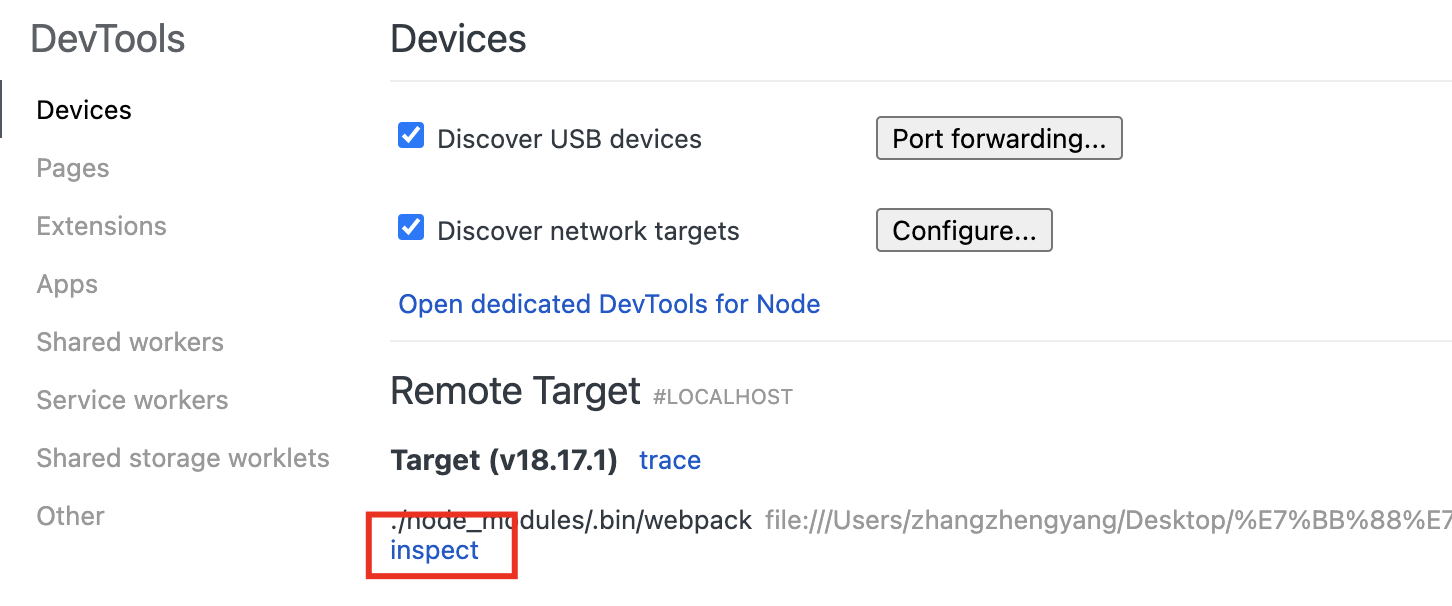
npx node --inspect-brk ./node_modules/.bin/webpack --inline --progress

# Debugger listening on ws://127.0.0.1:9229/6eb6ad8b-61b5-472b-b399-928127b595c2
# For help, see: https://nodejs.org/en/docs/inspector
打开 Chrome 调试 页面,并点击 inspect 按钮
Vscode 调试配置
找到运行与调试、添加配置。在 launch.json 文件中添加运行的配置
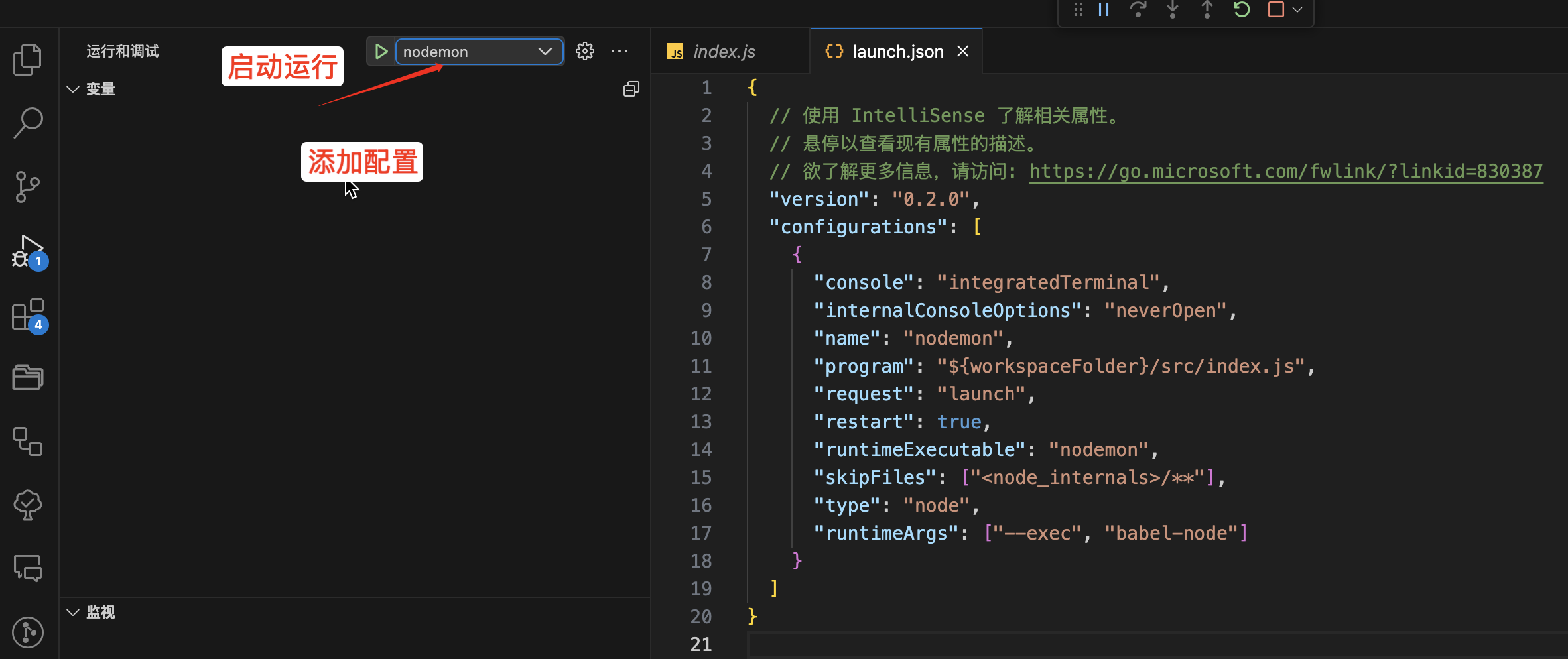
launch.json 文件
{
  // 使用 IntelliSense 了解相关属性。
  // 悬停以查看现有属性的描述。
  // 欲了解更多信息,请访问: https://go.microsoft.com/fwlink/?linkid=830387
  "version": "0.2.0",
  "configurations": [
    {
      "type": "node",
      "request": "launch",
      "name": "nodemon",
      "runtimeExecutable": "${workspaceFolder}/node_modules/.bin/nodemon",
      "program": "${workspaceFolder}/src/index.js",
      "restart": true,
      "console": "integratedTerminal",
      "internalConsoleOptions": "neverOpen",
      "runtimeArgs": ["--exec", "babel-node"]
    }
  ]
}
优化 webpack 配置
pnpm i -g npm-check-updates

ncu --help
新建 config 文件夹
pnpm i webpack-merge nodemon-webpack-plugin terser-webpack-plugin -Dconfig/webpack.config.base.js
const path = require("path")
const webpack = require("webpack")
const nodeExternals = require("webpack-node-externals")
const { CleanWebpackPlugin } = require("clean-webpack-plugin")

const webpackConfig = {
  target: "node",
  entry: {
    server: path.join(__dirname, "../src/index.js")
  },
  output: {
    path: path.join(__dirname, "../dist"),
    filename: "[name].bundle.js"
  },
  module: {
    rules: [
      {
        test: /\.(js|jsx)$/,
        use: {
          loader: "babel-loader"
        },
        exclude: [path.join(__dirname, "/node_modules")]
      }
    ]
  },
  externals: [nodeExternals()],
  plugins: [new CleanWebpackPlugin(), new webpack.EnvironmentPlugin(["NODE_ENV"])],
  node: {
    __dirname: true,
    __filename: true
  }
}
module.exports = webpackConfig
config/webpack.config.dev.js
const { merge } = require("webpack-merge")
const NodemonPlugin = require("nodemon-webpack-plugin")

const baseWebpackConfig = require("./webpack.config.base")

const webpackConfig = merge(baseWebpackConfig, {
  mode: "development",
  devtool: "eval-source-map",
  stats: { children: false }, // Hide children information
  plugins: [new NodemonPlugin()]
})

module.exports = webpackConfig
config/webpack.config.prod.js
const { merge } = require("webpack-merge")
const baseWebpackConfig = require("./webpack.config.base")

const TerserWebpackPlugin = require("terser-webpack-plugin")

const webpackConfig = merge(baseWebpackConfig, {
  mode: "production",
  stats: { children: false, warnings: false },
  optimization: {
    minimizer: [
      new TerserWebpackPlugin({
        terserOptions: {
          warnings: false,
          compress: {
            warnings: false,
            // 是否注释掉 console
            drop_console: false,
            dead_code: true,
            drop_debugger: true
          },
          output: {
            comments: false,
            beautify: false
          },
          mangle: true
        },
        parallel: true
      })
    ],
    splitChunks: {
      cacheGroups: {
        commons: {
          name: "commons",
          chunks: "initial",
          minChunks: 3,
          enforce: true
        }
      }
    }
  }
})

module.exports = webpackConfig
rimraf
pnpm i -D rimraf在 package.json 中添加脚本
{
  "scripts": {
    "clean": "rimraf dist"
  },
}